
NERDIO GUIDE
Beyond a conference — NerdioCon 2026: Learning, networking & unforgettable moments.
Save your spot
NERDIO GUIDE
Aaron Parker | March 30, 2026
Table of Contents
For many enterprises in 2026, the shift to hybrid work has made Azure Virtual Desktop (AVD) and Windows 365 core infrastructure components. However, without a focus on efficiency, you risk spiraling Azure consumption costs and an overwhelmed IT staff.
Statistics from the Microsoft 2025 Annual Report show that Azure revenue continues to grow at over 30% annually, driven by organizations scaling their cloud presence. To keep your piece of that cloud from becoming a money pit, you must move beyond manual provisioning and embrace automated, data-driven insights that quantify the value of your infrastructure.
Managing costs in a virtual desktop environment requires a deep understanding of how Azure bills for compute and persistent resources. Identifying these drivers early allows you to implement strategies that prevent budget overruns.
In AVD, compute costs are typically your largest expense, billed based on the time virtual machines (VMs) are powered on. Storage costs also play a major role; even when a VM is deallocated, you are still billed for the OS disk and any attached storage for user profiles, such as FSLogix. These costs can quickly escalate if your environment contains "zombie" resources—VMs or disks that are no longer in use but continue to draw from your budget.
Many IT teams over-provision resources, choosing larger VM sizes or keeping more hosts active than necessary to avoid performance complaints. This "just in case" approach often results in 40–60% of cloud capacity sitting idle during off-peak hours. Without granular visibility, it is difficult to find the sweet spot where you satisfy user demand without paying for unused cycles.
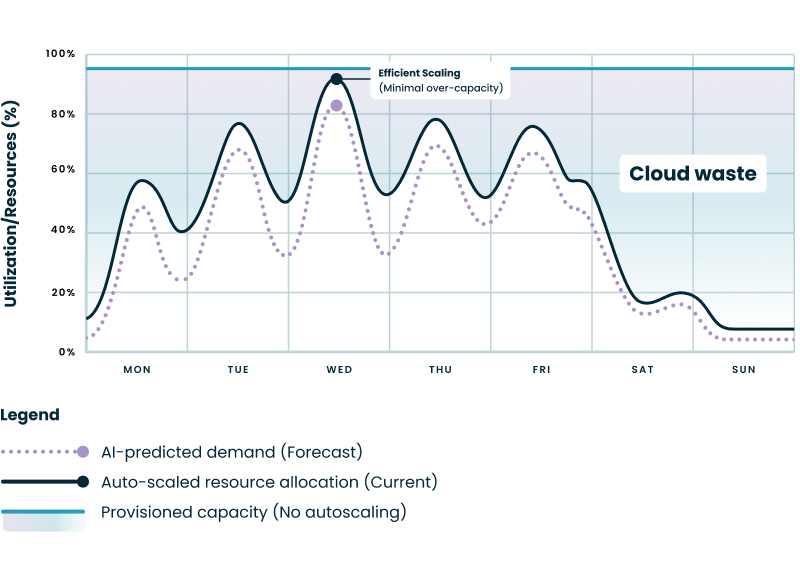
The following chart illustrates the cloud waste created when organizations maintain fixed capacity regardless of actual demand. While static provisioning ensures availability, it creates a significant gap of unused, paid-for resources during off-peak hours and weekends.
By using automated resource allocation, your infrastructure can follow the "AI-Predicted Demand" curve, ensuring efficient scaling with minimal over-capacity. This shift from a flat line of provisioned capacity to dynamic allocation is a primary driver of the cost savings measured in Operational Efficiency Insights.
See how you can optimize processes, improve security, increase reliability, and save up to 70% on Microsoft Azure costs.
Platform cost optimization involves using intelligent tools to align your cloud spend directly with actual user demand. By reducing unnecessary capacity, you can significantly lower your Azure expenditure while maintaining high availability.
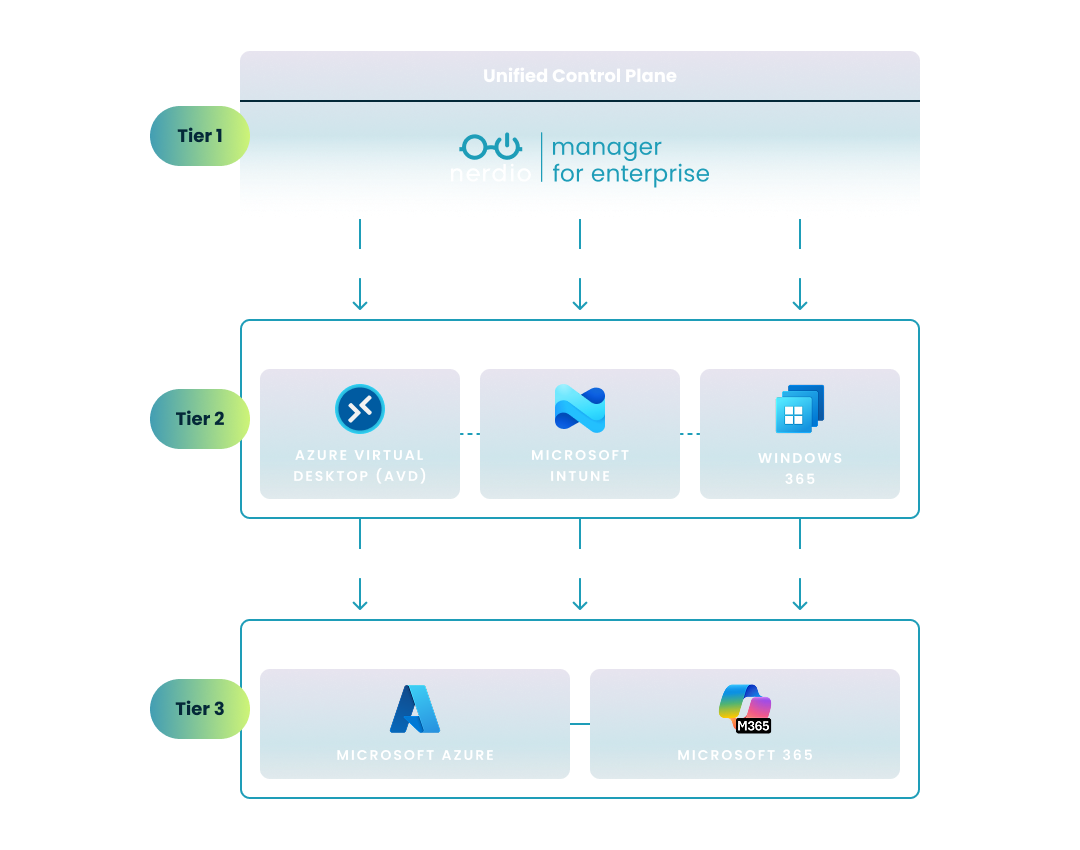
To effectively manage an enterprise-scale virtual desktop environment, it’s essential to understand the relationship between your infrastructure, your endpoints, and your management layer. The following diagram illustrates how a unified control plane orchestrates the complex interaction between Microsoft's cloud foundation and the various end-user computing (EUC) endpoints:
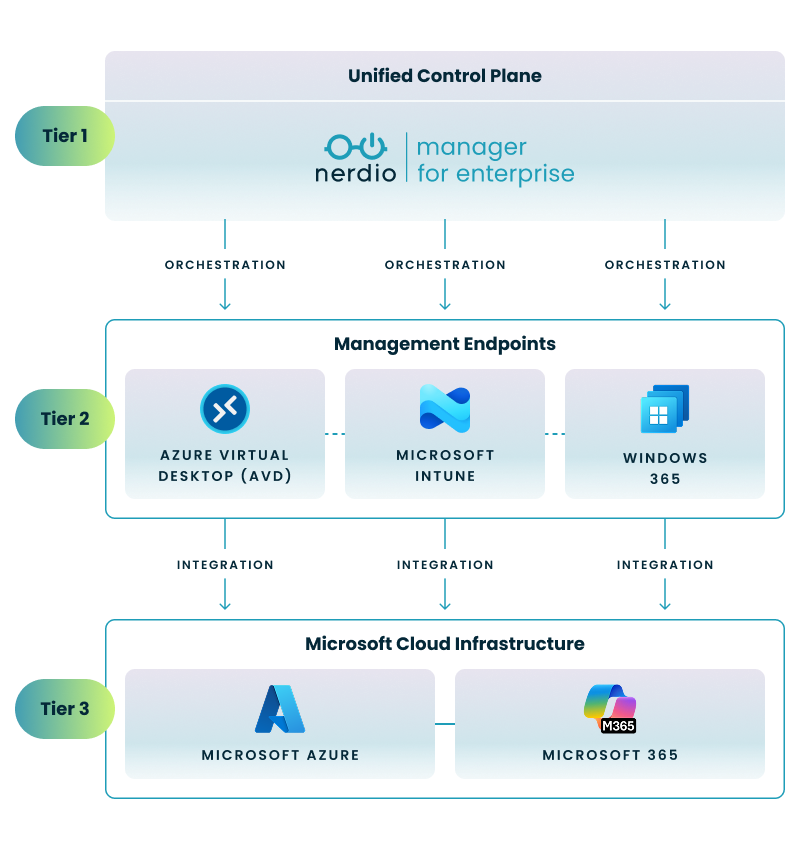
This three-tier architecture enables a streamlined approach to cloud management by organizing your environment into logical layers:
By layering a unified control plane over these native endpoints, you can ensure that configurations remain consistent and that cost-saving automations—like dynamic scaling—are applied uniformly across your entire estate.
Dynamic auto-scaling is a core strategy for efficiency, allowing you to scale virtual machines up or down based on real-time usage. Instead of keeping a host pool running 24/7, auto-scaling triggers ensure that VMs are only active when users are logged in, effectively "turning off the lights" when everyone goes home. Implementing a robust engine to autoscale Azure resources ensures that your infrastructure dynamically matches real-time user demand, effectively eliminating the cost of idle cloud capacity.
Nerdio Manager provides built-in capabilities designed specifically to manage AVD consumption and scale VMs dynamically. These tools help you reduce unnecessary capacity by automating the scaling process based on actual load. By using these features, you can gain a clear view through "Operational Efficiency Insights" on how these specific actions directly contribute to lowering your Azure expenditure.
While the final impact depends on your baseline configuration, organizations that move from unmanaged or basic native scaling to this intelligent model typically reduce their Azure compute and storage costs by 50% to 75%. Because your cloud resources are only active when they are fueling actual business productivity, the return on investment is immediate and remains transparently verifiable through your standard Azure billing dashboard.
See this demo to learn how you can optimize processes, improve security, increase reliability, and save up to 70% on Microsoft Azure costs.

The human cost of managing virtual desktops is often overlooked but represents a massive portion of the total cost of ownership. Automating repetitive tasks frees your IT professionals to focus on higher-value projects.
Many administrative tasks in AVD require significant time and multiple manual steps when performed directly in the Azure portal. Tasks like host pool creation, image management, and session host deployment are not only tedious but also prone to human error when handled manually.
By empowering Level 1 and Level 2 helpdesk staff to perform tasks that previously required an Azure Architect—such as session shadowing and automated host repair—Nerdio allows organizations to scale without proportional increases in headcount. Enterprises like Sage have reported saving over $1 million annually by combining infrastructure cost reductions with these significant operational efficiencies. Adopting these automated capabilities is a proven way to drive broader operational efficiency across Azure Virtual Desktop and Windows 365, ensuring your IT operations remain agile and cost-effective.
To visualize these differences, the following table compares a standard host pool deployment—one of the most common administrative tasks—across both platforms:
| Task Component | Microsoft Azure Portal (Manual) | Nerdio Manager (Automated) |
|---|---|---|
| Workflow Complexity | High; requires navigating multiple blades (Compute, Networking, AVD). | Low; unified wizard with pre-defined templates. |
| Input Consistency | Variable; manual entry increases risk of naming/setting errors. | High; uses standardized profiles and naming conventions. |
| Host Provisioning | Manual triggers or complex scripting required for batching. | Automated deployment with built-in batching and status tracking. |
| Post-Deployment | Requires manual setup of monitoring, backups, and scaling. | Auto-assigns scaling logic and monitoring upon creation. |
Consistency is the foundation of a secure and reliable virtual desktop environment. Reducing manual inputs minimizes the "human element" that often leads to unexpected downtime or security gaps.
Manual portal operations introduce the risk of incorrect configurations or the inconsistent application of corporate standards. Over time, this leads to configuration drift—where different parts of your environment no longer match the intended baseline—making troubleshooting difficult and increasing the likelihood of security vulnerabilities.
Guided actions and automated provisioning ensure that every VM and host pool is created according to your established standards. This approach reduces manual risks and contributes to a more predictable environment. By eliminating the need for manual data entry, you effectively decrease configuration drift and improve the overall reliability of your desktop estate.
Adopting best practices ensures your environment is not only efficient but also standardized and secure. Leveraging features that enforce these standards across your entire fleet is essential for enterprise-grade management.
By using standardized FSLogix and RDP settings profiles, IT teams can ensure a consistent desktop experience for every user while reducing the likelihood of configuration errors. You should look for tools that offer integrated management for features like:
Quantifying efficiency requires a dashboard that translates technical actions into business value. Clear reporting allows you to demonstrate the financial and operational impact of your management strategy to stakeholders.
A robust reporting experience should include:
The data output generated by Nerdio’s Operational Efficiency Insights provides a specific index representing how effectively your organization is using automation and configuration best practices to optimize the environment. This helps you evaluate your current leveraging of automation, identify areas where additional optimization is possible, and communicate measurable benefits to both technical and business leaders.
To help you quantify your progress, the interpretation guidance categorizes this index into performance levels based on the specific features and automation strategies you have deployed:
| Efficiency Tier | Characteristics & Required Capabilities |
|---|---|
| Baseline | Manual VM provisioning; static host pools; basic monitoring. |
| Developing | Basic scheduled auto-scaling; use of FSLogix and standardized RDP profiles. |
| Optimized | Dynamic auto-scaling; "Start VM on Connect" active; automated GPU driver management. |
| Exceptional | Continuous configuration drift prevention; full cost-insight analytics; standardized Azure Monitor enablement. |
These categories help your organization understand its current standing and provide a clear roadmap for moving from basic cloud management to an elite, automated operational state.
To make an informed decision about management platforms, you need an objective methodology for comparing workflows. This ensures that any claims of "efficiency" are backed by repeatable data.
The comparison should use an open and repeatable methodology where scenarios are executed under identical conditions. This includes using a controlled environment with a standardized AVD deployment with a Microsoft 365 tenant, an Intune baseline, and a dedicated recording workstation to ensure visual and functional uniformity and that all necessary licenses and cloud resources are properly aligned.
A professional-grade comparison requires:
Created by industry expert Benny Tritsch, the EUC Score toolkit records detailed interactions, sequence of actions, and overall scenario duration. This creates an objective dataset that quantifies the administrative workload, making it easy to compare the effort required in the Microsoft portal versus an automated platform like Nerdio. Such comparative data is critical for IT leaders who are weighing out-of-the-box cloud VDI capabilities against an enterprise-grade automation layer to reduce administrative overhead and scale efficiently.
Following a strict procedure ensures that your testing results are consistent and reproducible. This step-by-step approach is vital for validating your operational efficiency gains.
To capture a scenario accurately, follow this sequence:
This step-by-step wizard tool gives you the total cost of ownership for AVD in your organization.
You can improve efficiency by reducing manual portal operations that introduce the risk of configuration drift and inconsistent standards. Implementing automated management for image updates, host pool creation, and session host deployment allows IT teams to maintain a secure and predictable environment with significantly less manual effort.
Operational efficiency in AVD is achieved by using dynamic auto-scaling to align virtual machine consumption with actual user demand, which lowers Azure expenditure. Additionally, adopting standardized RDP settings, FSLogix profiles, and GPU driver management ensures platform consistency and reduces the time required for ongoing maintenance.
To optimize Windows 365, organizations should focus on automating administrative tasks for their Cloud PC environment, such as provisioning and resource grouping, to minimize manual input errors. While native portals offer basic functionality, leveraging specialized Windows 365 management tools for enterprises allows for more granular control over Cloud PC provisioning and resource grouping. Tracking efficiency trends over time through detailed analytics helps technical decision-makers identify further opportunities for automation and quantify the financial benefits of their management strategy.
Aaron Parker is a Senior PM Architect at Nerdio, where he focuses on research, development, and strategic product innovation across the Nerdio platform. In this role, he bridges the Core Engineering and Research and Development teams, translating real-world operational challenges into practical platform features for Nerdio Manager. He brings nearly 30 years of experience in end user computing, spanning pre-sales, design, implementation, and support of virtual desktop, modern device management, and enterprise mobility environments.
Beyond his day-to-day work, Aaron has been an active contributor to the IT community for close to two decades, speaking at industry events, writing, and maintaining open source projects.