Windows 365 management tools for enterprises

Carisa Stinger | November 4, 2025

Introduction

Windows 365 streams a full, personalized Windows desktop (a "Cloud PC") from the Microsoft cloud to any device. For enterprises, "management" is the entire ecosystem of tools and processes required to deploy, secure, and optimize thousands of these Cloud PCs. It’s how you ensure the service is both a productive tool for employees and a secure, cost-effective asset for the business.

Moving to Cloud PCs is a strategic step, but its true value is unlocked by effective management. This isn't just an IT task; it’s a core business function. When done right, it enforces a zero-trust security posture, ensures employees are productive with the right apps from day one, and provides a level of cost control and operational efficiency that is impossible to achieve with traditional physical PCs.

What are the native Microsoft tools for managing Windows 365?

To build a successful management strategy, you first need to understand the foundational tools provided by Microsoft. The two services below work together as the control plane for your entire Windows 365 environment.

What is the primary role of Microsoft Intune in Windows 365 management?

Microsoft Intune is the central, cloud-native solution for modern endpoint management. When a Windows 365 Cloud PC is created, it is automatically enrolled in Intune, making Intune the primary tool for day-to-day device administration.

Your IT team uses the Microsoft Intune admin center as the single portal to configure policies, manage apps, and review device compliance for your entire fleet of Cloud PCs:

  • Device Configuration: Applying policies for device settings, security baselines, and features.
  • Application Management: Deploying, updating, and removing applications on Cloud PCs.
  • Compliance & Security: Enforcing rules (e.g., require encryption, antivirus) and integrating with Microsoft Defender for Endpoint.
  • Provisioning: Creating and assigning provisioning policies, which are the blueprints used to deploy Windows 365 Cloud PCs to groups of users.

How does Microsoft Entra ID support Windows 365?

Microsoft Entra ID (formerly Azure AD) is the identity and access management backbone for your entire Microsoft ecosystem, including Windows 365. It's the "gatekeeper" that controls who can access what.

Its core functions for Windows 365 include:

  • Identity & Authentication: Manages all user identities, enabling single sign-on (SSO) and enforcing multi-factor authentication (MFA).
  • Conditional Access: This is a critical enterprise feature. Entra ID allows you to create rules like, "Block access to Cloud PCs from unmanaged devices or untrusted networks," which is a cornerstone of a zero-trust security model.
  • Group-Based Management: Your IT team uses Entra ID security groups to automatically assign Windows 365 licenses and Intune policies to users, enabling automation at scale.

Take Windows to the Cloud with Microsoft and Nerdio

Join us for a webinar to discover how to take Windows to the cloud. Get insights from industry leaders on navigating the modern workspace and driving secure, cloud-powered operations.

What are the common challenges when managing Windows 365 with native tools?

While Intune and Entra ID are powerful and essential, relying only on the native interfaces to manage thousands of users creates significant operational challenges. As organizations scale, IT teams often find themselves hitting a ceiling of complexity, cost, and manual effort.

How do enterprises handle complex provisioning, cost control, and monitoring?

At an enterprise scale, three high-level challenges quickly emerge:

  • Provisioning & Image Management: The complexity of creating, updating, and deploying custom Windows 11 Enterprise images to thousands of users, which often requires IT teams to develop and maintain complex PowerShell scripts and perform significant manual effort.
  • Cost Management: The significant difficulty in identifying and reclaiming unused licenses or right-sizing Cloud PC performance, which are critical tactics for any enterprise looking at how to reduce Windows 365 costs without manual oversight.
  • Performance Monitoring: When a user complains "my Cloud PC is slow," IT teams lack a simple, unified dashboard to quickly diagnose the problem. They must manually correlate data from multiple sources to investigate user logon times, app performance, and resource bottlenecks.

What are the specific operational limitations of using Intune at scale?

Beyond the high-level issues, IT administrators run into specific, daily operational hurdles inside the Intune console. These gaps can impact everything from security to help desk efficiency.

  • Compliance Blind Spots: While services like Windows Autopatch automate Microsoft updates, Intune can still report a device as "compliant" even if non-Microsoft software (e.g., Adobe, Java) is out-of-date and vulnerable.
  • Policy Conflicts: In hybrid environments, legacy Group Policy Objects (GPOs) from on-premise servers can clash with modern Intune policies, causing user downtime that is extremely difficult to troubleshoot.
  • Remote Support Bottlenecks: Intune's native remote support options are limited. A simple help desk ticket often must be escalated to a senior engineer with high-level permissions, which increases costs and frustrates users.
  • Audit & Data Retention: Intune's default 30-day data retention for many reports is a major problem for enterprises that must meet 90- or 180-day audit requirements for compliance standards like HIPAA or PCI.
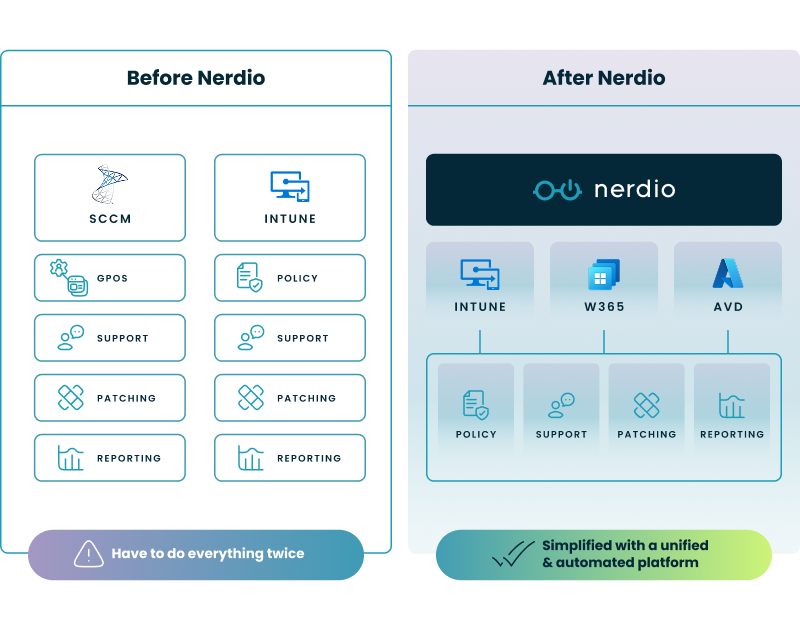
  • Tool Sprawl: Gaps in native functionality (like third-party patching or advanced reporting) force enterprises to buy, integrate, and manage multiple separate SaaS solutions and on-premise tools, creating redundant spending and fragmented data.
  • License Waste: Intune doesn't provide "software metering" to track if employees are actually using the expensive, provisioned software on their Cloud PCs, leading to massive budget waste.
  • Misconfiguration Risk: Intune lacks a simple "rollback" or version control for policies. A single admin error (e.g., a typo in a security policy) can lock out thousands of users, with no easy way to undo the change.
  • Legacy Tool Dependence: Intune is designed for modern endpoints, not servers. This forces hybrid enterprises to continue running and paying for complex, on-premise legacy tools like SCCM (System Center Configuration Manager) to manage their servers.

How does a platform like Nerdio Manager for Enterprise enhance Windows 365?

To solve these challenges, enterprises adopt a unified management platform that sits on top of the native Microsoft tools. These platforms act as an automation and optimization layer, centralizing control and filling the operational gaps left by the native tools. Nerdio Manager for Enterprise is a prominent example of a platform built specifically for this purpose.


How does it solve high-level provisioning, cost, and monitoring challenges?

A unified platform directly addresses the high-level scaling issues:

  • On Provisioning: It provides powerful automation to deploy and manage Cloud PCs and custom images at scale. This turns a multi-day scripting project into a simple, wizard-driven workflow.
  • On Cost Management: It implements automated cost-optimization rules. This includes auto-scaling for Windows 365 Frontline licenses (powering them on and off for shift workers) and identifying unused or over-provisioned Cloud PCs to dramatically reduce monthly spend. See this demo on how you can optimize processes, improve security, increase reliability, and save up to 70% on Microsoft Azure costs.
  • On Monitoring: It delivers unified dashboards that show performance, user experience, and cost data in one place, allowing IT to proactively find and fix issues before users report them.

How does Nerdio address the specific operational limitations of Intune?

The primary value of a management layer is solving the granular, daily frustrations of IT teams:

Native Tool Challenge The Unified Platform Solution (Nerdio)
Compliance Blind Spots
(Can’t see 3rd-party patch status)
True Compliance Reporting
(Integrates 3rd-party patch data with Intune reports for a single, accurate view.)
Misconfiguration Risk
(No policy "undo" button)
Policy Version Control & Rollback
(Provides a one-click restore for Intune policies to instantly reverse bad changes.)
Remote Support Bottlenecks
(Requires high-level admin rights)
Granular, Role-Based Remote Access
(Gives L1 help desks secure access to solve issues without making them global admins.)
Audit & Data Retention
(Limited to 30-day data)
Long-Term Audit-Ready Reporting
(Offers 180+ day data retention, with reports ready for auditors in minutes.)
License Waste
(No tracking for 3rd-party software)
Software Metering & License Reclamation
(Tracks real-world usage of expensive software so you can reclaim and reallocate unused licenses.)
Policy Conflicts
(GPO vs. Intune clashes cause downtime)
Proactive Conflict Detection
(Provides analytics to identify and resolve policy conflicts before they impact users.)
Tool Sprawl
(Need multiple tools for patching, support)
Tool Consolidation
(Integrates these functions into one interface, reducing cost and complexity.)
Legacy Tool Dependence
(Intune doesn’t manage servers)
Hybrid Management
(Extends modern management to servers, reducing the need for legacy tools like SCCM.)

How does Nerdio integrate with the Microsoft toolset?

This is the most critical point: a platform like Nerdio Manager for Enterprise is not a replacement for Microsoft's tools. It is an automation and management layer that sits on top of them, deployed securely in your own Azure subscription.

It leverages and extends the power of Intune, Microsoft Entra ID, and Azure. It makes the native tools easier to use and more powerful by automating their complex functions and providing a single, unified interface for all your endpoint management tasks, from Cloud PCs to physical devices and servers.

Optimize and save

See how you can optimize processes, improve security, increase reliability, and save up to 70% on Microsoft Azure costs.

What is the right management strategy for your enterprise?

Successfully managing Windows 365 at an enterprise scale requires a modern, two-layer approach. You need both the foundational security and the operational agility to deliver a secure, reliable, and cost-effective experience to all your users.

This strategy relies on:

  1. The Microsoft Foundation: Microsoft Intune and Microsoft Entra ID are the non-negotiable foundation for security, identity, and policy.
  2. The Enterprise Management Layer: A unified platform (like Nerdio Manager for Enterprise) is leveraged to add the critical automation, cost control, risk management, and administrative simplicity required to operate efficiently at scale.

The best approach is one that empowers your IT team to be a business enabler, not a bottleneck. By addressing the operational gaps in the native toolset, you can fully unlock the promise of Windows 365, automating complex tasks and optimizing resource spend while ensuring your environment is secure and compliant.


Frequently asked questions


About the author

Photo of Carisa Stinger

Carisa Stinger

Head of Product Marketing

Carisa Stringer is the Head of Product Marketing at Nerdio, where she leads the strategy and execution of go-to-market plans for the company’s enterprise and managed service provider solutions. She joined Nerdio in 2025, bringing 20+ years of experience in end user computing, desktops-as-a-service, and Microsoft technologies. Prior to her current role, Carisa held key product marketing positions at Citrix and Anthology, where she contributed to innovative go-to-market initiatives. Her career reflects a strong track record in driving growth and adoption in the enterprise technology sector. Carisa holds a Bachelor of Science in Industrial Engineering from the Georgia Institute of Technology.

Ready to get started?