What is unified endpoint management (UEM)?
This guide defines UEM, covering its features, evolution from MDM, and challenges of managing physical and virtual endpoints.
Carisa Stringer | November 17, 2025
Unified Endpoint Management (UEM) is a modern IT strategy and software platform that allows organizations to manage, secure, and monitor all their endpoints from a single, centralized console.
This unified approach goes beyond just mobile devices (phones and tablets) to include traditional endpoints like desktops and laptops (Windows, macOS, Linux) and, increasingly, virtual desktops (like Azure Virtual Desktop or Windows 365) and IoT devices. Its primary importance is simplifying IT administration, strengthening security, and enabling a secure, productive "work-from-anywhere" hybrid workforce.
The concept of UEM is the result of a natural evolution in IT, as the types of devices we use for work have expanded. To understand UEM, it helps to know what came before it: Mobile Device Management (MDM) and Enterprise Mobility Management (EMM).
| MDM (Mobile Device Management) |
EMM (Enterprise Mobility Management) |
UEM (Unified Endpoint Management) |
|
|---|---|---|---|
| Primary Focus | Device-Centric: Controlling the device hardware and settings (e.g., passcodes, remote wipe). |
App & Content-Centric: Includes all of MDM, plus management of applications and data (MAM, MCM). |
Unified Platform: Consolidates EMM and traditional client management into a single console. |
| Managed Assets |
Mobile Devices:
|
Mobile Ecosystem:
|
All Endpoints:
|
Mobile Device Management (MDM) was the foundational, device-centric technology. It focused on controlling and securing the mobile device hardware itself. This included tasks like enforcing device passcodes, configuring Wi-Fi settings, and giving IT the ability to remotely wipe a lost or stolen phone.
Enterprise Mobility Management (EMM) was the next logical step. It included all of MDM's capabilities but added a focus on applications and content. EMM introduced concepts like Mobile Application Management (MAM) to manage and secure corporate apps, and Mobile Content Management (MCM) to control access to work files, without IT having to take full control of the entire device.
UEM is the current standard because it consolidated EMM with traditional client management tools (like SCCM) that were used for desktops and laptops. The key shift was creating a single platform to manage both mobile (iOS, Android) and traditional (Windows, macOS) endpoints. This broke down IT silos and solved "tool sprawl," allowing administrators to apply consistent policies to all devices from one place.
UEM platforms are the "command center" for your entire device fleet, operating on a client-server model. This architecture is built on a few core components that work together to manage and secure your endpoints.
At its center, a UEM solution has a cloud-based management console (a well-known example is Microsoft Intune). This is the single web portal where your IT administrators define security policies, deploy applications, and view reports on device health. This console communicates with either a small software agent installed on the device or, more commonly, the native management APIs built directly into the device's operating system (like those in Windows 11, iOS, and Android).
A device must be "enrolled" to be managed. For corporate-owned devices, this is often a "zero-touch" automated process; a new laptop can be shipped directly to an employee, and upon its first boot, services like Windows Autopilot or Apple Business Manager automatically register it with your UEM. For personal devices, (a "Bring Your Own Device" or BYOD model), the user typically initiates enrollment through a company portal app to gain access to work resources.
Modern UEM is deeply integrated with cloud Identity Providers (IdP), such as Microsoft Entra ID (formerly Azure AD). This connection is critical for a Zero Trust security model. The UEM platform constantly assesses the device's health—is it patched? is it encrypted? is it jailbroken?—and reports this "compliance status" to the IdP. This enables Conditional Access, which enforces rules like, "Only allow healthy, compliant devices to access corporate email". This link between device compliance and identity is a foundational component of a modern data security strategy, ensuring that access is granted only to trusted users on trusted endpoint devices. When paired with Microsoft Defender for Endpoint, a UEM platform like Intune can provide comprehensive protection by combining device compliance management with advanced threat detection and response capabilities.
A modern UEM platform moves beyond simple device settings to give you control over the entire endpoint lifecycle. When evaluating solutions, there are several core functions you should expect.
The promise of UEM is a single platform for all endpoints, but a new challenge has emerged in modern enterprises. Today's IT environment is a hybrid of two fundamentally different types of endpoints: physical and virtual.
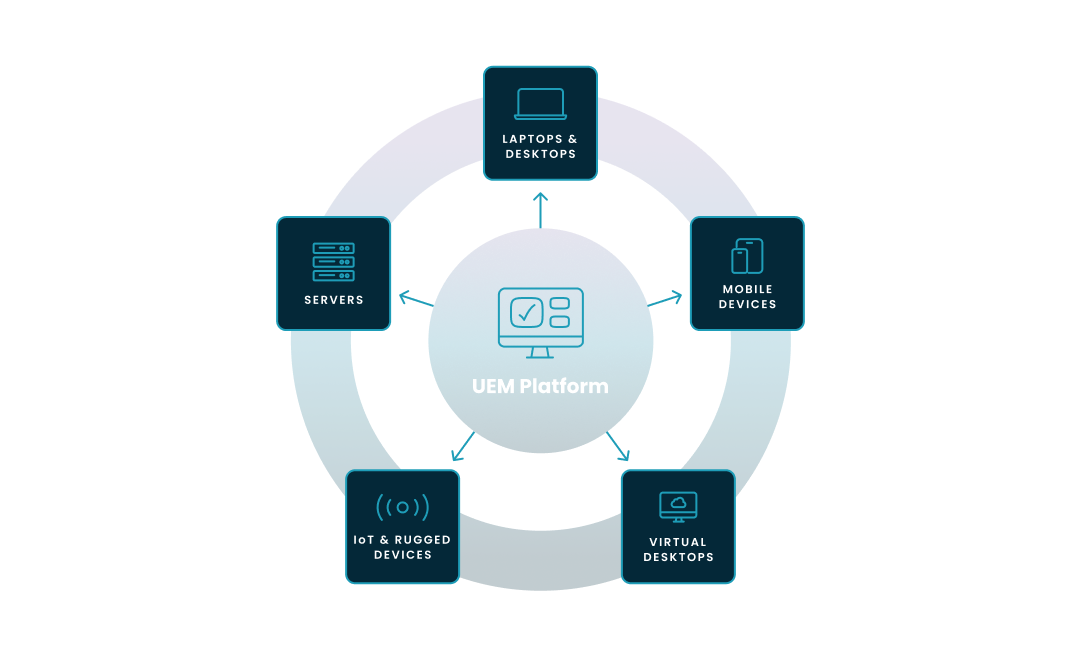
A true UEM platform provides a 'single pane of glass' to manage every type of endpoint in your organization. As this diagram shows, this scope has expanded from traditional devices to include a critical new category: virtual endpoints.
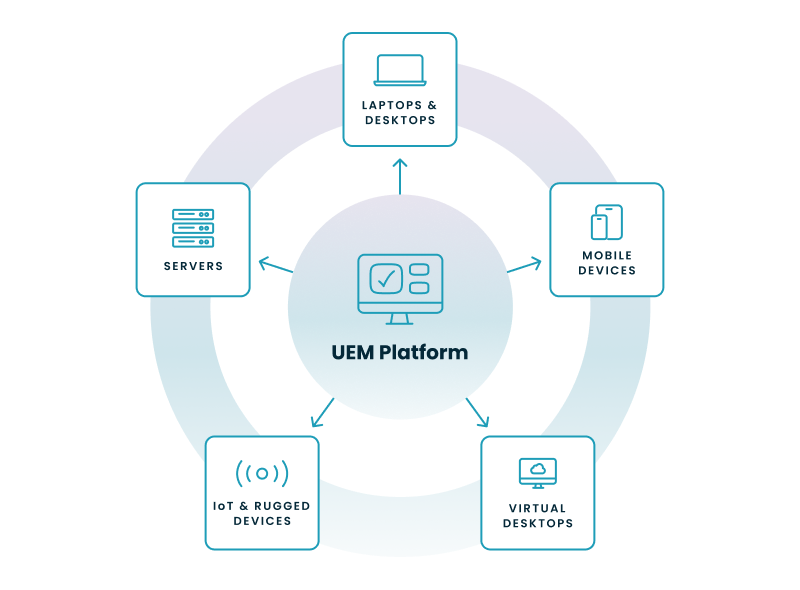
This unified approach means a single console is responsible for managing:
This is the critical gap. A UEM platform like Intune is excellent at managing the OS policy inside the virtual machine—for example, it can apply security baselines, deploy apps, and enforce updates just like on a physical laptop. IT teams can also use Microsoft Intune to manage Windows 365 Cloud PCs, applying security baselines, deploying applications, and enforcing compliance policies in the same way they do for physical devices.
However, Intune was not built to manage the underlying cloud infrastructure that runs that virtual desktop. It cannot manage the complex, VDI-specific tasks like:
This gap breaks the "unified" promise. It forces your IT team to use two separate, complex platforms: one endpoint management tool (like Intune) for all physical devices and a separate set of tools (like the Azure portal and custom scripts) to manage your virtual desktop infrastructure. This creates inefficiency, inconsistent policies, and runaway cloud costs from unoptimized virtual machines.

This two-platform problem is amplified when managing a large enterprise fleet with Microsoft Intune. While Intune is a powerful UEM, IT teams often face several operational hurdles when deploying it at scale.
Intune can report a device as "compliant" even if third-party (non-Microsoft) software like web browsers or PDF readers is dangerously out of date. This creates a false sense of security and a significant cybersecurity gap, as unpatched third-party apps are a primary attack vector for malware.
In hybrid environments, many organizations are migrating from legacy on-premises Group Policy Objects (GPOs) to modern Intune policies. These two policy sets can clash, leading to unpredictable behavior, user downtime, and long, frustrating troubleshooting sessions.
Native Intune compliance data is often retained for a limited period (e.g., 30 days). When auditors ask for a 90- or 180-day report to prove that all devices have been compliant, IT teams are often forced to manually export and stitch together data.
To fill these gaps, organizations are often forced to buy, manage, and integrate more third-party tools. You might have one tool for third-party patching, another for advanced reporting, and a third for remote support, which adds significant cost and complexity.
In a large environment, a simple policy error—like a misconfigured compliance rule—can accidentally lock thousands of users out of corporate resources. Native tools may lack a simple "one-click restore" or version control for policies, turning a small mistake into a major incident.
Most organizations waste a significant portion of their IT budget on "shelfware"—expensive software licenses that are installed but never used. Without detailed software metering to track real-time usage, it's nearly impossible to find and reclaim these unused licenses.
Intune is designed for endpoints (physical and virtual), but many enterprises still rely on on-premises servers. Many enterprises continue to rely on Microsoft Endpoint Configuration Manager (formerly SCCM) to manage on-premises servers and legacy Windows devices, often alongside modern cloud-based tools like Intune. This often forces them to continue using traditional on-premises tools like SCCM (System Center Configuration Manager) for server management, creating a costly and complex co-management scenario that slows a full cloud migration.
This step-by-step wizard tool gives you the total cost of ownership for AVD in your organization.
Solving these challenges requires a platform that bridges the gaps in the Microsoft ecosystem. Nerdio provides a unified management platform that enhances Intune for physical endpoints and adds the sophisticated VDI management that Intune lacks.
Nerdio extends Intune's capabilities to give IT teams a true, holistic view of their environment. It factually provides:
By centralizing key functions, a unified platform like Nerdio allows organizations to consolidate their IT stack. It integrates functions like third-party patching and advanced reporting, eliminating the need for multiple, fragmented tools. It also provides detailed software metering, allowing you to identify and reclaim unused, expensive software licenses to optimize your budget.
This is the key takeaway: Nerdio provides one interface to manage both your Intune-enrolled physical devices and your Azure Virtual Desktop/Windows 365 virtual desktop infrastructure. It automates the complex, VDI-specific tasks (like advanced auto-scaling, image management, and performance monitoring) that Intune doesn't cover. This approach helps enterprises reduce dependence on legacy tools like SCCM and truly bridges the gap, delivering on the promise of a single, unified endpoint management experience.
See how you can optimize processes, improve security, increase reliability, and save up to 70% on Microsoft Azure costs.
A Unified Endpoint Management (UEM) system is a single platform that allows IT teams to manage, secure, and monitor all of an organization's endpoints from one centralized console. This scope includes mobile devices (phones, tablets), traditional desktops and laptops (Windows, macOS), internet of things, and virtual endpoints (like AVD and Windows 365). Its primary goal is to simplify administration and enforce consistent security policies across every device.
UEM (Unified Endpoint Management) is a management tool used to configure, patch, and enforce policies on devices to keep them healthy and secure. EDR (Endpoint Detection and Response) is a security tool designed to actively monitor for, detect, and respond to cyberattacks and security breaches that are already in progress. In short, UEM manages the device's state and policies, while EDR hunts for active threats. Together, UEM and EDR form a complete endpoint security strategy: UEM provides proactive policy and management, while EDR provides reactive threat detection and response.
The main difference is scope. MDM (Mobile Device Management) is an older technology focused only on managing mobile devices like smartphones and tablets. UEM (Unified Endpoint Management) is the modern evolution that unifies the management of mobile devices plus traditional desktops (Windows, macOS) and virtual desktops, all from a single platform.
No, UEM is not the same as MDM; it is the modern replacement for it. MDM was the original solution for managing only mobile phones and tablets. UEM is a more comprehensive platform that includes all of MDM's capabilities but expands them to manage desktops, laptops, and virtual PCs, unifying the entire device fleet.
On-demand webinar
Carisa Stringer
Head of Product Marketing
Carisa Stringer is the Head of Product Marketing at Nerdio, where she leads the strategy and execution of go-to-market plans for the company’s enterprise and managed service provider solutions. She joined Nerdio in 2025, bringing 20+ years of experience in end user computing, desktops-as-a-service, and Microsoft technologies. Prior to her current role, Carisa held key product marketing positions at Citrix and Anthology, where she contributed to innovative go-to-market initiatives. Her career reflects a strong track record in driving growth and adoption in the enterprise technology sector. Carisa holds a Bachelor of Science in Industrial Engineering from the Georgia Institute of Technology.