NERDIO GUIDE

What is mobile device management (MDM) and why is it important?

Carisa Stringer | November 14, 2025

Introduction

Mobile Device Management (MDM) is a type of security and management software used by IT departments to monitor, secure, and enforce policies on mobile devices, including smartphones, tablets, and laptops. Its primary goal is to protect your corporate data and networks while enabling employees to use those devices for work.

This is critical because the "endpoint" is the new perimeter. With remote work and "Bring Your Own Device" (BYOD) policies, your data is no longer safe behind a central firewall. Consider that 44-51% of users face mobile scams daily and the human element is involved in 68% of all data breaches. MDM is the foundational technology that allows you to manage this risk, prevent data breaches, and ensure all your organization's devices are compliant and secure.

How does mobile device management work?

MDM uses a client-server architecture to give your IT administrators a central way to manage a fleet of devices. It's a straightforward model that allows for large-scale control.

This architecture consists of two main parts: the MDM server and the MDM agent.

What is the MDM server?

The MDM server is the "command center" for your entire mobile fleet. This is a central console—almost always cloud-based today—where your IT team can:

  • Define security policies (e.g., "all devices must have a 6-digit PIN").
  • Configure device settings (e.g., "push these Wi-Fi and VPN profiles to all new devices").
  • Send commands to devices (e.g., "lock this lost phone").

What is the MDM agent?

The MDM agent is a small, lightweight software component on the endpoint device (the smartphone, tablet, or laptop). This agent can be a downloaded app or, more commonly, a "profile" installed using the device's built-in management frameworks.

This agent "listens" for commands from the server. When the server sends a command (like "install this app"), the agent uses the device's native Application Programming Interfaces (APIs) to execute it. This communication is typically handled by platform-specific push notification services (like the Apple Push Notification service, or APNs), which ensures commands are delivered instantly without draining the device's battery.

What are the key features of an MDM solution?

While features vary, all enterprise-grade MDM solutions are built on a core set of functionalities. These tools are designed to give you full control over the lifecycle of your corporate devices.

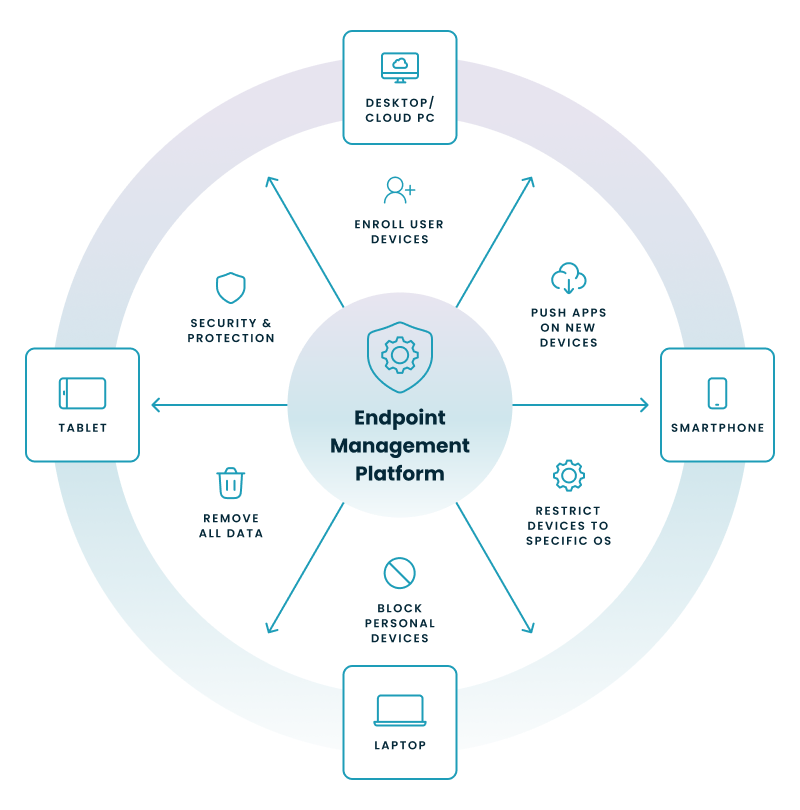
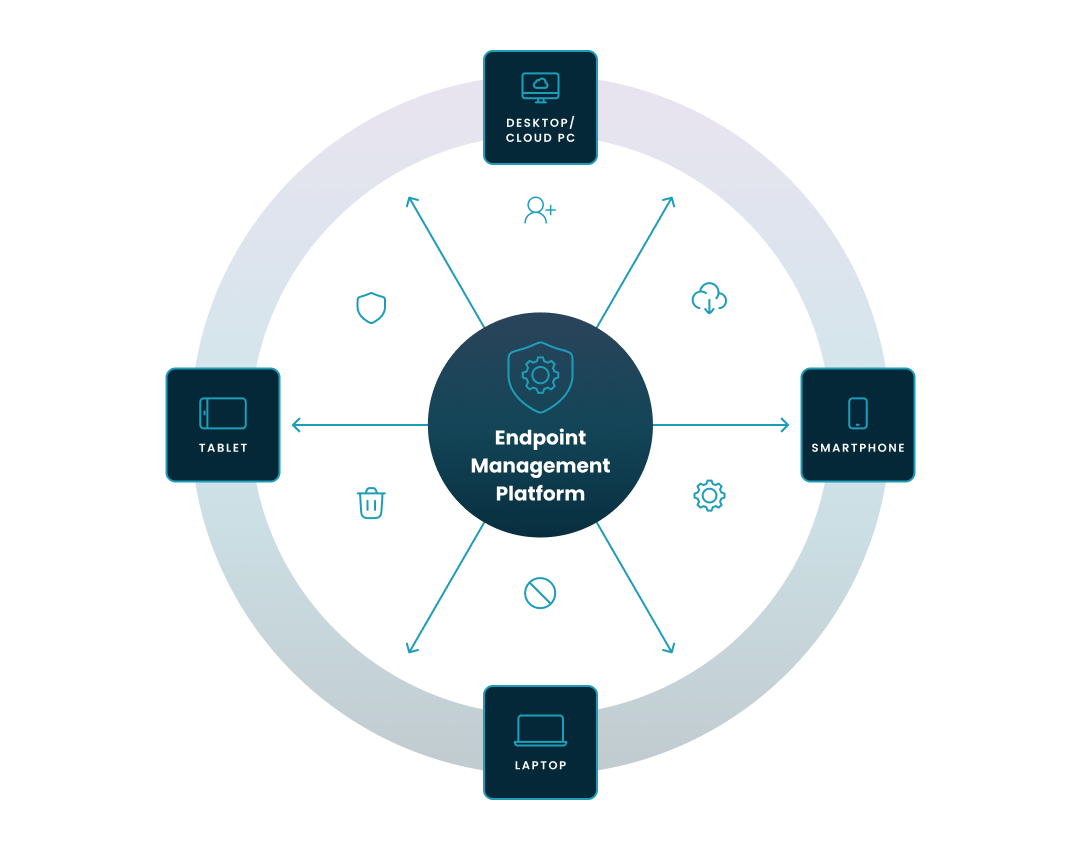
Let's walk through the diagram above. 

  • Endpoint Management Platform: This gives your IT team a single "pane of glass" to control all of these functions. The central platform (the hub) applies the key actions described below to your entire fleet of endpoints (the devices).
  • Enroll user devices: This is the foundational first step. Enrollment is the process of registering a device with the management platform. This can be a "zero-touch" automated process for corporate-owned devices (like Apple Business Manager) or a user-initiated process for BYOD (Bring Your Own Device) scenarios. On iOS 18 and newer, Apple requires Account-Based User Enrollment for BYOD devices, replacing older profile-based methods.
  • Push apps on devices: This is a core part of Mobile Application Management (MAM). Instead of users downloading apps themselves, you can remotely and silently install, update, and remove corporate applications (like Outlook, Teams, or internal apps). This also allows you to create "whitelists" (approved apps) and "blacklists" (forbidden apps).
  • Restrict devices to a specific OS: This is a critical compliance and security feature. You can create policies that block devices from accessing corporate data unless they are running an approved operating system version (e.g., "must be on iOS 17 or newer"). This protects you from vulnerabilities in outdated software.
  • Block personal devices: This feature, often part of a Conditional Access policy, allows you to enforce a "trusted device" model. You can set a rule that only devices that are fully enrolled and marked as "compliant" in your management platform are allowed to access sensitive data, effectively blocking unmanaged personal devices.
  • Remove all data from lost or stolen devices: These are your emergency "kill switches." If a device is lost or stolen, you can remotely send a command to:
    • Remote Lock: Instantly locks the device.
    • Full Wipe: Erases all data, restoring the device to factory settings.
    • Selective Wipe: On a BYOD device, this removes only the secure "work container" and all corporate data, leaving the user's personal photos and apps untouched.
  • Security and protection: This is the broad category of policies you enforce to harden the device. It includes forcing strong passcodes, setting screen-lock timers, verifying that the device's local storage is encrypted, and disabling high-risk features like the camera, screen capture, or USB file transfers. Modern MDM solutions can enforce device-level encryption for compliance (BitLocker, FileVault, Android/iOS native encryption).

Why is MDM so important for your business?

MDM directly addresses the most significant financial, legal, and operational risks your business faces in a mobile-first world. The value isn't just in security; it's in enabling your business to operate flexibly and efficiently.

When you don't have control over your endpoints, you are exposed to massive risks. Adopting an MDM strategy solves several critical business problems.

How does MDM solve security and data breach risks?

A lost or stolen laptop or smartphone is a data breach waiting to happen. The average cost of a data breach in the United. States has hit $10.22 million, and breaches involving remote work cost an average of $131,000 more than those that don't. MDM solves this by giving you the power to remotely lock or wipe that lost device, instantly neutralizing the threat. By enforcing encryption, you ensure that even if the device is stolen, the data on it is unreadable.

How does MDM enable BYOD (Bring Your Own Device)?

Employees want to use their personal phones and laptops for work, but this creates a massive security and privacy headache for IT. MDM solves this through containerization. On an employee's personal device, the MDM can create a separate, encrypted "work profile" or container.

  • For the business: All corporate apps (email, documents, etc.) and data live inside this secure container, completely isolated from the user's personal apps.
  • For the employee: Their personal data (photos, texts, browsing history) remains private and invisible to the company. If the employee leaves, IT can execute a "selective wipe" to remove only the work container, leaving their personal life untouched.

How does MDM help with regulatory compliance?

If you operate in an industry like healthcare (HIPAA), finance (PCI DSS), or handle European data (GDPR), you face strict regulations on how you protect sensitive information. A lost, unencrypted phone with patient or customer data can lead to staggering fines. HIPAA non-compliance penalties, for example, can range from $141 to $68,928 per violation with an annual cap of $2M.

MDM is a core tool for proving compliance. You can use its reporting features to:

  • Prove that all devices accessing sensitive data are encrypted.
  • Enforce and document that all devices have PINs.
  • Block non-compliant devices from accessing the network.
  • Audit the security status of your entire fleet from one dashboard.

How does MDM improve IT efficiency and cut costs?

Manually setting up 50 new laptops or phones for new hires is a time-consuming, expensive, and error-prone process. MDM automates this entirely. With "zero-touch" provisioning, a device can be shipped directly to a new employee. When they unbox it and connect to Wi-Fi, the MDM server automatically enrolls it and pushes all the necessary policies, apps, and settings.

This automation transforms IT from a manual repair shop into a strategic operator, saving thousands of hours in labor and getting employees productive on day one.

What is the difference between MDM, EMM, and UEM?

These terms represent the evolution of endpoint management, and you'll often hear them used interchangeably. MDM was the foundation, but its capabilities grew to meet new business needs, leading to EMM and, finally, UEM.

  • MDM (Mobile Device Management): This is the original, foundational layer. It is device-centric. It focuses on controlling the device hardware and its settings (passcodes, encryption, remote wipe).
  • EMM (Enterprise Mobility Management): This is the next step up. It's a suite of tools that includes all of MDM, but adds:
    • Mobile Application Management (MAM): Manages applications (not just the device).
    • Mobile Content Management (MCM): Securely controls access to corporate documents and files.
    • Identity and Access Management (IAM): Integrates with user directories for secure authentication.
  • UEM (Unified Endpoint Management): This is the modern standard and the current state of the industry (as of 2025). UEM includes all of EMM's capabilities but expands the scope to cover all endpoints from a single console. This includes:
    • Mobile devices (iOS, Android)
    • Traditional desktops and laptops (Windows, macOS, Linux)
    • IoT and ruggedized devices

Today, most modern platforms, including Microsoft's flagship Microsoft Intune, are considered UEM solutions.

How does modern endpoint management relate to VDI and DaaS?

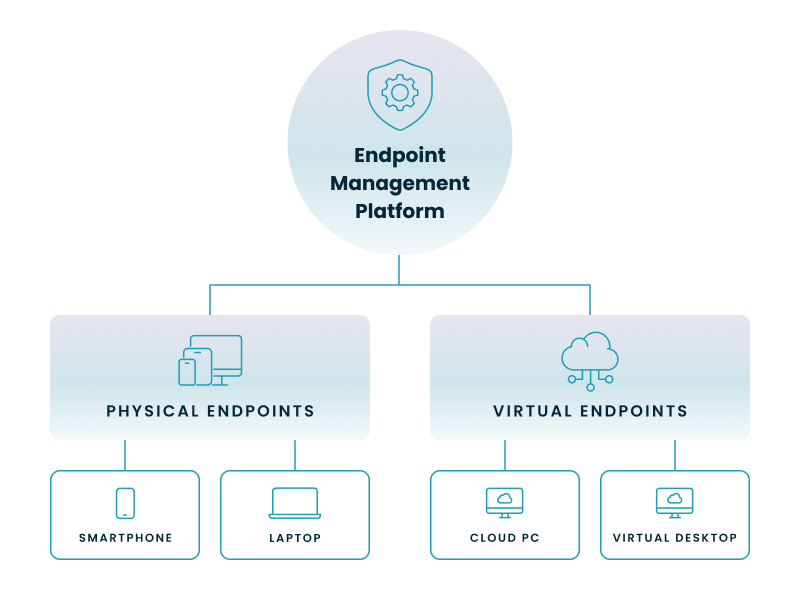
Your organization's "endpoints" are no longer just the physical devices you can touch. A modern IT environment is a hybrid of both physical and virtual endpoints.

This is a critical management challenge. Your IT team has to manage two separate worlds:

  1. Physical Endpoints: These are your company's laptops, smartphones, and tablets. You use a UEM tool like Microsoft Intune to manage these. You push policies, enforce compliance, and manage apps directly on the hardware.
  2. Virtual Endpoints: These are your cloud-based virtual desktops, like Azure Virtual Desktop (AVD) and Windows 365 Cloud PCs. These "devices" are actually virtual machines running in an Azure data center.

The problem is that traditional UEM tools were built to manage physical hardware. Managing a fleet of virtual desktops—spinning them up, shutting them down to save costs, applying images, and managing user sessions—requires a completely different set of tools and expertise. This leaves IT teams juggling two separate, complex management platforms, one for physical and one for virtual, creating inefficiency and security gaps.

How does Nerdio help with endpoint management in a Microsoft environment?

While Microsoft Intune is the native tool for managing endpoints, organizations can face operational challenges when applying its policies at an enterprise scale. Nerdio provides a unified management platform that integrates with and extends Intune to solve these specific challenges, particularly for organizations managing both physical endpoints and virtual desktops like Azure Virtual Desktop (AVD) and Windows 365.

Instead of replacing Intune, the platform acts as a simplifying and automation layer that provides a single interface to manage the entire endpoint estate.

How does Nerdio solve Intune's security and compliance gaps?

Nerdio adds critical functions for enterprises that need to go beyond native Intune capabilities:

  • Fixing Compliance Blind Spots: Intune can report a device as "compliant" even if third-party software (like a PDF reader or web browser) is out of date. Nerdio's platform provides live dashboards and reporting that include these third-party application patches, giving IT teams a true compliance state and visibility into actual vulnerabilities.
  • Solving Audit Requirements: Intune natively retains compliance data for 30 days. To solve for "audit season panic," Nerdio provides long-term historical compliance reporting, allowing teams to produce 90- or 180-day records for auditors in minutes.
  • Preventing Misconfiguration Risk: A simple misconfiguration in Intune can accidentally lock out thousands of users. Nerdio provides a critical safety net by adding version control for Intune policies, including automatic backups and a one-click restore function to instantly roll back a bad configuration.

How does Nerdio improve IT efficiency and reduce costs?

The platform unifies management tasks to reduce administrative overhead, cost, and complexity:

  • Reducing Tool Sprawl: Nerdio consolidates essential functions like third-party patching, remote support, and advanced reporting into its platform. This helps organizations eliminate redundant spending on multiple, fragmented third-party tools.
  • Optimizing Software Licenses: The platform provides software metering to track the real-time usage of expensive applications. This data allows you to confidently reclaim and reallocate unused software licenses, optimizing your IT budget.
  • Resolving Policy Conflicts: In large organizations, legacy Group Policy Objects (GPOs) from on-premises servers can clash with modern Intune policies. The Nerdio platform can proactively detect these conflicts, allowing IT to resolve them before they cause user downtime.
  • Accelerating Cloud Modernization: By integrating management for both virtual desktops (AVD/W365) and physical endpoints, Nerdio helps IT teams reduce their dependence on legacy tools like SCCM for managing servers and endpoints separately.

How does Nerdio add value with quantifiable outcomes?

By automating and optimizing the most complex parts of endpoint management, Nerdio delivers powerful, measurable results for IT departments.

  • Drastic Cost Savings: Nerdio's auto-scaling technology for Azure Virtual Desktop is a prime example. The platform automatically scales virtual desktop resources up and down to match user demand, ensuring you never pay for idle cloud computing.
    • Customer Outcome: Sage, a global leader in accounting software, uses Nerdio to save $1.5 million per year by optimizing its VM costs and avoiding the need for 20+ additional specialized IT hires.
    • Customer Outcome: A large U.S. local government saved an average of $10,000 per month on its Azure spend after implementing Nerdio.
  • Radical Time Savings & Efficiency: Nerdio automates the provisioning, imaging, and day-to-day management tasks that consume thousands of IT hours.
    • Customer Outcome: The managed services provider Think Solutions used Nerdio to achieve 95% faster onboarding for its customers, reducing deployment times for new AVD environments from weeks to just a day or two.
    • Customer Outcome: That same U.S. local government reduced its desktop deployment time from "weeks to just a few hours."

As Brad Ransbury, Systems Administrator for the City of Corona, noted, 

“With Nerdio’s integration with Intune, we now have a real-time view of our devices' security status... We no longer have to dig through multiple screens in Azure or Intune. The information is just there, ready to act on.”

Optimize and save

See how you can optimize processes, improve security, increase reliability, and save up to 70% on Microsoft Azure costs.

Frequently asked questions


About the author

Photo of Carisa Stinger

Carisa Stringer

Head of Product Marketing

Carisa Stringer is the Head of Product Marketing at Nerdio, where she leads the strategy and execution of go-to-market plans for the company’s enterprise and managed service provider solutions. She joined Nerdio in 2025, bringing 20+ years of experience in end user computing, desktops-as-a-service, and Microsoft technologies. Prior to her current role, Carisa held key product marketing positions at Citrix and Anthology, where she contributed to innovative go-to-market initiatives. Her career reflects a strong track record in driving growth and adoption in the enterprise technology sector. Carisa holds a Bachelor of Science in Industrial Engineering from the Georgia Institute of Technology.

Ready to get started?