End User Computing
End-user computing (EUC) gives employees secure access to apps and data from any device. Learn about EUC types, value, and strategy.
Beyond a conference — NerdioCon 2026: Learning, networking & unforgettable moments.
Save your spotEnd-user computing (EUC) gives employees secure access to apps and data from any device. Learn about EUC types, value, and strategy.
Amol Dalvi | June 24, 2025
Table of Contents
End-user computing (EUC) is the framework of technologies, policies, and processes that gives employees secure access to the applications and data they need to do their jobs, from any device, anywhere.
That definition sounds simple, but the reality is harder. Your workforce is spread across offices, homes, and client sites. Your security team wants centralized control. Your CFO wants predictable costs. Your employees want the same fast, reliable desktop experience whether they're in headquarters or a hotel room. EUC solves all of those problems at once. Done well, it turns IT from a cost center into a strategic business enabler.
EUC reduces costs, strengthens security, simplifies onboarding, and lets you scale your workforce without scaling your hardware.
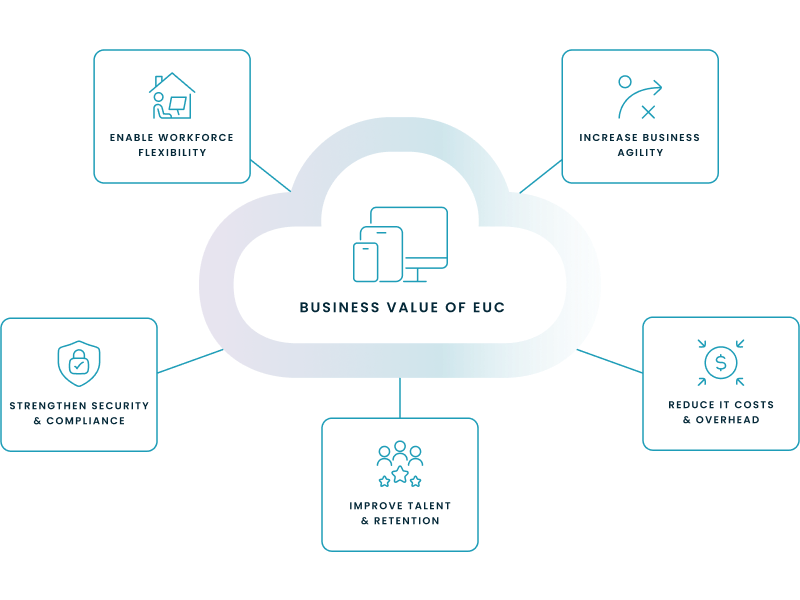
EUC lets you support remote and hybrid employees with the same desktop experience they'd get in the office. You don't need to ship a laptop to a new hire in another city because you can instead provision a virtual desktop in minutes. Gartner estimates that end-user spending on cloud services continues to accelerate, driven largely by organizations investing in this kind of flexible work infrastructure.
You provision secure virtual desktops for the exact duration of a project. Two hundred contractors need access on day one? Done. The contract ends on day 90? You de-provision access in the same workflow. No lingering accounts. No orphaned hardware.
EUC moves sensitive data off local devices and into a secure cloud environment like Microsoft Azure. A lost laptop becomes an inconvenience, not a data breach. Centralized control also makes it easier to enforce security policies and prove compliance to auditors. Microsoft's own security guidance recommends this centralized, zero-trust approach for distributed workforces.
Employees don't need expensive workstations when compute happens in the cloud. They can be productive on thin clients or personal devices through bring-your-own-device (BYOD) policies. You shift from large upfront hardware purchases to predictable monthly spending.
A modern EUC environment is a recruiting differentiator. Candidates expect to work from anywhere on tools that don't fight them. It's also a retention lever: fewer IT friction points mean fewer frustrated employees looking elsewhere.
The three main EUC solution types are virtual desktop infrastructure (VDI), Desktop as a Service (DaaS), and unified endpoint management (UEM). Organizations typically combine them based on their needs, budget, and compliance requirements. All three rely on virtualization, the technology that separates the desktop operating system from the physical device.
The Microsoft cloud desktop portfolio, sometimes called Windows Cloud, encompasses both Azure Virtual Desktop and Windows 365. Most enterprises evaluating EUC today work within this portfolio and run both products for different workload types.
| Feature | ||
| Infrastructure | You own and manage it (on-premises or private cloud) | Managed by a cloud provider (e.g., Microsoft Azure) |
| Cost model | Capital expenditure (CapEx) | Operational expenditure (OpEx) |
| Best for | Maximum control, deep customization, specific compliance needs | Simplicity, rapid scalability, predictable costs |
| Management | You manage everything | You manage desktops and apps; the provider manages infrastructure |
VDI is a centralized model where you host desktop operating systems on your own servers and stream them to end-user devices. The desktops typically run Windows 11 Enterprise, Windows Server 2019, or Windows Server 2022. Your IT team gets full control over the environment, which matters for organizations with strict security or customization requirements.
The tradeoff: you own the infrastructure. Capacity planning, hardware refreshes, and ongoing maintenance fall on your team.
DaaS is a cloud-hosted approach to virtual desktops where a provider manages the back-end infrastructure. Your IT team focuses on user desktops and applications rather than hardware and hypervisors.
Within the Microsoft ecosystem, Azure Virtual Desktop is consumption-based. You manage the session hosts and pay for what you use. Windows 365 delivers a personal Cloud PC at a fixed per-user price, with Microsoft handling more of the infrastructure. Both fall under the DaaS umbrella in Gartner's Magic Quadrant for DaaS.
UEM is how you manage and secure every device your employees use to access corporate resources. That includes laptops, desktops, tablets, and smartphones, whether company-owned or personal. Microsoft Intune is the primary UEM tool in the Microsoft stack. It gives you one central console to enforce security policies, deploy applications, and troubleshoot issues across your entire device fleet from the cloud.
EUC applies wherever employees need secure access to applications and data from locations or devices you don't fully control. Four use cases come up most often.
EUC decouples desktops from physical locations. If an office goes offline due to a power outage, natural disaster, or network failure, users connect to their virtual desktops from any other location. The infrastructure lives in the cloud, not in a server room that might lose power. Recovery time drops from days to minutes because there's nothing on-site to rebuild.
When you acquire a company, you need to onboard hundreds of users onto your systems fast. EUC lets you provision virtual desktops with your standard configuration without touching the acquired company's hardware. You run parallel environments during the transition period and cut over teams in waves. No laptop imaging. No shipping hardware across offices.
EUC keeps sensitive data in the cloud and off local devices. Patient records and financial information never sit on an endpoint. That architecture simplifies regulatory compliance and strengthens your security posture. When a healthcare organization needs to deploy electronic medical records (EMR) access to clinical staff across multiple facilities, EUC makes it possible without putting patient data on laptops.
EUC delivers graphics-intensive processing power from the cloud to standard devices. Engineers, designers, and data scientists run demanding applications without expensive specialized workstations at every desk. The heavy compute happens on cloud servers. Users just need a screen and a connection.
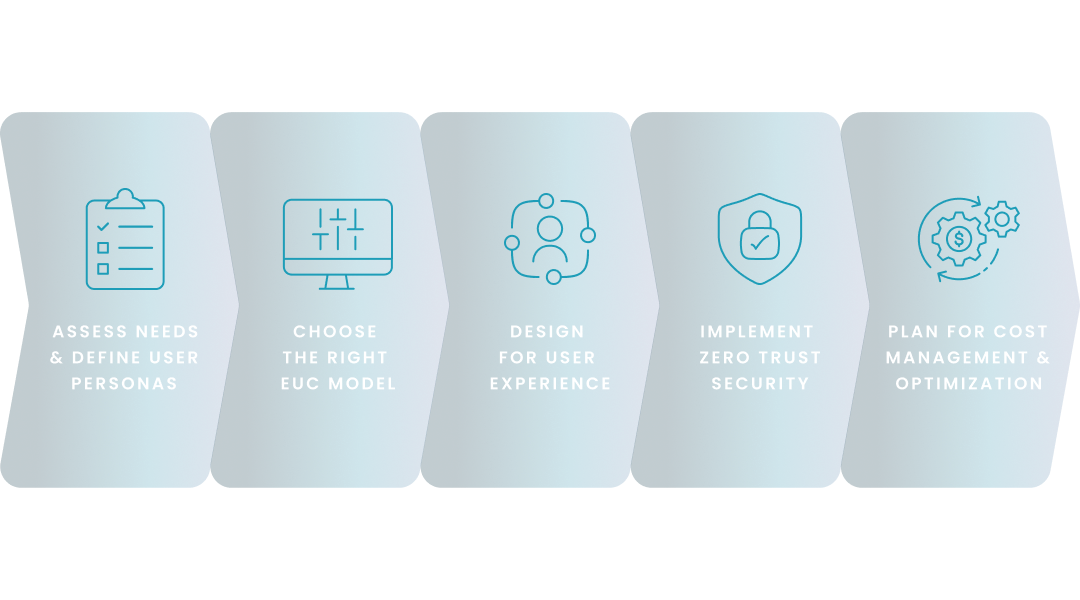
Building an EUC strategy comes down to five decisions. What do you need? Which delivery model fits? How do you protect the user experience? How do you secure it? And how do you keep costs under control?
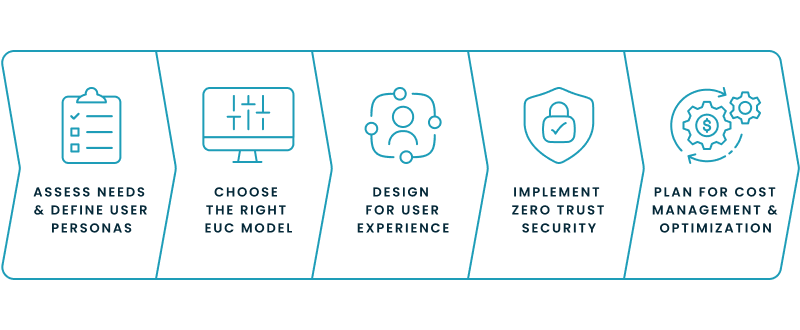
Map your current pain points first. Where are security gaps? What are users complaining about? Where is IT spending the most time on manual work? Then segment your workforce into personas. A call center agent, a financial analyst, and a software developer all have different compute, application, and security requirements. A one-size-fits-all approach will fail at least one group.
Match the model to your requirements. VDI gives you maximum control but requires IT resources to manage the infrastructure. DaaS prioritizes simplicity and predictable costs. Most large enterprises run a hybrid approach: persistent and non-persistent VDI for different workload types, plus DaaS for certain user segments.
Prioritize performance and fast logins. If the virtual desktop is slow or the login process is cumbersome, users will resist it and adoption will stall. What does a good experience look like in practice? Responsive applications and consistent performance whether the user is on corporate Wi-Fi or a home connection.
Authenticate and authorize every access request, regardless of whether the user is inside or outside your network. NIST's Zero Trust Architecture (SP 800-207) formalizes this as "never trust, always verify." Tools like Microsoft Defender for Endpoint provide threat detection and automated response at the device level across your entire endpoint fleet.
Set up automation and monitoring before you scale, not after your first surprise bill. Auto-scaling, which adjusts compute resources based on actual demand, is the most impactful cost lever. Reserved instances and savings plans reduce per-unit costs for predictable workloads. Without these controls, cloud desktop costs can grow beyond what on-premises would have cost.

Nerdio Manager manages Windows 365, Microsoft Intune, and Azure Virtual Desktop from a single console. It's an enterprise management and automation platform built specifically for Microsoft's Windows Cloud portfolio.
Nerdio Manager's auto-scaling evaluates user demand across Azure Virtual Desktop environments and powers down unused session hosts automatically. A 2024 economic validation by TechTarget's Enterprise Strategy Group found that customers achieved an average 55% reduction in Azure Virtual Desktop costs with Nerdio Manager compared to running Azure Virtual Desktop alone. Equitable Bank reported 74% compute savings through auto-scaling.
For Windows 365, Nerdio Manager extends native capabilities. Its unified application management deploys apps to endpoints in roughly 30 seconds by pushing updates directly rather than waiting for standard polling intervals. Advisor right-sizes Cloud PC SKUs so you're not overpaying for capacity. Intune policy backup and restore protects your configuration at scale.
When IT teams manage both products, Nerdio Manager provides golden image orchestration, automated desktop lifecycle management, and CIS-certified security baselines across the entire Windows Cloud environment.
See Nerdio Manager in action for Windows 365, Intune, and Azure Virtual Desktop. Or explore how DaaS saves money beyond compute alone.
This step-by-step wizard tool gives you the total cost of ownership for AVD in your organization.
EUC is evolving in four directions. AI is automating desktop management. Cloud integration is deepening. User-experience monitoring is replacing infrastructure monitoring. And industry-specific platforms are gaining traction.
Your EUC platform will predict performance issues before users notice them and allocate additional resources automatically when demanding applications launch. This shifts IT from reactive troubleshooting to proactive optimization.
Virtual desktops will connect more tightly with cloud services beyond basic desktop delivery. You'll build workflows where the user's desktop environment pulls directly from cloud databases, analytics tools, and AI services without switching between separate applications.
Experience-level analytics measure the end-to-end user experience rather than just infrastructure metrics like CPU and memory. Login times, application latency, and session quality give IT teams the data to find and fix problems before users submit tickets. Are your London users experiencing slower logins than your New York team? Experience analytics catch that before it becomes a support queue problem.
Regulated industries need EUC configurations that meet their compliance requirements out of the box, and vendors are responding. A healthcare DaaS platform might ship with HIPAA security controls and EMR integrations already configured. A financial services platform might include audit-ready logging and data residency controls. These reduce deployment time and compliance risk compared to building a compliant environment from scratch.
See how you can optimize processes, improve security, increase reliability, and save up to 70% on Microsoft Azure costs.
Azure Virtual Desktop and Windows 365 are both end-user computing tools. They deliver a complete desktop experience from a centralized cloud environment to any device. IT teams manage the desktop environment rather than the physical hardware it runs on.
The primary risks are security gaps and lost data control. When employees use personal devices or unapproved applications without oversight, they create vulnerabilities: data breaches, malware infections, and non-compliance with industry regulations. EUC governance policies establish the controls needed to mitigate these risks.
EUC is what makes secure BYOD possible. With VDI or DaaS, the desktop environment streams to an employee's personal device but never stores corporate data on it. Employees use their preferred hardware. The company maintains control over its data and applications.
VDI centralizes the processing power that AI applications require. Organizations host demanding AI workloads in a cloud or data center environment and deliver the results to users on standard devices. No expensive local hardware needed. The data stays in the corporate environment, which matters as AI models process increasingly sensitive information.
On-demand webinar
Software product executive and Head of Product at Nerdio, with 15+ years leading engineering teams and 9+ years growing a successful software startup to 20+ employees. A 3x startup founder and angel investor, with deep expertise in Microsoft full stack development, cloud, and SaaS. Patent holder, Certified Scrum Master, and agile product leader.