Citrix TCO in 2026: How to calculate the total cost of ownership for Citrix DaaS
Citrix DaaS TCO covers licensing, infrastructure, operations, and hidden costs. Compare with Windows Cloud and Nerdio Manager.
G2 Names Nerdio a Leader Across Fall 2026 Reports for Desktop as a Service Read the blog
Citrix DaaS TCO covers licensing, infrastructure, operations, and hidden costs. Compare with Windows Cloud and Nerdio Manager.
Carisa Stringer | September 26, 2025
Table of Contents
Citrix Desktop as a Service (DaaS) total cost of ownership (TCO) covers the Citrix subscription, the infrastructure your desktops run on, and the operational work to keep them running. Most renewal quotes only show the first layer. Many TCO calculations stop there too, which is why the quote and the actual spend rarely match.
This guide is for IT directors and platform owners working through a Citrix renewal or evaluating an exit to Microsoft's Windows Cloud portfolio, which covers both Azure Virtual Desktop and Windows 365.
Most Citrix renewal decisions come down to how much operational responsibility your team is willing to carry, on which platform, and at what total cost.
Citrix renewal quotes have spiked. Some large enterprise customers face renewal increases of 200% to 300%, paired with three-year terms and minimum-seat-count requirements, per cubesys CEO Paul Heaton in the Australian Financial Review. That kind of increase has made Citrix TCO a pressing budget question rather than something teams can defer to later. Private equity firms acquired both Citrix and Omnissa Horizon (formerly VMware Horizon) and have since restructured pricing.
Microsoft has spent the same period closing the technical gap. Azure Virtual Desktop now covers many of the workload patterns that historically required Citrix or Omnissa, and Microsoft's recently announced AVD Hybrid offering brings Azure Virtual Desktop to customers who cannot go fully cloud. For many teams, deferring the conversation is no longer a credible answer to the CIO. The question is what the migration math actually looks like.
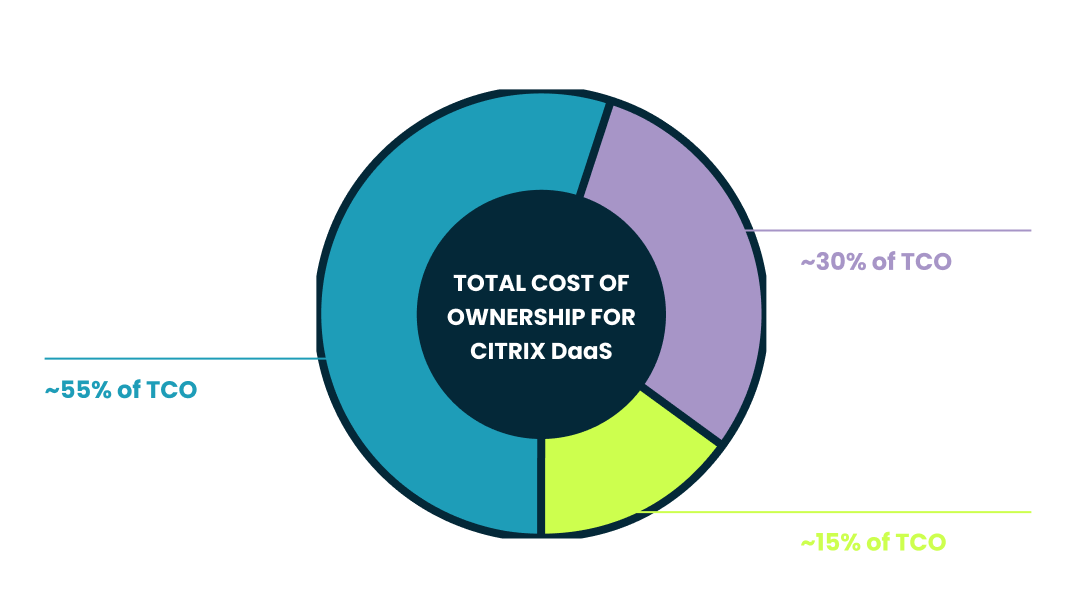
Citrix DaaS TCO has three layers. Licensing is the most visible, infrastructure is the largest, and operations is the most underestimated.
Citrix does not publish list prices, but procurement-data firm Vendr puts list pricing at roughly $30 to $50 per user per month, depending on tier, with enterprise buyers (1,000+ users) typically negotiating 30% to 45% below list. Pricing varies by feature tier, licensing model (per-user, per-device, or concurrent), user count, and contract length.
Many enterprise capabilities sit outside the core DaaS subscription. Organizations that use only a portion of the bundled feature set still pay for the whole bundle.
Citrix DaaS infrastructure runs in Microsoft Azure for many cloud deployments. Citrix supplies the control plane, while you pay for the underlying compute, storage, and networking separately.
Azure costs accumulate across virtual machine (VM) compute, storage for user profiles and data (Azure Files, Azure NetApp Files), and network egress. Session host VMs "usually cost the most" of any Azure Virtual Desktop or Citrix-on-Azure infrastructure component, per Microsoft's cost documentation. Azure Reservations and Savings Plans support one- or three-year commitments at discounts to pay-as-you-go pricing for predictable workloads.
Hybrid deployments add on-premises hardware costs. Physical hosts, hypervisor licenses, servers running Cloud Connectors, and the power and rack space those servers consume all add to the budget.
If you have ever watched an Azure bill climb through the month, this is the layer where it lands.
Citrix operations cost more than teams expect because day-to-day administration requires specialized work that continues long after deployment. Image management, policy configuration, and delivery-group troubleshooting all require dedicated Citrix expertise, and for many environments the operational labor adds up to a larger line than the subscription itself.
Citrix is genuinely good technology. HDX still leads on graphics-heavy workloads, and Citrix is Epic-certified at Level 2 for Hyperspace, which keeps it the default in many hospitals. The trade-off is the operational footprint. Citrix admins command a hiring premium because the skill set is narrow and aging.
Survey respondents in the DaaS Like a Pro 2024 to 2025 State of the Union named cost as their top DaaS challenge. And much of that cost lives in operations.
Many teams also pay for third-party software to fill gaps in Citrix's native monitoring, security, and endpoint management, layering more licensing on top.
Some Citrix costs never appear on a license invoice. They still hit the budget.
Hourly downtime costs exceed $300,000 for over 90% of mid-size and large enterprises, per ITIC's 2024 downtime survey. Virtual desktop outages tend to land squarely in revenue-generating workflows.
Citrix certification and recertification fees scale with your team's renewal cadence, and most employers carry that cost (e.g., 78% of employers reimburse certification fees, per SHRM's 2023 Benefits Survey). The Citrix stack's complexity keeps this an ongoing line, particularly in regulated industries where certification cadence is non-negotiable.
Migration costs in either direction scale with three factors. Deployment complexity, integration footprint, and the customization layered on through previous renewal cycles each add to the bill. Long-tenured Citrix environments carry more of all three.
Forced Citrix upgrades typically cost weeks of testing, deployment, and business-disruption work that was not on the prior year's plan. Citrix's License Activation Service became the only way to activate on-premises Citrix components as of April 15, 2026. Teams running older Citrix Virtual Apps and Desktops versions must upgrade to a LAS-compatible release (currently the 2507 LTSR, released August 2025) to stay supported. That kind of licensing change adds labor many teams have not budgeted for.
This step-by-step wizard tool gives you the total cost of ownership for AVD in your organization.
In many environments, Windows Cloud total cost of ownership is lower than Citrix DaaS because Microsoft 365 customers already pay for the Windows Cloud platform license. Citrix adds another license layer on top of Microsoft and Azure costs. That difference is one reason a Citrix vs AVD total cost of ownership comparison often starts with licensing, then widens when infrastructure and operations are included.
Windows Cloud is Microsoft's umbrella for Azure Virtual Desktop (consumption-based, customer-managed) and Windows 365 (fixed per-user, Microsoft-managed). Many enterprises run both Microsoft products together for different user populations, which is why a unified management layer matters once operations cross both.
Citrix charges a separate per-user subscription on top of Microsoft licensing and Azure infrastructure. Windows Cloud bundles the platform license into Microsoft 365 plans many enterprises already own.
Azure Virtual Desktop access rights are included with eligible Microsoft 365 and Windows Enterprise licenses, including Microsoft 365 E3, E5, and the new E7 Frontier Suite (GA May 2026), per Microsoft 365 plans and pricing. Organizations that already hold those seats have a marginal control-plane licensing cost of $0 for Azure Virtual Desktop. Windows Cloud TCO becomes the Microsoft 365 license you already own, plus Azure infrastructure consumption, plus a cloud desktop management platform such as Nerdio Manager for Enterprise for Windows 365, Microsoft Intune, and Azure Virtual Desktop.
Windows 365 uses fixed per-user monthly pricing. A Windows 365 Enterprise Cloud PC with 2 vCPU, 8 GB RAM, and 128 GB storage lists at $41 per user per month. Predictability is the design choice. Workloads with steady utilization and limited customization typically fit the Windows 365 model better; variable workloads and complex apps typically fit Azure Virtual Desktop better. A more granular Citrix vs. Windows 365 comparison breaks down where each fits.
Five dimensions drive the TCO gap between Citrix DaaS and Windows Cloud.
Citrix DaaS |
Windows Cloud with Nerdio Manager |
|
|---|---|---|
Control plane licensing |
Separate per-user subscription required |
Windows 365: included in Cloud PC price. Azure Virtual Desktop: included with Microsoft 365 E3, E5, or E7 |
Infrastructure |
Customer-managed Azure or hybrid; native tools and manual configuration drive optimization |
Windows 365: Microsoft-managed. Azure Virtual Desktop: customer-managed Azure, optimized through the same Nerdio Manager console used for Windows 365 and Microsoft Intune |
Operational overhead |
Specialized Citrix expertise for image management, policy configuration, and delivery-group troubleshooting |
Single console for Windows 365, Microsoft Intune, and Azure Virtual Desktop covering Cloud PC administration, application delivery, policy control, and Azure Virtual Desktop management |
Cost optimization |
Native auto-scaling available; meaningful savings depend on configuration, scripting, and ongoing oversight |
Auto-scaling and dynamic storage tier switching for Azure Virtual Desktop, plus right-sizing and license reclamation recommendations through Nerdio Advisor for Windows 365 |
Licensing drives the largest single TCO swing, but operations is where the gap compounds over a three-year contract.
Citrix requires deep platform-specific expertise. Windows Cloud spreads operational work across four to five Microsoft admin surfaces unless a management layer pulls them together.
On Citrix, image management with Machine Creation Services or Provisioning Services, granular policy configuration, and delivery-group troubleshooting are the daily reality. On the Microsoft side, Azure Portal handles infrastructure, Entra ID handles identity, PowerShell handles whatever falls between, and Microsoft Intune handles Cloud PCs and parts of Azure Virtual Desktop endpoint management. Without a unifying layer, those four to five surfaces stack up for one business function.
Nerdio Manager covers Windows 365, Microsoft Intune, and Azure Virtual Desktop in one console. Golden image updates, application delivery, policy control, Cloud PC administration, and Intune backup and restore happen in the same management plane. In practice, that can materially change the labor side of a Citrix vs AVD total cost of ownership comparison.
Independent click-count testing by Dr. Tritsch IT Consulting found that golden image updates drop from 146 clicks (5:09) to 13 clicks (0:37) when Nerdio Manager handles Azure Virtual Desktop operations versus the native Azure portal. Fewer manual steps also mean fewer chances to make a bad change late in the day.
Nerdio Manager addresses the two budget lines teams usually fight with most after migrating off Citrix: infrastructure spend and admin overhead.
Nerdio Manager deploys, manages, and optimizes Windows 365, Microsoft Intune, and Azure Virtual Desktop from a single console.
For Azure Virtual Desktop, the platform pairs auto-scaling with dynamic storage tier switching that moves stopped-and-deallocated VMs from premium SSD to standard HDD. Storage savings reach roughly $900 to $1,200 per month per 100 machines.
For Windows 365, the same console surfaces sizing, licensing, and utilization data, plus right-sizing and license suitability recommendations through Nerdio Advisor, Unified Application Management, and Intune backup and restore for configuration protection.
Enterprise customers report 55% average savings on Azure compute through Nerdio Manager auto-scaling, per TechTarget's Enterprise Strategy Group ESG economic validation (commissioned by Nerdio, September 2024).
Teams handle Cloud PC sprawl and Intune overhead from one place instead of splitting work across separate tools. Sizing, licensing, and policy data all surface in the same console.
Native Intune application delivery can take up to three hours depending on configuration. Nerdio's Unified Application Management uses a centralized catalog for deploying Windows applications across Windows 365 and Azure Virtual Desktop, with delivery typically completing in minutes.
On the Azure Virtual Desktop side, the same platform centralizes golden image updates, policy control, and session host management. Teams do not have to split administration across separate consoles or maintain custom PowerShell scripts.
Customers exiting Citrix have reported savings between 50% and 70% across licensing, compute, and labor.
Sage, a global accounting and payroll firm, reported 62-65% savings on VM direct costs and over $1M in annual savings after moving from Citrix to Azure Virtual Desktop with Nerdio. Damart, a European retailer, reported 50% savings on licensing and 50% on labor after leaving Citrix. Össur, a medical device manufacturer, reported approximately 70% reductions in licensing cost after exiting Citrix.
Organizations planning a Citrix exit can use Nerdio Migrate to transition off Citrix to Windows 365 or Azure Virtual Desktop. For a head-to-head capability view, the Nerdio vs. Citrix comparison covers the full feature set, and the broader Citrix alternatives page maps the field.
Get a demo of how Nerdio Manager handles Windows 365, Microsoft Intune, and Azure Virtual Desktop in one console, or start a free trial in your Azure environment.
See how you can optimize processes, improve security, increase reliability, and save up to 70% on Microsoft Azure costs.
Citrix does not publish per-user list prices. Vendr's procurement data (mentioned in the article) places list pricing at roughly $30-$50 per user per month depending on tier, with enterprise customers typically negotiating 30-45% below list. Per-user cost varies by edition, licensing model (per-user, per-device, or concurrent), and contract length. A custom quote is required.
A complete calculation covers three primary layers. Direct licensing includes the Citrix subscription and add-ons such as NetScaler application delivery and advanced security analytics. Infrastructure consumption includes Azure compute, storage, networking, and egress, or on-premises hardware for hybrid deployments. Operations includes Citrix admin labor, third-party tooling, training, certification, support, and migration costs. Add hidden costs as well like downtime exposure, bundle features you do not use, and forced upgrade work tied to Citrix's licensing changes.
Two structural reasons. First, Citrix DaaS requires a separate per-user subscription on top of Microsoft licensing and Azure infrastructure, while Azure Virtual Desktop access rights are included with Microsoft 365 E3, E5, and E7 licenses customers usually already own. Second, Citrix's operational footprint (image management, policy configuration, specialized headcount) is heavier than a Windows Cloud environment managed through a unified console. Auto-scaling and right-sizing through Nerdio Manager compound the cost gap on the Azure Virtual Desktop side.
Windows 365 total cost of ownership typically costs less than Citrix DaaS for steady-state workloads. Fixed pricing of $41 per user per month for the 2 vCPU / 8 GB RAM / 128 GB Cloud PC typically beats Citrix DaaS once infrastructure and operations fold in. The advantage holds for workloads with steady utilization and limited customization. For variable workloads, Azure Virtual Desktop's consumption model is often more cost-efficient. Many enterprises run both Windows 365 and Azure Virtual Desktop for different populations and manage them through one Nerdio Manager console.
Right-size session host VMs against actual utilization, commit predictable workloads to Azure Reservations or Savings Plans (with the caveat that reserved instances are best for stable, steady-state environments), audit bundle features against actual use, and consolidate third-party tooling. A dedicated guide on how to lower Citrix Azure spend covers each lever in detail. Many teams use this as a bridge while planning a longer-term Windows Cloud migration.
Migration cost depends on user count, application complexity, profile and data volume, and how much customization the Citrix environment carries. Discovery, application testing, pilot, and rollout each have their own labor. The faster a team can replicate an existing Citrix configuration into Azure Virtual Desktop, the lower the implementation labor. Published Nerdio migrations include Carvana's 14-day deployment and cubesys's 2-week rollout of a 4,000-user environment. Larger or more complex environments scale accordingly with application footprint and integration scope. The Citrix vs. AVD comparison lays out the broader decision context, including a Citrix vs AVD total cost of ownership comparison.

On-demand webinar



Carisa Stringer
Head of Product Marketing
Carisa Stringer is the Head of Product Marketing at Nerdio, where she leads the strategy and execution of go-to-market plans for the company’s enterprise and managed service provider solutions. She joined Nerdio in 2025, bringing 20+ years of experience in end user computing, desktops-as-a-service, and Microsoft technologies. Prior to her current role, Carisa held key product marketing positions at Citrix and Anthology, where she contributed to innovative go-to-market initiatives. Her career reflects a strong track record in driving growth and adoption in the enterprise technology sector. Carisa holds a Bachelor of Science in Industrial Engineering from the Georgia Institute of Technology.