What is unified endpoint management (UEM) software?
UEM software manages every endpoint from one console. Learn how it works, where the category falls short, and what to evaluate.
Carisa Stringer | November 17, 2025
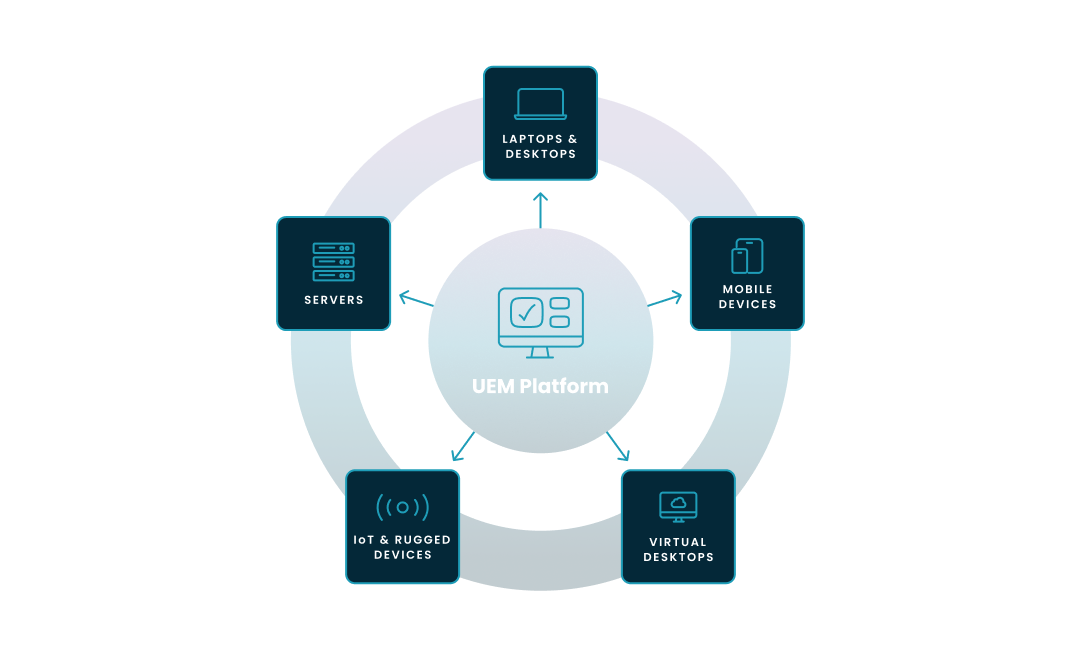
Unified endpoint management (UEM) software is a platform that manages, secures, and monitors every endpoint in an organization from a single console. That scope includes laptops, desktops, mobile devices, and, increasingly, cloud-hosted virtual desktops like Windows 365 and Azure Virtual Desktop, collectively known as Windows Cloud.
Your fleet isn't a few hundred Windows PCs behind a firewall anymore. It's endpoints across every OS, a bring-your-own-device (BYOD) program nobody fully approved, a contractor workforce on personal Macs, and an Azure Virtual Desktop environment that finance insists on running around the clock. UEM software replaces the patchwork of separate management tools with one platform that applies consistent policies across every device type.
Under the hood, a UEM platform operates on a client-server model with three components.
A cloud-based portal where administrators define security policies, deploy applications, and review device health. Microsoft Intune is the most widely deployed example in the Microsoft ecosystem.
The console communicates with endpoints through lightweight agents installed on each device or through native management APIs built into the operating system. Windows 11, iOS, and Android all expose management APIs natively, and most modern UEM platforms favor this agentless approach for physical devices.
Modern UEM ties directly into cloud identity providers like Microsoft Entra ID. The UEM platform continuously assesses each device's health: is it patched? Encrypted? Jailbroken? It reports a compliance status back to the identity provider. The compliance status feeds Conditional Access rules so that only compliant devices reach corporate resources. The connection between device compliance and identity is how Zero Trust actually works in practice.
Devices must enroll before management policies apply. Corporate-owned devices use zero-touch provisioning (Windows Autopilot or Apple Business Manager register the device automatically on first boot). Personal devices follow a BYOD model where the employee installs a company portal app to gain access to work resources.
UEM didn't appear from nowhere. IT kept adding device types, and the management tools had to keep up. Three generations, each one absorbing the last.
Mobile Device Management (MDM) came first. MDM was device-centric: enforce passcodes, configure Wi-Fi, remotely wipe a lost phone. It managed the hardware, not what ran on it.
Enterprise Mobility Management (EMM) came next. EMM kept MDM's capabilities and added Mobile Application Management (MAM) to control corporate apps and Mobile Content Management (MCM) to secure work files, without requiring full control of the employee's personal device.
UEM is the current standard because it consolidated EMM with the traditional client management tools (like Microsoft Endpoint Configuration Manager) that IT teams were already using for desktops and laptops. One platform for both mobile and traditional endpoints, consistent policies across device types, fewer consoles to juggle.
| MDM | EMM | UEM | |
| Focus | Device hardware: passcodes, settings, remote wipe | Applications and content on top of device management | All endpoints from one console |
| Managed assets | Smartphones, tablets | Smartphones, tablets, corporate apps, corporate data | Phones, tablets, desktops, laptops, virtual desktops, IoT |
Five capabilities separate UEM software worth evaluating from the products that just check the Gartner box.
The foundation is device lifecycle management and security policy enforcement, working together. Lifecycle management covers the full arc from enrollment to retirement. Zero-touch provisioning gets a new employee productive on day one; remote wipe cleans corporate data when they leave.
Security baselines layer on top, applying consistent rules across the fleet. Device encryption (BitLocker on Windows, FileVault on macOS), passcode requirements, and feature restrictions based on user roles all get managed from one policy set. A platform that enforces baselines inconsistently across operating systems creates the gaps it was supposed to close.
Application management deploys, updates, and secures apps at scale. IT teams push required software like Microsoft 365, maintain a self-service catalog for optional tools, and block unapproved installs. OS patching is part of this function too. Automating critical security updates across the fleet is table stakes for UEM. The 2025 Verizon DBIR found that exploits were the entry point in 20% of confirmed breaches, and unpatched software was one of the most common reasons those exploits landed.
Compliance monitoring and reporting tracks device health over time and generates the audit trail your compliance team is going to ask for. How long platforms retain compliance data is where they diverge. Microsoft's Intune documentation notes a default 30-day compliance status validity period, configurable up to 120 days. But native compliance trend reporting is narrower than what organizations in financial services or healthcare typically need for 90-day or 180-day audit cycles.
Data protection provides the incident playbook for the inevitable: a laptop left in a cab, an employee who gives two weeks' notice, a device that was never supposed to have corporate data on it in the first place. Remote lock, full factory wipe for corporate devices, and selective wipe that removes only corporate data from personal BYOD devices.
Most UEM platforms handle these five. How well they extend to virtual desktops running in Azure alongside those physical endpoints is where vendors diverge.
Traditional UEM software manages physical endpoint policies but does not orchestrate virtual desktop infrastructure. For organizations running both physical and cloud-hosted endpoints, the result is a management gap that most UEM content ignores. Organizations don't just run physical endpoints. They run virtual desktops in the cloud: Windows 365 Cloud PCs, Azure Virtual Desktop session hosts (the virtual machines that host user sessions in Azure Virtual Desktop), and in most enterprise environments, both side by side.
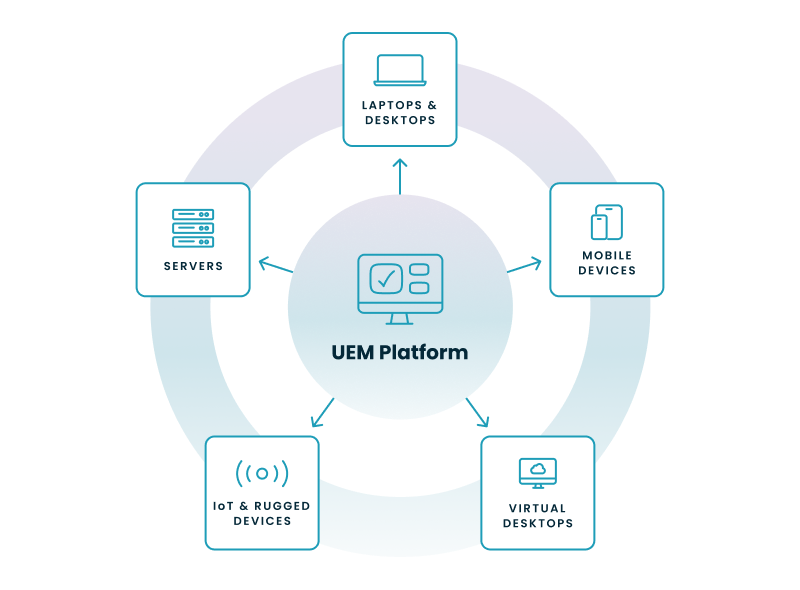
A UEM platform like Intune handles the OS layer inside a virtual desktop the same way it handles a physical laptop: security baselines, app deployment, compliance policies. That part works.
Intune's scope is the OS layer and endpoint policy. The infrastructure underneath the virtual desktop sits in a different operational domain. Spinning up new session hosts from a golden image (the master VM image from which session hosts deploy). Scaling VMs up and down to match demand and control Azure costs. Managing user profiles and session performance. Pushing image updates across regions without disconnecting users. These are Virtual Desktop Infrastructure (VDI) management tasks that require a different operational layer than what UEM software provides.
Here's where Intune's scope ends and the gap begins:
| Capability | Intune (native UEM) | Requires additional tooling |
| Physical device enrollment and provisioning | Yes (Windows Autopilot, Apple Business Manager) | None |
| Security baselines and compliance policies | Yes, across all enrolled devices | None |
| App deployment (Win32, Store, LOB) | Yes | Third-party patching for non-Microsoft apps |
| OS patching (Windows Update for Business) | Yes | None |
| Compliance trend reporting | 30–60 day trends natively | 90–180 day audit trails for regulated industries |
| Virtual desktop OS policy (inside the VM) | Yes, same as physical endpoints | None |
| Session host provisioning and scaling | No | Azure portal, PowerShell, or VDI management platform |
| Auto-scaling (power off idle VMs) | No | Native AVD scaling (single-trigger) or third-party |
| Golden image lifecycle management | No | Azure portal, custom scripts, or VDI management platform |
| Multi-region deployment orchestration | No | Custom automation or VDI management platform |
| User profile management (FSLogix) | No | Separate configuration and monitoring |
| Cloud cost attribution and optimization | No | Azure Cost Management plus additional tooling |
The result for organizations running both physical and virtual endpoints: two management platforms. Intune for physical devices and endpoint policies, and a separate set of tools for the virtual desktop infrastructure. Running two management platforms creates duplicated effort, policy inconsistency between physical and virtual endpoints, and cloud cost waste from VMs running when nobody's using them.
The Intune-at-scale version of this problem compounds as fleet size grows. Organizations moving from Group Policy to Intune can hit conflicts between the two policy sets. Teams relying on Configuration Manager for on-premises servers alongside Intune for endpoints run a co-management model that adds cost and complexity. And third-party software patching (browsers, PDF readers, collaboration tools) often sits outside Intune's native scope. The result is compliance blind spots: the UEM reports "compliant," but third-party apps remain unpatched.
Intune is the most widely deployed UEM platform in the Microsoft ecosystem. But its scope was designed for endpoint policy management, not for virtual desktop infrastructure orchestration. The "unified" in UEM hasn't fully caught up with how enterprises actually operate.

The Intune coverage table maps the boundary on paper. In practice, the cost shows up in your team's calendar and your Azure bill:
If three or more of these sound familiar, you've been absorbing the cost of a management gap that your tooling was never designed to close.
This step-by-step wizard tool gives you the total cost of ownership for AVD in your organization.
If your organization runs both physical endpoints and cloud-hosted virtual desktops (or plans to), the standard UEM feature checklist was written for a simpler world. Five criteria matter for the one you actually manage:
Nerdio Manager for Enterprise addresses this gap. It extends Intune's endpoint management with Windows Cloud infrastructure orchestration from a single interface. Patented auto-scaling handles the VM cost problem your team currently solves with scripts or the Azure portal. Desktop orchestration manages the golden image lifecycle. Intune policy backup and restore, Advisor-driven license right-sizing, and bulk Windows 365 provisioning round out the management layer. Unified compliance and reporting covers both physical and virtual endpoints in the same view.
According to an independent economic validation by TechTarget's Enterprise Strategy Group, organizations using Nerdio Manager achieved up to a 55% reduction in Azure Virtual Desktop costs compared to managing Azure Virtual Desktop natively. Nerdio Manager is 100% Microsoft-focused by design. It deploys inside your Azure tenant without the need for external infrastructure so no data leaves your control.
For more on how Nerdio Manager works alongside Intune, see Nerdio for Intune. To understand where each tool's scope begins and ends, see this Intune scope comparison.
See how you can optimize processes, improve security, increase reliability, and save up to 70% on Microsoft Azure costs.
A unified endpoint management system is a single platform that manages, secures, and monitors all of an organization's endpoints from one console. That includes mobile devices (phones, tablets), traditional desktops and laptops (Windows, macOS), virtual endpoints (Windows 365, Azure Virtual Desktop), and IoT devices.
Partially. UEM software like Microsoft Intune can apply security baselines, deploy apps, and enforce compliance policies inside a virtual desktop, the same way it does for a physical laptop. But UEM does not manage the underlying virtual desktop infrastructure: session host provisioning, auto-scaling, golden image lifecycle, cost optimization, and multi-region orchestration. That's a different operational layer entirely. Organizations running Windows 365 or Azure Virtual Desktop alongside physical endpoints typically need a VDI management platform on top of their UEM.
UEM manages device configuration, patching, and policy enforcement to keep endpoints healthy. EDR (Endpoint Detection and Response) monitors for active cyberattacks and responds to breaches in progress. UEM is proactive management; EDR is reactive threat detection. Together, they form a complete endpoint strategy: UEM keeps devices compliant and patched, while EDR tools like Microsoft Defender for Endpoint hunt for threats that get through.
Scope. MDM manages only mobile devices (smartphones and tablets). UEM manages mobile devices plus desktops, laptops, and virtual desktops from one platform. UEM is the modern evolution of MDM.
No. MDM was the original solution for managing mobile phones and tablets. UEM replaced it by adding desktop, laptop, and virtual desktop management into a single platform. UEM includes everything MDM does and extends it to the full device fleet.
On-demand webinar
Carisa Stringer
Head of Product Marketing
Carisa Stringer is the Head of Product Marketing at Nerdio, where she leads the strategy and execution of go-to-market plans for the company’s enterprise and managed service provider solutions. She joined Nerdio in 2025, bringing 20+ years of experience in end user computing, desktops-as-a-service, and Microsoft technologies. Prior to her current role, Carisa held key product marketing positions at Citrix and Anthology, where she contributed to innovative go-to-market initiatives. Her career reflects a strong track record in driving growth and adoption in the enterprise technology sector. Carisa holds a Bachelor of Science in Industrial Engineering from the Georgia Institute of Technology.