Comparing how a unified platform such as Nerdio unifies control over Intune, Windows 365, and Azure Virtual Desktop into a single pane of glass vs. managing disparate silos

Managing Windows 365 with Intune

This guide details how to manage Windows 365 with Intune, covering provisioning, security, app deployment, and solving common enterprise challenges.

Carisa Stringer | February 6, 2026

Introduction

Windows 365 provides your organization with powerful, persistent Cloud PCs, giving employees a full Windows desktop experience from any device. 

Microsoft Intune is the native cloud tool used to manage and secure these Cloud PCs; in fact, they are designed to automatically enroll in Intune the moment they’re provisioned. 

Proper management is not just an IT task but a core business function, essential for protecting your corporate data, empowering user productivity, and controlling IT costs.

Foundational components 

Before diving into complex challenges, it’s important to understand the two core technologies and how they work together. This combination forms the basis of modern endpoint management in the Microsoft cloud.

What is Windows 365?

Windows 365 is a cloud-based service that provides a complete, personalized Windows desktop experience—including apps, data, and settings—streamed from the cloud to any device. For an enterprise, this means you can deploy and manage dedicated, persistent virtual desktops (Cloud PCs) running Windows 11 for your users, simplifying onboarding and enabling secure remote work. While Windows 365 Business is available for smaller teams, the Enterprise edition discussed here is specifically designed to leverage Microsoft Intune for centralized management at scale.

What is Microsoft Intune?

Microsoft Intune is a cloud-native endpoint management solution. It's the "how" you manage and secure your devices. It handles Mobile Device Management (MDM) and Mobile Application Management (MAM) for all your corporate endpoints, which includes physical laptops, mobile phones, and your Windows 365 Cloud PCs. By centralizing the administration of these diverse assets, Intune enables organizations to adopt a unified endpoint management strategy that applies consistent security standards across both physical and virtual environments.

How does Intune automatically connect to Windows 365?

The integration is native and seamless. When you assign a Windows 365 license and a provisioning policy to a user, the Cloud PC is automatically built and, as a part of that process, enrolled directly into your Microsoft Intune environment. This means that from day one, every Cloud PC is under your IT team's management. To streamline this, administrators often use Microsoft Entra security groups to automatically assign these licenses and policies to specific cohorts of end-users.

What are the fundamental tasks for managing Cloud PCs with Intune?

When your IT team talks about "managing" a Cloud PC, they are referring to a specific set of daily operational tasks. While Intune is the tool for these jobs, performing them efficiently at an enterprise scale is the primary challenge.

  • Provisioning and Setup: This is the initial "day one" task of setting up a new user. It involves assigning the correct Cloud PC configuration and ensuring the user can log in and be productive.
  • Application Lifecycle Management: This is the ongoing process of deploying the applications your employees need, but more importantly, it includes patching and updating that software to protect against vulnerabilities.
  • Enforcing Security and Compliance: This involves using Intune to apply your company's security rules. Common examples include enforcing BitLocker disk encryption, setting screen lock timeouts, managing conditional access, and ensuring the device is compliant before it can access company data.

Why does managing Windows 365 with Intune become difficult at an enterprise scale?

While Intune provides the fundamental tools, scaling these functions to thousands of users in a complex enterprise environment introduces significant operational friction. These challenges can directly impact your company's productivity, create security risks, and drive up IT costs.

Why do compliance blind spots occur with third-party software?

Intune is excellent at reporting on Microsoft product compliance, but it can show a device as "compliant" even if critical third-party (non-Microsoft) software like Adobe Acrobat or common web browsers are dangerously out of date. This creates a false sense of security; "green in Intune" doesn't always mean the device is actually secure, and unpatched third-party software is a primary target for attackers. This vulnerability gap persists even if you utilize Windows Autopatch to automate your Microsoft updates, as the service does not currently cover the third-party application landscape.

What causes policy conflicts in a large enterprise?

Most large companies are in a hybrid state. This means legacy Group Policy Objects (GPOs) from your on-premises servers can (and do) clash with modern Intune policies. Native Intune tools make it very difficult to diagnose why a setting isn't applying, leading to user downtime and long, frustrating troubleshooting hours for your IT team.

Why is long-term compliance reporting a challenge for audits?

Native Intune only retains most compliance data for 30 days. When an auditor asks for 90 or 180 days of compliance records (which is a standard request), your IT team is forced to manually export and stitch together data from CSV files. This is time-consuming, expensive, and increases the risk of failing an audit.

What creates remote support bottlenecks for the help desk?

Native Intune provides limited remote access capabilities. This means when a user has a simple problem, your Level 1 (L1) help desk staff often can't see what the user sees. This forces them to escalate simple tickets to expensive senior engineers, slowing down resolution times and frustrating both users and IT staff.

How does "tool sprawl" increase costs and complexity?

To fill the gaps in Intune, organizations often buy multiple, separate third-party tools: one for third-party patching, one for advanced reporting, and another for remote support. Buying, managing, and integrating these disparate tools creates redundant spending, fragments your IT data, and adds unnecessary complexity.

What is the business impact of unmanaged software licenses?

Companies waste a significant portion of their IT budgets on unused software licenses. For an average company, some reports place this waste at over $18 million annually. Without a simple way to see which applications are actually being used, it's nearly impossible to reclaim those licenses and optimize your software budget.

What is the risk of policy misconfiguration in Intune?

In a large environment, a single administrator can be responsible for policies affecting thousands of users. A simple, honest mistake or misconfiguration can accidentally lock thousands of users out of their Cloud PCs. Native Intune lacks a simple "undo" or "rollback" function, meaning a small error can become a major incident.

Why do enterprises remain dependent on legacy tools like SCCM?

Intune is designed for endpoints (like Cloud PCs), not for managing servers. This forces many enterprises to maintain a complex and costly co-management model, utilizing Microsoft Endpoint Configuration Manager for servers and on-premises infrastructure while simultaneously using Intune for cloud endpoints. This adds complexity and significantly slows down an organization's cloud migration strategy.
How can enterprises solve these common Intune management challenges?

To bridge the gap between standard Intune capabilities and enterprise requirements, many organizations adopt a unified management platform. The table below provides a quick comparison of how this "management layer" addresses specific operational limitations, followed by a detailed breakdown of each solution.

Management Challenge Native Intune Limitation Unified Platform Solution
Compliance Blind Spots Intune may report a device as "compliant" even if third-party apps (like Adobe or Chrome) are unpatched. True Compliance Visibility: Dashboards integrate third-party patch status into reports for a single, accurate view of vulnerability.
Policy Conflicts Legacy GPO and modern Intune policy clashes are common in hybrid environments and difficult to diagnose. Proactive Conflict Detection: Tools automatically detect and report conflicts between GPOs and Intune rules before they impact users.
Remote Support Bottlenecks Native remote help options are limited or require expensive add-ons, forcing escalations to senior engineers. Granular Remote Access: Features like Nerdio Console Connect give L1 staff secure, instant access to solve issues without full admin rights.
Audit & Data Retention Intune natively retains most compliance data for only 30 days, making it difficult to satisfy audit requests. Long-Term Audit Readiness: Automated historical reporting retains compliance data for 180+ days, generating audit evidence in minutes.
License Waste Intune does not track if users are actually using installed software, leading to budget waste. Software Metering: Real-time usage tracking allows IT to identify unused apps and reclaim expensive licenses.
Misconfiguration Risk A single policy error can disrupt thousands of users, with no simple "undo" button. Version Control & Rollback: Automatic backups of Intune policies allow for a one-click restore to reverse problematic configurations.
Tool Sprawl Gaps in functionality force IT to manage separate tools for patching and reporting. Tool Consolidation: Essential functions are integrated into a single interface, eliminating the need for multiple vendors.
Legacy Tool Dependence Intune is designed for endpoints, not servers, forcing reliance on SCCM for server management. Unified Hybrid Management: A single platform manages both Windows 365 and Azure Virtual Desktop, reducing reliance on legacy systems.

Now let’s take a deeper dive into how you can overcome these challenges by enhancing Intune with a unified management platform that sits on top of Intune, providing the enterprise-scale features you need in one place.

How can you gain true compliance visibility, including third-party patches?

The solution is to use live dashboards and historical reporting that explicitly integrate the patch status of your third-party applications. This gives your IT team a true, unified compliance state, allowing them to see which devices are actually vulnerable.

How can you proactively detect and resolve policy conflicts?

You can use tools that are built to proactively scan and detect policy conflicts between your legacy GPOs and modern Intune rules. This allows your IT team to resolve issues before they cause user downtime, rather than troubleshooting after a user reports a problem.

What is the solution for long-term audit and compliance reporting?

Implement a platform that provides long-term historical compliance reporting out-of-the-box. This solves the 30-day limit by generating automated audit trails, allowing your team to produce evidence for auditors in minutes, not weeks.

How can you empower the help desk to resolve issues faster?

Equip your L1 help desk staff with a tool that provides secure, instant remote access to Cloud PCs. This empowers them to see what the user sees and solve more tickets on the first call, which dramatically reduces escalations and frees up your senior engineers for high-value projects.

How can you consolidate tools and reduce redundant spending?

Adopt a unified management platform that consolidates these essential functions—like third-party patching, advanced reporting, and remote support—into a single interface. This eliminates tool sprawl and helps you cut redundant spending on multiple third-party solutions.

How can you identify and reclaim unused software licenses?

The solution is to implement software metering, which tracks the real-time usage of your expensive applications. This data-driven insight gives you the confidence to reclaim and reallocate unused licenses, directly optimizing your software budget.

How can you reduce the risk of policy misconfiguration?

Add a critical safety net with a platform that provides version control for your Intune policies. This gives you automatic backups and, most importantly, a one-click restore function, allowing your team to instantly roll back a bad configuration.

How can you create a unified, cloud-first management strategy?

You can accelerate your cloud-first strategy by using a platform that integrates management for both Windows 365 and Azure Virtual Desktop. This allows your IT teams to reduce their dependence on SCCM and adopt a truly unified, modern management model.

What are the business outcomes of a well-managed Windows 365 environment?

By addressing these common challenges with an endpoint management platform, your enterprise can achieve a truly modern, efficient, and secure Windows 365 environment. The expected business outcomes are tangible and directly impact your bottom line.

  • Seamless Onboarding: New employees are productive on their first day with all their apps and settings ready to go.
  • Robust Security: Your company data is protected by consistent, verifiable, and, most importantly, audit-proof security policies.
  • Predictable Costs: Your monthly cloud and software spending is optimized, predictable, and free of waste from unused licenses or redundant tools.
  • Happy Users: Your team has a reliable, high-performing computing experience from any location, and when they need help, they get it faster.

How do unified management platforms like Nerdio enhance Intune?

Unified management platforms like Nerdio Manager are designed to enhance, not replace, Microsoft Intune. They act as an enterprise-grade automation and optimization layer that sits securely on top of your Microsoft tenant. Rather than adding complexity, this approach simplifies operations by addressing the scale challenges large organizations face.

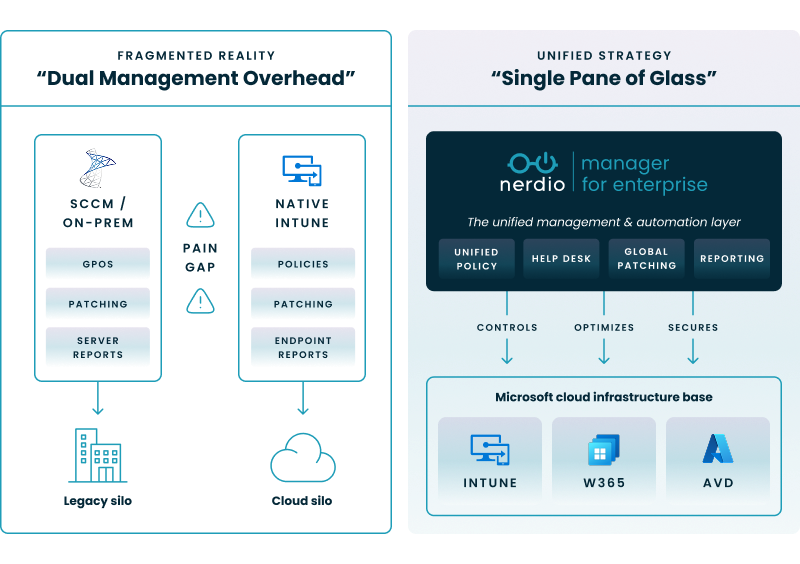
To visualize this architecture, the diagram below illustrates how a unified platform operates as a cohesive layer above your existing infrastructure. Instead of managing disparate silos, this model unifies control over Intune, Windows 365, and Azure Virtual Desktop into a single pane of glass.

Comparing how a unified platform such as Nerdio unifies control over Intune, Windows 365, and Azure Virtual Desktop into a single pane of glass vs. managing disparate silos

By providing a single, intuitive interface, these platforms unify management and add critical capabilities that Intune alone does not provide.

“With Nerdio’s integration with Intune, we now have a real-time view of our devices' security status—whether it’s BitLocker keys, compliance policies, or security vulnerabilities. We no longer have to dig through multiple screens in Azure or Intune. The information is just there, ready to act on.”

– Brad Ransbury, Systems Administrator, City of Corona

Specifically, a platform like Nerdio Manager solves the key challenges by:

  • Providing True Compliance Visibility: It delivers dashboards that integrate third-party patch status, giving you a complete and accurate view of device security.
  • Enabling Proactive Policy Management: It offers tools to detect GPO and Intune policy conflicts, and uniquely provides version control with automatic backups and a one-click restore for Intune policies.
  • Delivering Long-Term Audit Trails: It solves Intune's 30-day data limit by providing long-term historical compliance reporting, making you audit-ready at all times.
  • Empowering the Help Desk: It provides tools like Nerdio Console Connect for secure, instant remote access, allowing L1 staff to solve more issues directly and reduce ticket escalations.
  • Consolidating IT Tools: It reduces tool sprawl and costs by integrating functions like software metering for license optimization , patching, and advanced reporting in one place.
  • Accelerating Cloud Strategy: It helps organizations reduce SCCM dependency by providing a single, unified management model for both Windows 365 and Azure Virtual Desktop.

See this demo to learn how you can optimize processes, improve security, increase reliability, and save up to 70% on Microsoft Azure costs.

Optimize and save

See how you can optimize processes, improve security, increase reliability, and save up to 70% on Microsoft Azure costs.

Frequently asked questions


About the author

Photo of Carisa Stinger

Carisa Stringer

Head of Product Marketing

Carisa Stringer is the Head of Product Marketing at Nerdio, where she leads the strategy and execution of go-to-market plans for the company’s enterprise and managed service provider solutions. She joined Nerdio in 2025, bringing 20+ years of experience in end user computing, desktops-as-a-service, and Microsoft technologies. Prior to her current role, Carisa held key product marketing positions at Citrix and Anthology, where she contributed to innovative go-to-market initiatives. Her career reflects a strong track record in driving growth and adoption in the enterprise technology sector. Carisa holds a Bachelor of Science in Industrial Engineering from the Georgia Institute of Technology.

Ready to get started?