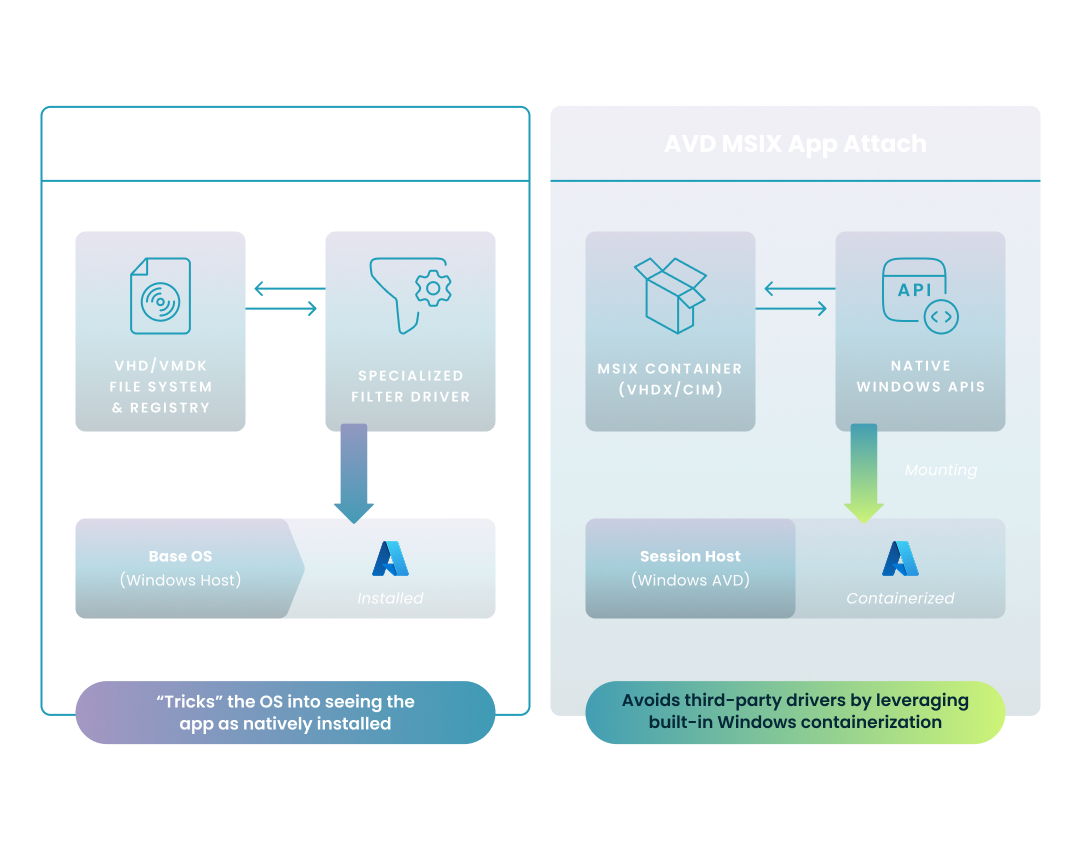
Filter driver vs native API: Omnissa merges VHDs via drivers; AVD MSIX uses native Windows containerization.

NERDIO GUIDE

VMware (Omnissa) App Volumes vs AVD MSIX App Attach

Carisa Stringer | April 1, 2026

Introduction

Application virtualization allows IT teams to separate software from the operating system, enabling dynamic delivery and simplified image management. 

Comparing Omnissa (formerly VMware) App Volumes and AVD MSIX App Attach is essential for organizations transitioning to Azure Virtual Desktop (AVD) who must balance legacy software support with cloud-native efficiency.

Disclaimer: Content referencing Omnissa and Microsoft products is based on public information from those company’s websites, current as of the last article update. For the latest product details and further inquiries, please consult the official Omnissa or Microsoft websites.

What are the fundamental differences between Omnissa (formerly VMware) App Volumes and AVD MSIX App Attach?

These two technologies represent different architectural philosophies for solving the same problem: making applications available without permanent installation. While one relies on a sophisticated filter driver to "trick" the OS, the other leverages native Windows containerization.

While both solutions aim to decouple applications from the OS, they achieve this through different technical paths. The diagram below illustrates how each technology interacts with the Windows kernel to present software to the user.
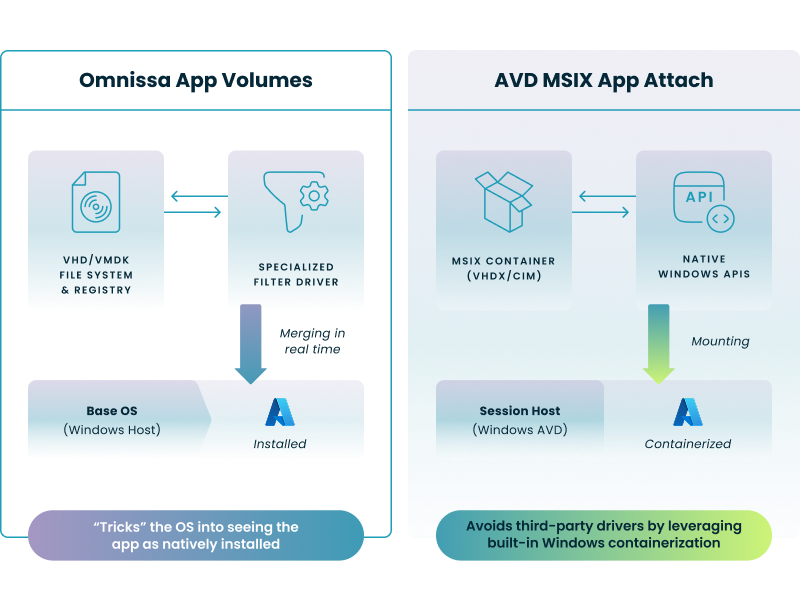
Filter driver vs native API: Omnissa merges VHDs via drivers; AVD MSIX uses native Windows containerization.

Key Architectural Takeaways:

  • Omnissa App Volumes (Filter Driver): This method uses a specialized driver to merge the file system and registry of a virtual disk with the base OS in real-time. To the operating system, the application appears natively installed, though it actually resides on a separate VHD or VMDK.
  • AVD MSIX App Attach (Native APIs): This cloud-native approach leverages built-in Windows APIs to mount MSIX containers. Because it utilizes native Windows containerization, it requires no third-party drivers, reducing potential conflicts and overhead within the session host.

A closer look: How does Omnissa (formerly VMware) App Volumes deliver applications?

Omnissa App Volumes uses a layering approach where applications are captured into virtual disks (VHD or VMDK). When a user logs in or launches an app, a specialized filter driver merges the file system and registry of that virtual disk with the base OS in real time, making the app appear natively installed. In the current Omnissa App Volumes 2512 release, the Apps on Demand feature allows these disks to attach only at the moment a user clicks an icon, significantly reducing the initial login performance hit.

How does AVD MSIX App Attach work natively?

MSIX App Attach is Microsoft’s cloud-native solution designed specifically for Azure Virtual Desktop. It uses the MSIX container format, which packages apps with their own virtual registry and file system. Rather than “installing" the app, AVD mounts the MSIX package (stored as a VHDX or CIM image) directly to the session host. This method is highly efficient because it uses the native Windows API to register the application, avoiding the need for third-party drivers and ensuring the base image remains completely gold and untouched.

How do these solutions compare in application compatibility and packaging?

The success of any application delivery strategy depends on its hit rate—the percentage of your software portfolio that can actually be virtualized. Legacy enterprise environments often struggle with this phase due to the complexity of older installers. These complexities often lead to persistent legacy VDI configuration issues that can stall modernization efforts if not addressed with specialized automation.

Which solution offers better compatibility for legacy enterprise applications?

Omnissa (formerly VMware) App Volumes is widely recognized for its high compatibility rate, often cited at 99% for traditional Windows applications, including those with deep system dependencies or custom drivers. Conversely, MSIX has a lower native success rate for older apps—often requiring the Package Support Framework (PSF) or third-party tools to handle fixups for things like hardcoded file paths. This makes App Volumes the preferred choice for organizations with diverse, older application portfolios.

How complex is the application packaging process?

  Omnissa (formerly VMware) App Volumes AVD MSIX App Attach
Primary Format VHD / VMDK MSIX (inside VHDX/CIM)
Ease of Capture High (Record-and-playback) Moderate (Requires conversion)
Driver Support Supports many kernel drivers Limited (Containerized)
Automation Via App Volumes Manager Requires PowerShell/Manual Effort

Nerdio naturally simplifies the AVD application packaging process by providing an automated packaging wizard for MSIX App Attach. While the native Microsoft process requires manual expansion of MSIX files into VHDX images via command-line tools, Nerdio Manager for Enterprise automates the entire lifecycle—from uploading the installer to generating the final virtual disk.
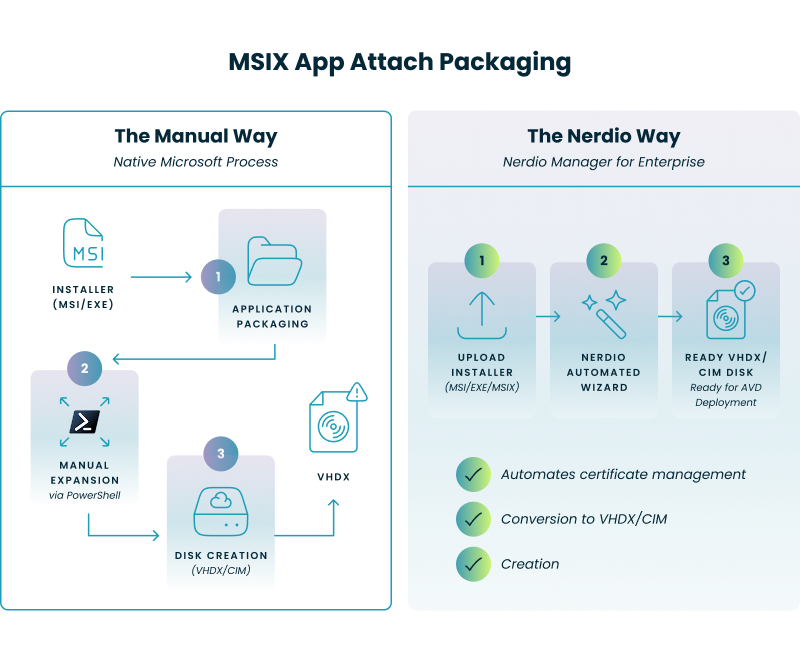

MSIX to VHDX/CIM conversion: Nerdio automates manual PowerShell steps for AVD App Attach packaging and disk generation.

What are the infrastructure and management requirements for each?

Choosing between these tools often comes down to the hidden costs of infrastructure and the complexity of the management plane. Enterprise IT leaders must account for the servers and databases required to keep these systems running.

What infrastructure is needed to deploy Omnissa (formerly VMware) App Volumes?

A standard Omnissa App Volumes deployment requires several backend components, including App Volumes Manager servers and a dedicated SQL Server database to track entitlements. While this provides robust governance, it creates a management footprint that must be patched and scaled. Organizations already using Omnissa Horizon (formerly VMware Horizon) typically find this integration seamless, as it shares much of the same ecosystem and licensing. However, when conducting a comparative analysis of AVD and Horizon, it becomes clear that Nerdio offers an enterprise-grade management plane that overcomes the limitations inherent in using the standalone native tools.

What are the native prerequisites for AVD MSIX App Attach?

Because MSIX App Attach is built into the Windows OS and Azure Virtual Desktop service, it requires no additional management servers. The control plane is the Azure Portal itself, and the applications are stored on standard Azure Files or Azure NetApp Files shares. This significantly reduces the total cost of ownership (TCO) by eliminating the need for dedicated SQL instances and application managers.

What are the specific networking requirements for Omnissa (formerly VMware) App Volumes vs. Azure Files-based MSIX storage?

The connectivity needs of these two solutions differ based on where the intelligence of the application delivery resides. While Omnissa requires consistent communication between agents and managers, Microsoft’s App Attach focuses on high-throughput access to the Azure storage fabric.

Omnissa (formerly VMware) App Volumes AVD App Attach (Azure Files)
Primary Protocol HTTPS (Agent to Manager) SMB 3.x (Host to File Share)
Management Port TCP 443 TCP 443 (Azure Resource Manager)
Data Transfer Port TCP 443 / 80 TCP 445 (SMB over Private Link)
Database Connectivity TCP 1433 (SQL Server) N/A (PaaS Managed)
Identity Protocol LDAPS / Kerberos / SAML Kerberos / Microsoft Entra ID
Traffic Direction Bi-directional (Manager/Agent) Outbound from Session Host to File Share
  • Omnissa (formerly VMware) App Volumes: The most critical networking factor is the latency between the App Volumes Manager and the SQL Database. High latency here can cause delays in application entitlement and mounting. Additionally, for multi-site deployments, you must account for TCP 443 synchronization traffic between Manager instances.
  • Azure Files App Attach: The primary hurdle is ensuring that Port 445 is not blocked by internal firewalls, which is why most enterprises utilize Azure Private Link. This ensures that application traffic stays on the Microsoft backbone. Furthermore, using CIM (Composite Image File System) images instead of VHDX reduces the metadata overhead sent over the network, leading to better performance in bandwidth-constrained environments.

How does Nerdio help with Omnissa (formerly VMware) and MSIX App Attach?

Nerdio serves as the essential bridge for enterprises modernizing their application delivery, particularly those moving from Omnissa Horizon (formerly VMware) to Azure Virtual Desktop. By abstracting the technical complexities of both formats, Nerdio ensures IT teams can focus on delivery rather than infrastructure. Organizations can successfully transition Horizon virtual apps into the AVD ecosystem by leveraging Nerdio’s robust, enterprise-grade automation, which provides a more resilient migration path than the limited native tools available elsewhere. To fully modernize the virtual desktop environment, IT teams can transition their user profile management from VMware DEM to FSLogix, ensuring a seamless and high-performance experience for users migrating to Azure Virtual Desktop.

How does Nerdio simplify the management of these technologies?

Nerdio Manager for Enterprise provides a Unified Application Management (UAM) dashboard that allows you to manage MSIX App Attach, WinGet, and traditional scripted installs from a single pane of glass. For MSIX specifically, Nerdio automates the creation of CIM/VHDX images and handles the critical distribution of code-signing certificates to session hosts—a process that is notoriously difficult to manage manually.

  • Quantifiable Efficiency: Enterprises using Nerdio have reported up to a 40% improvement in operational efficiency when managing AVD environments compared to legacy VDI methods.
  • Cost Impact: By leveraging Nerdio’s automation and right-sizing for AVD, organizations have successfully reduced monthly costs. For example, Mr. Cooper Group Inc. reduced their Azure costs by 50%, contributing to an estimated $7 million to $10 million in annual savings by optimizing their virtual desktop environment with Nerdio.
  • Third-Party Flexibility: If your legacy apps simply won't fit into MSIX, Nerdio integrates seamlessly with advanced vendors like Liquidware (FlexApp) and AppCURE, giving you the flexibility of App Volumes-style layering within a native AVD framework.

Optimize and save

See how you can optimize processes, improve security, increase reliability, and save up to 70% on Microsoft Azure costs.

Frequently asked questions


About the author

Photo of Carisa Stinger

Carisa Stringer

Head of Product Marketing

Carisa Stringer is the Head of Product Marketing at Nerdio, where she leads the strategy and execution of go-to-market plans for the company’s enterprise and managed service provider solutions. She joined Nerdio in 2025, bringing 20+ years of experience in end user computing, desktops-as-a-service, and Microsoft technologies. Prior to her current role, Carisa held key product marketing positions at Citrix and Anthology, where she contributed to innovative go-to-market initiatives. Her career reflects a strong track record in driving growth and adoption in the enterprise technology sector. Carisa holds a Bachelor of Science in Industrial Engineering from the Georgia Institute of Technology.

Ready to get started?