
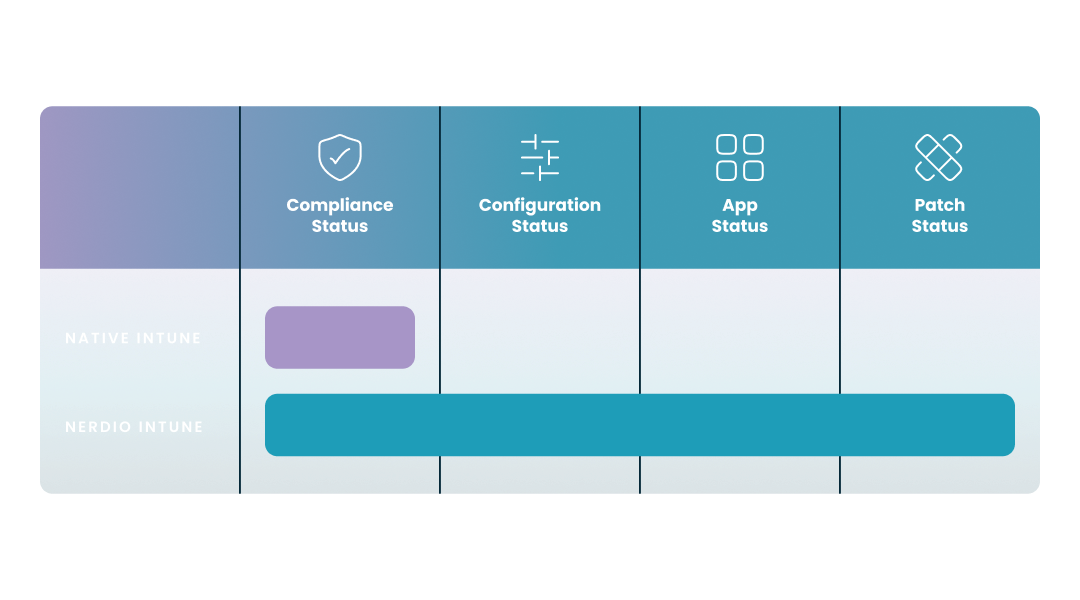
Bar chart comparing endpoint visibility. Native Intune bar covers 1 pillar (Compliance Status). The Nerdio bar covers 4 pillars: Compliance, Config, App, and Patch Status.

NERDIO GUIDE

Native Intune reporting vs. Nerdio Intune reporting

Carisa Stringer | February 19, 2026

Introduction

Native Microsoft Intune reporting is the industry standard for cloud-based device management, but it is often built with a focus on compliance rather than comprehensive operational visibility. While it effectively tells you if a device is "safe" to access your network, it may leave you "flying blind" when it comes to the granular details of application health, configuration drift, and third-party patching.

This guide provides a neutral, technical comparison of native Intune reporting capabilities against the extended visibility offered by Nerdio Manager for Enterprise. By understanding the "1 vs. 4" visibility model, IT professionals can better align their reporting strategy with the complex demands of modern enterprise environments.

What are the main limitations of native Microsoft Intune reporting for large enterprises?

Native reporting provides a high-level overview of your environment, but it often lacks the "glass box" transparency required for rapid troubleshooting. In a large-scale environment, these gaps can lead to increased help desk tickets and delayed incident response.

  • Delayed Data Sync (96-Hour Latency): For many Intune and co-managed devices, reporting data is processed in cycles that can lead to an end-to-end latency of up to 96 hours before it reflects in the admin center.
  • The "Success/Failure" Binary: Native reports often provide a simple status of "Failure" for scripts or app deployments without exposing the specific exit codes or step-by-step logs needed to diagnose the root cause.
  • Limited Data Retention: While audit logs are kept for two years, many operational and compliance reports are subject to shorter 30-to-180-day retention windows, which can complicate long-term trend analysis or annual audits.
  • Fragmented Management Portals: Monitoring often requires navigating between the Intune admin center, Azure Monitor, and potentially custom KQL queries in Log Analytics, creating a disjointed experience for administrators.

Why is Intune compliance status only one part of total endpoint visibility?

Compliance reporting in Intune is designed to answer a specific security question: Does this device meet the minimum requirements to access corporate data? While this is essential for Zero Trust, it does not provide a complete picture of the device's operational health.

The chart below illustrates the "Visibility Gap" between a security-only focus and a comprehensive management strategy.
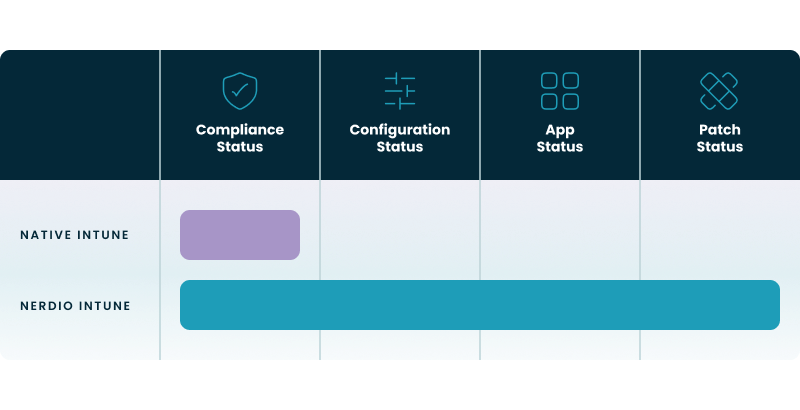
 Bar chart comparing endpoint visibility. Native Intune bar covers 1 pillar (Compliance Status). The Nerdio bar covers 4 pillars: Compliance, Config, App, and Patch Status.

Key Takeaways from the 1 vs 4 comparison:

  • Compliance Status (The Foundation): Both native and unified tools track security health to satisfy Conditional Access policies.
  • Beyond the Green Light: Relying only on the "Compliance" bar can lead to "green dashboards" that hide underlying performance bottlenecks.
  • Operational Excellence: Moving across the full axis—through Config, App, and Patch status—allows IT teams to prevent user downtime by catching configuration drift and application failures before they trigger a compliance violation. By expanding visibility into configuration, applications, and third-party patches, organizations can move beyond basic compliance toward a more comprehensive and proactive endpoint management strategy.
Visibility Pillar Native Microsoft Intune Nerdio Manager for Enterprise Operational Impact
1. Compliance Status Standard: Reports on security baselines and conditional access. Enhanced: Includes native data plus historical compliance auditing. Ensures the device is "safe" to connect to the network.
2. Config Status Limited: Focuses on policy push success/failure. Full: Tracks configuration drift and global baseline alignment. Identifies when local settings deviate from corporate standards.
3. App Status Basic: Reports success or failure of application installs. Deep: Provides granular, step-by-step installation logs. Shortens time-to-resolution for silent app deployment failures.
4. Patch Status OS-Centric: Primary focus on Windows and Office updates. Unified: Tracks Windows, Office, and third-party application patches. Eliminates security blind spots in common third-party software.

How does Nerdio provide a unified reporting view for both physical and virtual devices?

Nerdio Manager for Enterprise functions as an orchestration layer that sits on top of Intune, centralizing data from various sources into a single, actionable dashboard. By consolidating data across the Microsoft 365 ecosystem, including identity signals from Entra ID and threat data from Defender for Endpoint, a unified management layer can deliver more comprehensive operational insights than a standalone security view. This approach is also particularly valuable for organizations running "mixed fleets" of physical laptops and virtual desktops (AVD/Windows 365).

  • Single Pane of Glass: Rather than switching consoles, you can monitor the health of your physical Intune-managed devices alongside your Azure Virtual Desktop (AVD) and Windows 365 Cloud PCs.
  • Cross-Tenant Reporting: For service providers or large enterprises with multiple tenants, a unified management layer allows for aggregated reporting, making it easier to spot global trends.
  • Historical Log Aggregation: Nerdio can store and surface granular logs—such as specific PowerShell script execution details—that are often difficult to retrieve from the native Intune portal.

Table: visibility comparison

Native Microsoft Intune Nerdio + Intune
Compliance Status Native Focus (Excellent) Native + Extended Auditing
Config Status Basic (Policy Push) Advanced (Drift Detection)
App Status Simple (Success/Fail) Detailed (Step-by-Step Logs)
Patch Status OS-Centric (Windows/Office) OS + 3rd Party Application
Data Latency High (Up to 96 hours) Real-time Dashboard Widgets

What are the 4 pillars of comprehensive endpoint analytics in Nerdio?

To achieve true operational excellence, IT teams must move beyond a single-pillar (Compliance) view by leveraging a more comprehensive Microsoft endpoint manager strategy. Nerdio structures its reporting around four distinct pillars to ensure no aspect of the endpoint experience is left unmonitored.

  1. Compliance Status: Leverages native Intune data to ensure the device satisfies security baselines for Conditional Access. Beyond reporting, Nerdio empowers IT teams by streamlining security policy enforcement, ensuring that automated workflows keep every endpoint aligned with corporate and regulatory standards.
  2. Config Status (Drift Detection): Tracks whether a device has moved away from its intended configuration, helping identify "policy drift" even if the device remains "compliant." While standard mobile device management solutions often focus on simple policy push success, Nerdio tracks configuration drift to identify when local settings deviate from corporate standards.
  3. App Status (Lifecycle Visibility): Provides deep visibility into application deployment; instead of just seeing an app "failed," you see exactly which installation step failed.
  4. Patch Status (Vulnerability Management): Adds visibility into the patching status of critical third-party apps like Chrome, Adobe, and Zoom alongside standard Windows updates.

How can IT teams improve their Intune script reporting and troubleshooting?

Troubleshooting PowerShell scripts in Intune is notoriously difficult because errors often occur silently on the client side. Improving this requires moving from a "fire-and-forget" model to an orchestrated model that provides real-time feedback. By providing deep visibility into execution logs and exit codes, Nerdio enhances the power of automated Intune scripts, ensuring that custom configurations are deployed reliably across the entire fleet. For example, Penn State University utilized Nerdio's robust PowerShell scripting capabilities and reporting dashboards to automate monotonous tasks, drastically reducing the time spent on manual configuration.

  • "Glass Box" Visibility: Orchestration tools provide a "glass box" view of script execution, allowing you to see progress in real-time rather than waiting for the next Intune sync cycle.
  • Custom Exit Code Mapping: By standardizing exit codes in your scripts, you can trigger automated remediation. For example, a specific failure code can automatically prompt a re-run.
  • Step-by-Step Sequencing: Using an orchestrator allows you to sequence scripts (e.g., "Install App A only after Script B confirms the prerequisite exists"), providing a clear audit trail.

Table: technical troubleshooting and actionability

  Native Intune Reporting Nerdio Extended Management
Reporting Latency Typically 24–96 hours for full sync across all dashboards. Near real-time visibility through unified dashboard widgets.
Script Troubleshooting Basic "Fail" status; logs often require manual retrieval from device. "Glass Box" visibility with step-by-step PowerShell execution logs.
Data Retention Standard 30–90 days for most operational reports. Extended retention (180+ days) for historical auditing and compliance.
Direct Intervention Remote actions (Restart, Reset) via Intune portal. Integrated Console Connect for direct, secure troubleshooting.

How does Nerdio help with Intune reporting and management at scale?

Nerdio Manager for Enterprise does not replace Intune; it enhances it by providing the automation and visibility that IT professionals need to manage thousands of endpoints efficiently. It bridges the gaps between security, operations, and user experience.

  • Unified Dashboarding: Nerdio consolidates the "1 vs. 4" visibility model into a single view, allowing you to see Compliance, Config, App, and Patch status across your entire fleet.
  • Operational Automation: Beyond just reporting, Nerdio allows you to act on data. If an "App Status" failure occurs, you can use Console Connect to troubleshoot the device directly.
  • Simplified Remediation: When a reporting pillar shows a "Red" status, Nerdio’s scripted sequences help you fix the issue across your estate without manual intervention.

Table: feature comparison of native Intune vs. Nerdio-enhanced management

Native Microsoft Intune Nerdio + Intune (Unified Layer) Operational Benefit
Scope of View Physical & Cloud PCs (Siloed) Physical, AVD, and W365 (Unified) Reduced management complexity and headcount.
Security Posture Microsoft Security Baselines CIS-Certified & NIST-aligned Baselines Guaranteed adherence to global security standards.
App Management Standard Intune App Lifecycle Automated 3rd Party Patching & Scripting Reduced vulnerability window for non-Microsoft apps.
Incident Response Log-based (Reactive) Log-based + Action-based (Proactive) Faster Mean Time to Recovery (MTTR).

Frequently asked questions


About the author

Photo of Carisa Stinger

Carisa Stringer

Head of Product Marketing

Carisa Stringer is the Head of Product Marketing at Nerdio, where she leads the strategy and execution of go-to-market plans for the company’s enterprise and managed service provider solutions. She joined Nerdio in 2025, bringing 20+ years of experience in end user computing, desktops-as-a-service, and Microsoft technologies. Prior to her current role, Carisa held key product marketing positions at Citrix and Anthology, where she contributed to innovative go-to-market initiatives. Her career reflects a strong track record in driving growth and adoption in the enterprise technology sector. Carisa holds a Bachelor of Science in Industrial Engineering from the Georgia Institute of Technology.

Ready to get started?