GUIDE
Planning guide: migrating from Omnissa Horizon to Azure Virtual Desktop with Nerdio Manager
Key differences and factors to consider before making the move

Beyond a conference — NerdioCon 2026: Learning, networking & unforgettable moments.
Save your spotGUIDE
Key differences and factors to consider before making the move

Omnissa Horizon, previously VMware Horizon or the app and desktop virtualization component of VMware Workspace ONE, has long been recognized as a leader in the desktop as a service (DaaS) and virtual client computing market by industry analyst firms.
While it was historically considered status quo to replace the fundamental components of Microsoft’s remote desktop technology components with solutions from Omnissa Horizon, those historical assumptions are no longer holding true. In more recent years, Microsoft’s Azure Virtual Desktop (AVD) technology, including the AVD aspects that act as the foundation for Windows 365, have evolved quickly, and Microsoft has emerged as a compelling option for organizations seeking greater flexibility, scalability, and integration in the modern cloud era.
The EUC market is starting to see a shift away from legacy VDI vendors, such as Omnissa Horizon, with a movement towards native Azure Virtual Desktop capabilities alongside IT management tools like Nerdio Manager. That joint combination of Microsoft and Nerdio helps organizations optimize their Azure consumption, streamline the day-to-day operations of desktop image management, and simplify access to real-time analytics that ensure environments are delivering an optimal user and IT admin experience.
While the migration process away from a legacy VDI vendor like Omnissa Horizon to Azure Virtual Desktop with Nerdio Manager can be a difficult decision, the long-term benefits commonly associated with licensing cost savings, simplified infrastructure management, and technology integration across the Microsoft stack outweigh the short-term migration investment.
This guide can help IT decision makers assess the level of effort associated with the migration stages, key considerations as it relates to each stage of the migration process, and how to evaluate and assess the business and technology benefits of moving from Omnissa Horizon to Azure Virtual Desktop with Nerdio Manager.
Any successful migration from Omnissa Horizon to Azure Virtual Desktop with Nerdio Manager should begin with a clear business case, not just a technical plan. Most organizations have internal expertise in VMware and Omnissa technology that is long established and software agreements that can run the course of multiple years. That’s why it is important for organizations to act now and understand the business case for the migration, ensuring that key stakeholders are aligned on why the move matters, what a successful migration looks like, and how the value of the migration will be measured. This can be broken down into multiple categories, such as:
Cost reduction: Many organizations are looking to make the move to AVD with Nerdio Manager based on the potential cost savings. To assess those savings, organizations will want to have a good understanding of their current Omnissa Horizon environment costs as they relate to infrastructure, Omnissa licensing, Microsoft licensing, endpoint devices, user training, and IT administration costs as they relate to the migration as well as day-to-day operations.
Today, organizations are likely paying for native Azure Virtual Desktop capabilities, then paying again to replace those AVD components with Ominssa components (ex. AVD Broker vs. Horizon Broker). There are also Microsoft licensing benefits in Azure, such as Windows 11 Enterprise multi-session, that no longer require the RDS CAL/SAL license.
Existing Nerdio Manager and Azure Virtual Desktop customers have reported the following cost savings compared to Omnissa Horizon-style environments: Moving an organization from VMware Horizon-style environments to AVD with Nerdio optimization reduces costs from roughly $66 to about $15 per month per user.
Operational efficiency: Although existing expertise in Omnissa Horizon and vSphere technology within your organization maybe very prevalent today, making the move to Azure Virtual Desktop with Nerdio Manager applies the same basic principles, and moving to AVD with Nerdio Manager has proven to simplify and streamline ongoing operations. To establish the operational efficiency benefits of the migration, quantify how automation and simplified management workflows reduce IT effort and support costs.
Once the learning curve of Nerdio Manager and Azure Virtual Desktop is conquered, organizations have reported the following operational efficiency savings: Noah Estes, Operating System Network Analyst at Oregon State University’s (OSU) College of Business, saw an operational efficiency improvement of 40% when moving from Omnissa Horizon to Nerdio Manager and Azure Virtual Desktop.
Risk reduction: Cloud desktops have become a cornerstone of many organizations’ security strategies, and while the cost of a security breach is something no organization wants to face, proactive measures ensure the right level of security and compliance are a key element of any cloud desktop solution. When making the decision to migrate to a new technology, your organization requires assurance that the same or better security standards are in place.
While Omnissa Horizon is a SaaS platform that requires its own security and compliance certifications, Azure Virtual Desktop is a native Azure service that inherits the security benefits of Azure. Nerdio Manager is installed within your organization’s Azure subscription, thereby inheriting the same security controls as your Azure tenant.
Scalability & agility: The business benefits of cloud computing are plentiful and commonly one of the biggest drivers in the decision to migrate. Whether it’s making the move from a capital expense to an operating expense, scaling resources on demand based on business need, or the enhanced global availability of resources as your organization drives growth, the ability to scale your AVD and Nerdio Manager instances in the cloud is likely a top business driver.
During the COVID-19 pandemic, higher education needed to quickly pivot and scale IT environments for remote students and instructors. Even under rapidly changing circumstances brought on by the pandemic, Velocity was able to use Nerdio Manager for Enterprise and the Microsoft stack of technologies to deploy a proof-of-concept within twenty-four hours for a complete replatforming of Bsix Brooke House College’s core systems from an on-premises architecture to a cloud-based architecture.
Executive alignment: Executive leadership constantly balances competing project priorities, but an unexpected subscription or licensing price increase in an existing solution can abruptly adjust priorities under increased pricing pressures. It is important that organizations know their renewal dates as well as potential pricing or licensing changes for any upcoming Omnissa Horizon subscription and/or VMware vSphere subscriptions well in advance of their renewal dates to ensure they can adequately plan for a migration.
TechRadar.com recently reported, “Broadcom has allegedly increased VMware licensing costs by 8-15 times for many customers after eliminating perpetual and pay-as-you-go licenses, replacing them with bundled subscriptions that require a three-year minimum contract.”
To assess the business value of the migration, it is important to have an understanding of some key metrics before you begin. Here are some key metrics to capture before and after your migration process to demonstrate the business value of the migration project:
Business value bucket | Key metrics to measure | Before vs. after comparison | Business impact/outcome |
|---|---|---|---|
Cost reduction |
|
|
|
Operational efficiency |
|
|
|
Risk reduction |
| Primarily focus on tool comparison and ease/confidence in usage:
|
|
Scalability & agility |
|
|
|
Executive prioritization & sponsorship |
|
|
|
There are a variety of ways to deploy Omnissa Horizon across on-premises and cloud infrastructure with varying degrees of configurations based the type of desktop or application (Windows or Linux), physical or virtual, or infrastructure location (Horizon 8 on supported cloud platforms, including VMware Cloud on AWS, Azure VMware Solution, Google Cloud VMware Engine, Oracle Cloud VMware Solution, and Alibaba Cloud VMware Service). This image is simply to serve as a frame of reference based on a common deployment scenario.
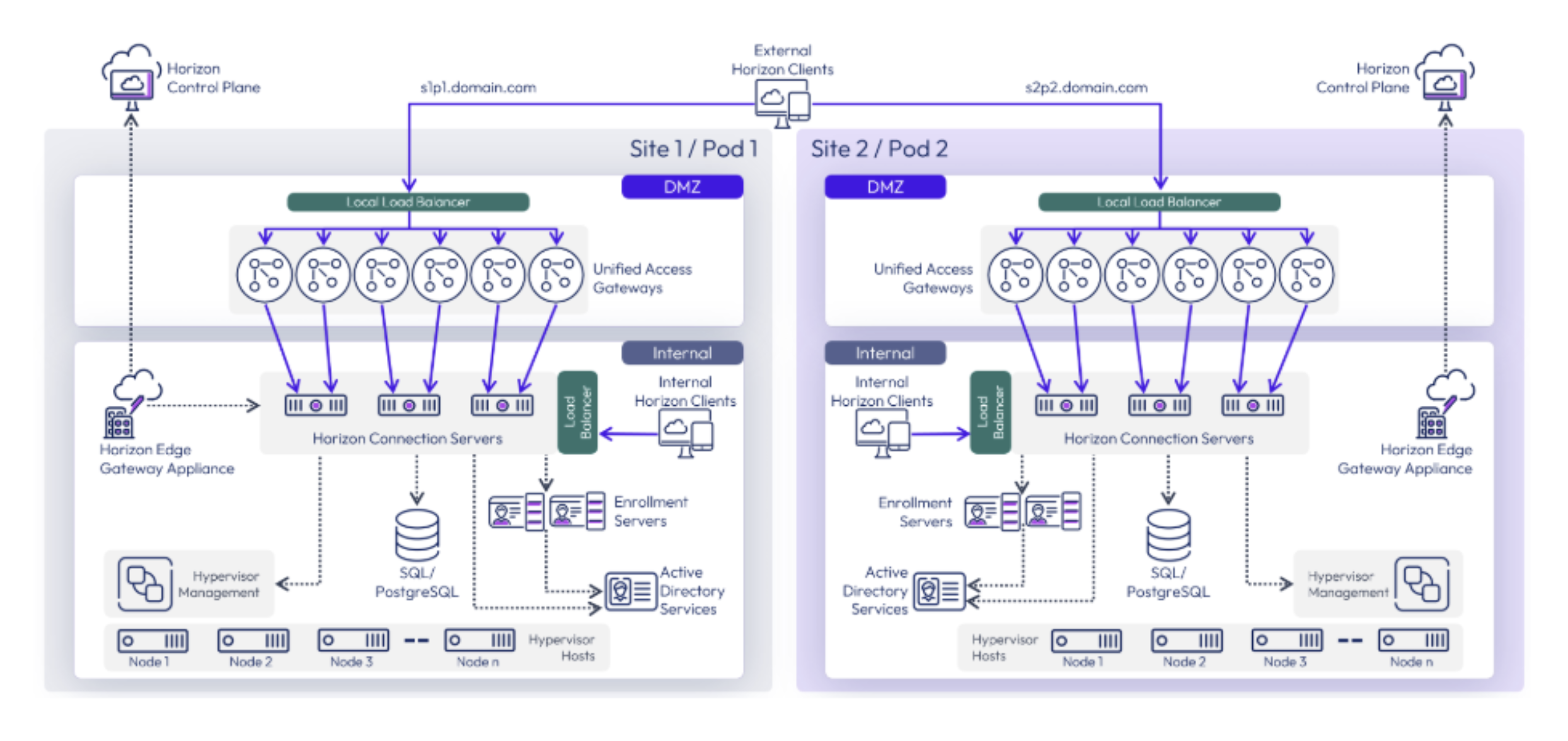
Azure Virtual Desktop is supported with both on-premises infrastructure (Azure Local) and cloud infrastructure (Azure) today. Microsoft has announced that they will be expanding the on-premises deployment options with Azure Virtual Desktop to include a broader range of environments, including vSphere. Support for vSphere with Azure Virtual Desktop will simplify the migration process once available. Nerdio Manager for Enterprise is a key addition to any deployment model—it helps to simplify desktop image management workflows across Azure and hybrid environments, optimize infrastructure utilization, accelerate cloud deployment, and reduce costs from an easy-touse centralized platform. The most common deployment models for AVD with Nerdio Manager are:
The following figure represents the most common deployment model, where Azure Virtual Desktop with Nerdio Manager is a cloud-only deployment. Additional resources regarding on-premises options follow a similar architecture; they simply act as an extension of the desktop subnet. For the purposes of this guide, the migration will focus on a cloud-only deployment, as this type of migration encompasses the full transition of an Omnissa Horizon with vSphere on-premises apps and desktops environment to a fully cloud-hosted Azure Virtual Desktop with Nerdio Manager deployment.
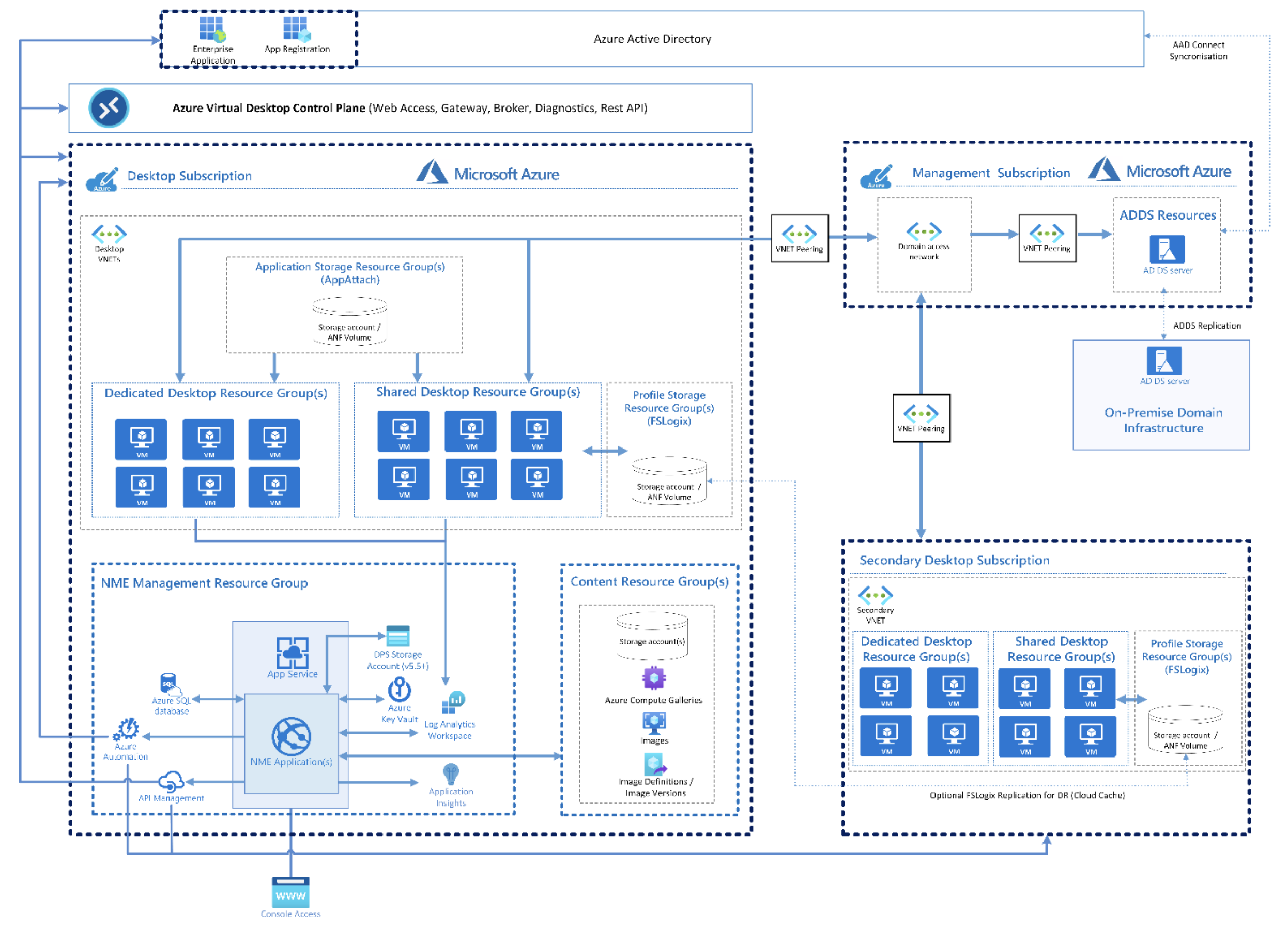
Many of the native Omnissa Horizon components are a replacement for native Azure Virtual Desktop components. It is important to note that part of the cost of the Omnissa Horizon license is for the build and support of those duplicative components. Although you may opt for Omnissa Horizon components today over the native Azure Virtual Desktop components, the way the Microsoft remote access licensing is structured means you are still paying for those AVD components today, although your organization may opt not to use them. Here are some of the key component comparisons:
Omnissa Horizon has gone through some recent licensing changes, so it’s important to understand the old and new options. Today, Omnissa offers Horizon SaaS editions (where the Horizon management plane is hosted in the cloud) and Horizon Term editions (where there is a timed license for an on-premises deployment with no cloud access).
Azure Virtual Desktop licensing is more straightforward, as most Microsoft 365 licenses and Windows 11 licenses are eligible to access Windows 11 with Azure Virtual Desktop if you have the proper per user license. Please note that only applies to the Azure Virtual Desktop access entitlement. Azure infrastructure usage, including virtual machines, storage, and networking components, etc. are charged separately. The charge for the physical servers is also a separate charge if leveraging vSphere.
A key element of Azure Virtual Desktop that is helpful to note is Windows 11 Enterprise multisession capabilities. With Azure Virtual Desktop, your Windows 11 Enterprise licenses support multi-session capabilities in Azure and on Azure Local. This is another cost savings benefit, as it alleviates the cost of the RDS CAL or SAL.
The Nerdio Manager for Enterprise licensing model is equally simple in comparison. Available in a Core or Premium edition, customers get all the AVD image management, cost optimizations, security controls, and real-time insights that simplify the migration and management of Azure Virtual Desktop with billing based on the number of monthly active AVD users.
All Omnissa Horizon editions are available as a named user or a per concurrent connection. A key factor to consider in your migration plans is the use of vSphere in your deployment. Most editions of Horizon include VMware vSphere Foundation (VVF) for VDI, which entitles organizations to vSphere (ESXi), vCenter Server, and vSAN for VDI workloads as part of their Omnissa Horizon subscription. When migrating away from Omnissa Horizon, it is key that your organization accounts for the following options as your entitlement to VMware vSphere Foundation (VVF) for VDI is no longer applicable:
Azure Virtual Desktop uses the Remote Desktop Protocol (RDP) as its core display and transport protocol. Historically, legacy VDI vendors, such as VMware (now Omnissa), would build their own protocols to replace the native RDP protocol. VMware has had a few different versions of their protocol over the years, but today, the Omnissa Horizon protocol is known as Blast Extreme.
In recent years, Microsoft has invested heavily in RDP to modernize it for cloud and enterprise use. While there were years when the hot topic was the performance difference in the various legacy VDI vendors’ protocols compared to RDP, today the differences are becoming less prevalent. At its core, RDP is built natively into Windows and continuously updated by Microsoft. It supports adaptive graphics, UDP-based transport, multimedia redirection, Microsoft Teams optimization, and it has tight integration with Entra ID.
Given that RDP is developed by Microsoft for remote access to Microsoft desktops and applications, it benefits from a broad range of Microsoft applications and device compatibility with deep integration into the Windows OS and Microsoft security stack.
Omnissa Horizon works with a variety of protocols, with Blast Extreme being the most common. Blast Extreme is optimized for high-performance graphics and multimedia in virtual desktop environments. It is highly tunable and can deliver excellent user experience over challenge networks, but it introduces an additional protocol layer that must be configured, tuned, secured, monitored, and updated to ensure the best user experience.
This can add an additional layer of operational overhead and potential security concerns when compared to the native Windows RDP protocol that is designed for Microsoft operating systems and cloud environments.
Image management, sometimes called lifecycle management or desktop orchestration, is the process of creating, maintaining, and updating the AVD host VM image that serves as the golden virtual machine from which you build out your AVD host pool (or desktop pool in Omnissa Horizon). This is where the bulk of the day-to-day management and operations come into play, as admins must apply operating systems patches, install/patch/remove applications, configure settings, and test changes before deploying the image to the users.
This is also one of the key elements of a cloud desktop or virtual desktop architecture that makes it such a good solution for highly regulated industries that strive for a high level of security and compliance standards. The effective image management of a virtual app and desktop environment can help ensure consistency, enhance your overall security posture, and increase user access reliability while reducing operational efforts and risks.
In Omnissa Horizon, the image management process can sometimes be considered a manual, infrastructure-centric process. Admins must create and maintain their golden images directly in vSphere managed through vCenter, then use features like instant clones to push changes to the desktop pools. While powerful, the coordination from vCenter to the Horizon components, storage, and networking can be time-consuming, especially at scale.
With Nerdio Manager, the image creation and management process in Azure Virtual Desktop is automation-first. The Nerdio Manager platform provides an easy-to-use UI that simplifies the process of creating a standardized golden image, utilizing automatic OS and application updates, validating images, and rolling them out to AVD host pools with minimum disruption. Nerdio Manager offers image versioning, rollback, and scheduling within the image management workflow, significantly reducing the manual effort and operational risk. Enterprise Strategy Group (ESG) found the IT hours needed to manage AVD were cut by approximately 50% with Nerdio Manager. The following key differences in image management and provisioning are worth noting:
While the long-term benefits of moving from Omnissa Horizon to Azure Virtual Desktop with Nerdio Manager are compelling, most organizations want to validate a few practical considerations early in the planning process. The following concerns are common and should be accounted for as part of a successful migration strategy:
End-user experience and performance: Confirm that session responsiveness, multimedia redirection, and collaboration workloads (such as Microsoft Teams) deliver the expected experience across your typical user network conditions.
Application compatibility and delivery approach: Validate how line-of-business applications behave in AVD, including dependency mapping, packaging requirements, and whether apps are best delivered as full desktops, RemoteApp, or via alternative methods.
User profiles and personalization: Ensure profile persistence and consistency across sessions, including performance implications of profile containers, storage configuration, and any existing profile management tooling.
Operational readiness and administrator workflows: Plan for the learning curve associated with new AVD constructs (host pools, application groups, scaling) and how Nerdio Manager can streamline day-to-day operations through centralized management and automation.
Security, identity, and compliance alignment: Review authentication flows, conditional access policies, logging, and administrative controls to ensure your future-state environment meets or exceeds current standards.
Licensing and infrastructure dependencies: Account for Horizon licensing changes, renewal timelines, and any bundled vSphere entitlements that may affect your on premises strategy or timing for moving workloads to Azure.
Migration disruption and rollout approach: Reduce risk by piloting with representative users, validating assumptions early, and using a phased cutover plan rather than attempting a large-scale migration all at once.
Don’t wait until your Omnissa Horizon renewal date. Use the technical data points and business value in this planning guide to outline the risks of staying on Omnissa Horizon to your executive leadership today, and start developing a plan to move from Omnissa Horizon to Azure Virtual Desktop with Nerdio Manager sooner than later. Here at Nerdio, we hear from so many of our customers that they didn’t think they would be impacted by all the licensing and pricing changes, and then we are rushing to do anything we can to help them before their renewal date.
Building a plan early helps put you in control! Your Horizon and vSphere knowledge is easily transferrable to Azure Virtual Desktop and Nerdio Manager. The Nerdio team will help you rapidly deploy and build a proof of value environment for your team.
The Nerdio team is here to help you through the process! Share your current Omnissa Horizon deployment details, and we will help you get started! Visit getnerdio.com today to schedule your personalized call.