NERDIO GUIDE
Customer story
Beyond a conference — NerdioCon 2026: Learning, networking & unforgettable moments.
Save your spotNERDIO GUIDE
Carisa Stringer | January 16, 2026
Cross-tenant AVD and Intune analytics is the unified monitoring and reporting of Azure Virtual Desktop performance and Microsoft Intune device health across multiple Entra ID tenants. For enterprise IT teams, this visibility is essential for managing security and user experience at scale.
Without a consolidated view, managing session host health and device compliance across business units becomes fragmented, leading to operational inefficiencies and increased security risks. Centralized analytics allow you to maintain a consistent posture while optimizing costs and performance globally.
Managing a single Azure tenant is straightforward, but enterprise environments often span multiple business units, geographic regions, or subsidiaries. In these scenarios, having a "single pane of glass" isn't just a convenience—it's a requirement for governance and rapid troubleshooting.
Imagine a global organization where one division is running outdated AVD session hosts while another has misconfigured Intune policies. Without cross-tenant analytics, your IT team might spend hours manually switching between portals just to identify a common connectivity issue. Statistics show that centralized visibility can reduce the mean time to resolution (MTTR) by up to 30% in multi-tenant environments by surfacing global trends that remain invisible in isolated views.
When evaluating endpoint health, many organizations rely solely on Microsoft Intune’s "Compliance Status." However, compliance is a binary indicator: a device either meets your specific policy rules or it doesn't. While useful, this metric often obscures the deeper technical realities of your environment.
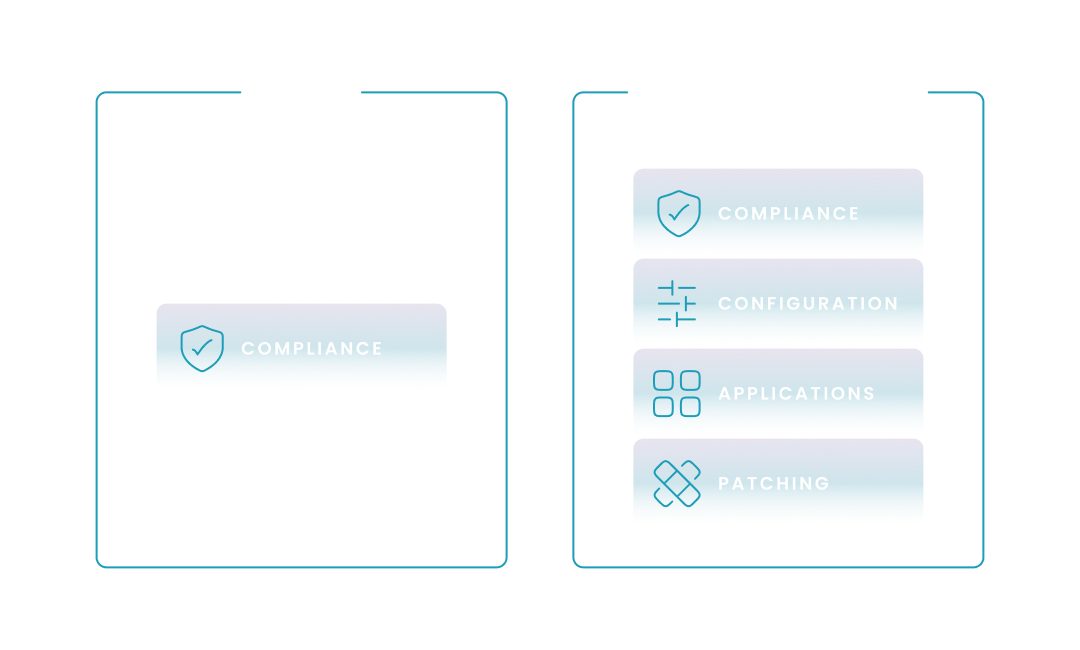
Relying only on compliance is like checking if a car is "legal to drive" (it has brakes and lights) without checking its fuel level, engine health, or tire pressure. A device can be "Compliant" in Intune while still missing critical application updates or having a drifted configuration that impacts user productivity. To bridge this gap, enterprises are moving toward a 4-pillar visibility model that offers a more granular view of both virtual (AVD) and physical endpoints.
To help you visualize the limitations of traditional reporting, the following table compares native Intune monitoring against the broader visibility model required for cross-tenant enterprise environments. In the following section, we will describe the 4 pillars of comprehensive cross-tenant endpoint analytics—Compliance, Configuration, Application, and Patch status—and how they work together to ensure true operational excellence.
| Visibility Pillar | Native Microsoft Intune Focus | Comprehensive Analytics (Nerdio Model) | Operational Impact |
|---|---|---|---|
| Compliance Status | ✅ | ✅ | Confirms if devices meet basic security rules. |
| Configuration Status | ❌ | ✅ | Detects "drift" from established global baselines. |
| Application Status | ❌ | ✅ | Verifies software installation health across all tenants. |
| Patch Status | ❌ | ✅ | Tracks WUfB deployment and vulnerability gaps in real-time. |
To achieve true operational excellence, your analytics must move beyond simple "green checkmarks." You need to understand exactly where a device stands in its lifecycle and how its configuration deviates from your global standards.
By tracking these four specific pillars across every tenant, you can proactively identify issues before they trigger a support ticket. For example, knowing that a specific application failed to update on 15% of your AVD hosts across three different tenants allows you to fix the root cause—the installer—rather than chasing individual "non-compliant" alerts.
| Focus Area | Why it Matters | |
|---|---|---|
| Compliance Status | Security Policies | Ensures devices meet encryption, OS version, and MFA requirements. |
| Configuration Status | Desired State | Detects "configuration drift" where settings have changed since original deployment. |
| Application Status | Software Health | Verifies that critical line-of-business apps are installed and functioning correctly. |
| Patch Status | Vulnerability Management | Tracks the deployment of security updates (WUfB) across all virtual and physical devices. |
Centralize Windows Update for Business (WUfB) reports to identify which tenants are vulnerable to zero-day exploits.
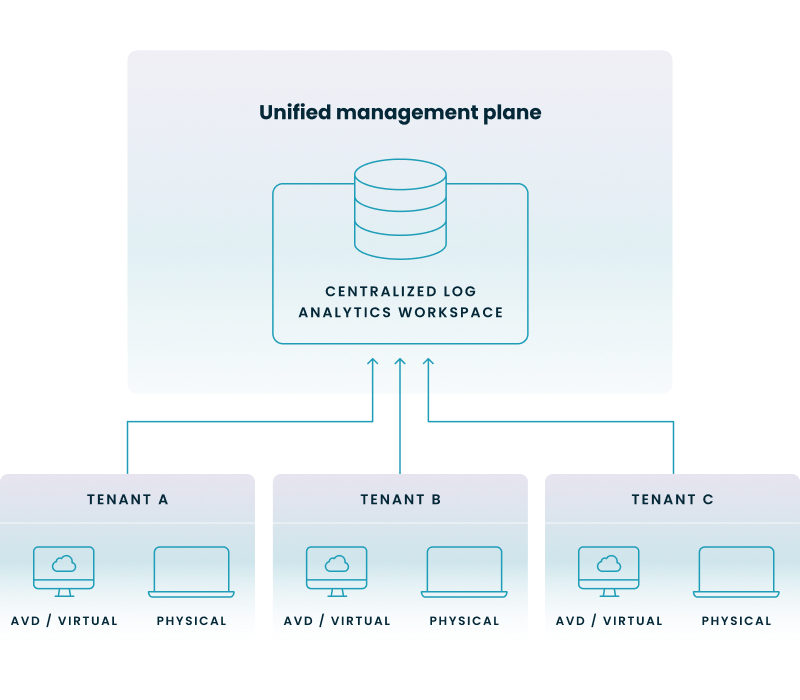
Setting up cross-tenant analytics requires a robust data architecture, typically following a "hub-and-spoke" model. This involves directing logs from multiple "spoke" tenants into a single "hub" Log Analytics Workspace (LAW) where the data can be queried and visualized.
To visualize this architecture, consider the flow of telemetry from disparate business units into a single point of truth. The following diagram illustrates how virtual and physical endpoint data from multiple Entra ID tenants are aggregated through a unified management plane into a centralized workspace.
To do this successfully, you must navigate the complexities of Entra ID permissions and data residency. Many organizations leverage Azure Monitor Workbooks to create interactive reports that can toggle between different subscriptions and tenants. However, the manual effort to maintain these queries as your environment scales can be significant.
To help you navigate the technical transition from fragmented native reporting to a consolidated model, the following table contrasts the manual architectural requirements of native tools with the automated, multi-tenant framework provided by Nerdio.
| Manual Hub-and-Spoke (Native) | Nerdio Management Layer | |
|---|---|---|
| Tenant Connection | Manual Log Analytics Workspace peering. | Automated cross-tenant "Identity Fabric" linking. |
| Query Logic | Custom KQL union operators required for every report. | Pre-built, multi-tenant dashboards out of the box. |
| Authentication | Manual B2B guest account or Lighthouse delegation. | Standardized trust settings and service principal automation. |
| Remediation | Per-tenant manual script execution. | Global Scripted Actions pushed to all tenants at once. |
Nerdio provides a unified management layer that eliminates the friction of managing disparate tenants. By integrating deeply with both AVD and Intune, it automates the collection of telemetry and presents it through an intuitive interface designed for technical and business professionals alike.
Nerdio Manager for Enterprise is specifically built to handle the complexities of multi-tenant environments. It doesn't just show you that a problem exists; it provides the tools to remediate it across your entire estate with a few clicks. For instance, if your analytics surface a patching gap (the 4th pillar), you can use Nerdio's "Scripted Actions" to force an update across all session hosts, regardless of which tenant they reside in.
Entra ID Registered and Joined devices cannot be migrated directly between tenants; they must be unenrolled from the source tenant and re-enrolled into the target tenant. This typically requires a device reset or a "fresh start" to ensure that identity tokens and management certificates are correctly issued by the new directory.
Azure AD External Identities (now part of Microsoft Entra) is a set of capabilities that allow organizations to securely interact with users outside their primary directory, including partners (B2B) and customers (B2C). It enables seamless collaboration by allowing external users to sign in with their own identities while administrators maintain control over resource access through Conditional Access policies.
Cross-tenant synchronization is a feature in Microsoft Entra ID that automates the creation, updating, and deletion of B2B collaboration users across different tenants within the same organization. It eliminates the need for manual invitations, ensuring that employees can access shared applications and resources across business units with a single set of credentials.
A prominent 2025-2026 attack vector involves threat actors exploiting complex email routing and misconfigured "Direct Send" spoofing protections to deliver sophisticated phishing campaigns via platforms like Tycoon2FA. Additionally, security researchers have identified critical remote code execution vulnerabilities in services like WSUS (CVE-2025-59287) that attackers use as a pivot point to gain SYSTEM-level access and move laterally into Azure-connected environments.
To monitor cross-tenant AVD deployments, you should configure Intune Diagnostic Settings in each tenant to route logs—including operational and device compliance data—to a centralized Azure Log Analytics workspace. Once the data is aggregated in a "hub" workspace, you can use Azure Monitor Workbooks or Power BI to visualize the health and status of virtual desktops across your entire organization.
Cross-tenant analytics improve management by providing a "single pane of glass" view into the four critical pillars of endpoint health: compliance, configuration, application status, and patching. This centralized visibility allows IT teams to identify global performance trends and security gaps, enabling proactive remediation across multiple business units simultaneously.
You can monitor performance by leveraging Endpoint Analytics within Intune to track scores for startup performance, application reliability, and resource utilization across all managed tenants. By aggregating these metrics into a central dashboard, you can identify specific host pools or regions experiencing latency or hardware bottlenecks and apply automated optimizations globally.
Carisa Stringer
Head of Product Marketing
Carisa Stringer is the Head of Product Marketing at Nerdio, where she leads the strategy and execution of go-to-market plans for the company’s enterprise and managed service provider solutions. She joined Nerdio in 2025, bringing 20+ years of experience in end user computing, desktops-as-a-service, and Microsoft technologies. Prior to her current role, Carisa held key product marketing positions at Citrix and Anthology, where she contributed to innovative go-to-market initiatives. Her career reflects a strong track record in driving growth and adoption in the enterprise technology sector. Carisa holds a Bachelor of Science in Industrial Engineering from the Georgia Institute of Technology.