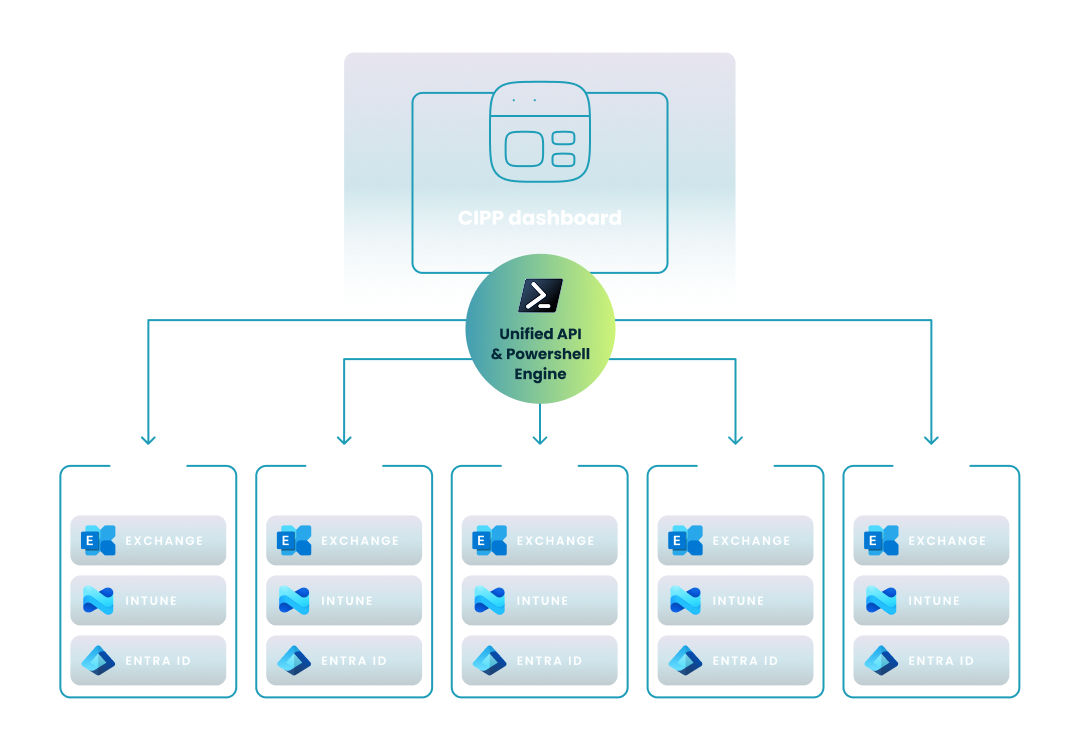
CyberDrain CIPP uses a unified API and a PowerShell engine to allow IT professionals to manage users, groups, and security standards across multiple client tenants from a single dashboard

Cyberdrain CIPP

This guide explores CyberDrain CIPP, an open-source tool for MSPs to streamline Microsoft 365 management, automate tasks, and ensure cross-tenant compliance.
Carisa Stringer | January 26, 2026

Introduction

CyberDrain CIPP (Conditional Integration & Provisioning Platform) is an open-source, multi-tenant management solution designed for Managed Service Providers (MSPs) to streamline Microsoft 365 administration. 

Created to resolve the inefficiencies of hopping between dozens of individual tenant portals, it provides a centralized dashboard to automate tasks, enforce security standards, and manage cross-tenant configurations. 

For IT professionals, CIPP bridges the gap between manual PowerShell scripting and expensive proprietary tools, allowing your team to scale operations while maintaining rigorous security compliance across your entire client base.

What is CyberDrain CIPP and why should IT teams use it?

Managing multiple Microsoft 365 environments often feels like a constant battle against "portal fatigue" and configuration drift. CyberDrain CIPP offers a way to regain control by unifying these disparate environments into a single, manageable interface.

What are the origins and core components of the CIPP project?

  • Founder and Community Focus: CIPP was created by Kelvin Tegelaar in 2021 to fill the functional gaps in existing multi-tenant tools like Microsoft 365 Lighthouse.
  • Architecture Stack: The platform is built using a React-based UI and a PowerShell-driven API, leveraging Azure Functions and Static Web Apps for a responsive, serverless experience.
  • Open-Source Philosophy: It is an open-source project hosted on GitHub, allowing for community transparency and rapid contributions from fellow MSP professionals.

How does CIPP solve the problem of Microsoft 365 "portal fatigue"?

  • Unified Dashboard: Instead of logging into separate Entra ID, Intune, and Exchange portals for every client, you can perform administrative tasks for all tenants from one console.
  • Administrative Efficiency: The tool is designed to save several hours per engineer each month by automating repetitive tasks and providing quick access to common IT functions.
  • Scalability: By centralizing management, you can onboard and support more clients without a proportional increase in technical headcount.

What are the primary features and capabilities of the CIPP dashboard?

The CIPP dashboard is more than just a viewer; it is a powerful action engine that allows you to execute changes across your entire portfolio simultaneously. These capabilities transform how you handle daily tickets and long-term security projects.

How does CIPP facilitate multi-tenant identity and user management?

  • Centralized User Actions: You can list users, reset passwords, manage licenses, and convert users to shared mailboxes across all connected tenants.
  • Standardized Offboarding: Use a simplified wizard to disable sign-in, remove licenses, hide users from address lists, and set Out-of-Office messages in one workflow.
  • Group Management: List and edit M365 groups, manage members, and apply group templates to ensure consistency.

What are CIPP Standards and how do they ensure tenant compliance?

  • Desired State Configuration: CIPP "Standards" act as a policy engine that checks for best practices, such as MFA enrollment and mailbox auditing, and can "Auto-Remediate" settings that fall out of compliance.
  • Baseline Deployment: You can build a "Gold Standard" policy set and deploy it to all tenants at once, ensuring that every client meets your security minimums.
  • Reporting and Alerts: The platform executes daily best practice analyses and generates reports on security scores, risky sign-ins, and license usage. Evaluating such features is a key part of selecting effective management tools for multi-tenant Microsoft 365 environments. For even greater oversight, integrating analytics for AVD and Intune across tenants helps correlate security and performance data. This data-driven approach supports the ability to standardize the deployment of M365 Business Premium, ensuring consistent policy application.

How is CyberDrain CIPP architected and what are the deployment requirements?

Understanding the technical underpinnings of CIPP is essential for IT professionals who need to maintain the platform's reliability. While it is highly flexible, it does require a specific Azure infrastructure to function correctly.

What Azure resources are required to run a self-hosted instance of CIPP?

  • Serverless Stack: A standard deployment requires Azure Static Web Apps for the frontend and Azure Functions for the API backend.
  • Storage and Security: You must configure Azure Key Vault for secret management and Cosmos DB or local storage tables for data persistence.
  • Cost Considerations: Self-hosting costs typically range from $10 to $30 per month in Azure consumption, though excessive "write" operations or large tenant counts can push this over $100.

What is the difference between self-hosted CIPP and the sponsored version?

  • Self-Hosted Model: You clone the code from GitHub and manage the Azure environment yourself, providing maximum customization but requiring internal engineering time for maintenance.
  • CIPP as a Service (Sponsored): For a $99 monthly sponsorship, the creators provide a hosted instance with automated updates, staging environments, and priority support.
  • Update Cycles: The hosted version ensures you are always on the latest release, whereas self-hosted instances require manual updates via GitHub forks.

How does CyberDrain CIPP manage security and GDAP transitions?

In the modern security landscape, managing permissions correctly is as important as the management tasks themselves. CIPP places a heavy emphasis on following Microsoft’s Zero Trust principles.

How does CIPP simplify the management of Granular Delegated Admin Privileges (GDAP)?

  • GDAP Migration Tools: CIPP includes wizards to help MSPs transition from legacy DAP (Delegated Admin Privileges) to the more secure GDAP model.
  • Permission Checks: The platform features a "Permissions Check" tool to verify that the CIPP service account has the necessary API scopes and role mappings across all client tenants.
  • Role Mapping: You can use the dashboard to map specific security groups to GDAP roles, ensuring your technicians have only the access they need for a specific task.

What security measures protect the CIPP platform itself?

  • Authentication: Access to the CIPP UI is secured via Entra ID (Azure AD), allowing you to enforce your own Conditional Access policies and MFA.
  • Scoped Permissions: The application uses specific Graph API permissions rather than "Global Admin" rights, adhering to the principle of least privilege.
  • Encryption: Sensitive credentials and API tokens are stored securely in Azure Key Vault to prevent exposure.

How does CIPP compare to Microsoft 365 Lighthouse and Cloud RMM tools?

Deciding on a management stack requires comparing community-driven projects with native Microsoft tools and comprehensive commercial platforms. Each serves a different segment of the MSP market.

How do CIPP, Microsoft 365 Lighthouse, and Cloud RMM platforms differ?

To choose the right management tool, you must weigh the benefits of a native Microsoft tool against the speed of community-driven automation and the comprehensive support of a commercial platform. The table below compares these three distinct approaches to multi-tenant management.

  Microsoft 365 Lighthouse CyberDrain CIPP Cloud RMM (e.g., Nerdio)
Primary Focus Native monitoring and basic security reporting Deep administration, scripting, and automation Full User-to-Device Lifecycle (Identity & Infrastructure)
Management Scope Limited: Primarily focused on reporting and read-only views Broad: Extensive user/group actions and custom scripting Comprehensive: Manages Users, Access, Intune Devices, Patching, and Azure Infrastructure
Endpoint Support Basic: Leverages native Intune views without deep remediation Variable: Application deployment via Chocolatey but limited remote support Advanced: Secure multi-tenant remote support (Console Connect) and policy troubleshooting
Maintenance & Security SaaS: Fully managed by Microsoft with no hosting required Self-Hosted: Requires your team to host, secure, and update the instance Turnkey: Vendor handles all patching, security fixes, and API updates
Support Model Vendor Included: Standard Microsoft support channels Community: Rely on Discord or GitHub; no formal SLA Enterprise-Grade: Dedicated 24/7 technical support and structured training
Cost Model "Free": Included with qualifying M365 subscriptions Consumption-Based: "Free" license but involves Azure costs and labor Predictable: Straightforward license fee per user or tenant

This functional horizon diagram illustrates the management "reach" of each tool across the five core pillars of a modern MSP portfolio.
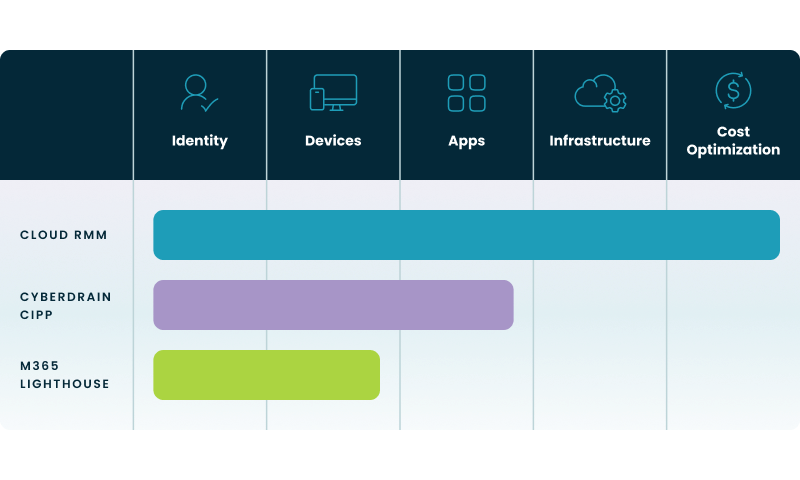

Cloud RMMs surpass Cyberdrain Cipp and M365 Lighthouse in management "reach" across the five core pillars of a modern MSP portfolio

  • Identity and Access Management: While all three solutions address the identity layer, community tools like CIPP and Cloud RMM platforms provide the "write" capabilities necessary for active administration that Lighthouse often lacks.
  • The Infrastructure Gap: This visual highlights that M365-focused tools are specialized for the user layer, whereas a Cloud RMM (Nerdio) extends management to the underlying Azure infrastructure and virtual desktop environments.
  • Cost Optimization as a Managed Service: Most traditional tools treat cost as a reporting metric; however, the diagram shows that a Cloud RMM approach treats cost optimization as an active, automated management pillar.
  • Application and Device Lifecycle: The breadth of coverage in the top two columns illustrates the transition from simple policy monitoring to full, multi-tenant application delivery.

How should you choose between a community tool and a Cloud RMM?

  • Resource Availability: Community tools like CIPP are ideal for MSPs with excess engineering capacity who want a low-cost entry point into automation.
  • Support and SLAs: A "Cloud RMM" approach (like that offered by commercial vendors) provides 24/7 technical support and guaranteed SLAs, which community forums cannot match.
  • Scope of Management: While CIPP excels at M365 policy, a Cloud RMM often extends management to endpoints, application patching, and Azure infrastructure in a single turnkey platform.

How does Nerdio help with multi-tenant Microsoft 365 management?

Nerdio Manager for MSP functions as a comprehensive Cloud RMM that extends your management capabilities beyond the identity-focused features of tools like CIPP. While community tools provide excellent scripting for M365 policy, Nerdio addresses the complex operational gaps that often lead to technician burnout.

  • Solving Operational Gaps in Intune: Nerdio doesn't just deploy policies; it helps you proactively detect and resolve Intune policy conflicts before they impact users. Furthermore, Nerdio extends this automation to help MSPs automate the lifecycle of multi-tenant AVD images, keeping virtual desktops secure and updated. Comparison of such advanced capabilities is essential when considering substitutes for M365 multi-tenant management tools.
  • Secure Remote Support: It includes Nerdio Console Connect, a built-in tool that allows your technicians to securely access any managed device (physical or virtual) without needing separate remote control software.
  • Infrastructure Optimization: While CIPP manages the M365 "User," Nerdio manages the entire Azure infrastructure, including auto-scaling for Virtual Desktops (AVD) and Windows 365 to keep costs low.
  • Long-Term Compliance: Nerdio retains historical Intune compliance and log data indefinitely, solving the native 30-day limit and ensuring you are always ready for an auditor's request.
  • Turnkey Maintenance: As a commercial platform, Nerdio handles all the "plumbing"—including API updates, security patches, and Microsoft "Day Zero" feature support—so your engineers can focus on billable client work.

Frequently asked questions


About the author

Photo of Carisa Stinger

Carisa Stringer

Head of Product Marketing

Carisa Stringer is the Head of Product Marketing at Nerdio, where she leads the strategy and execution of go-to-market plans for the company’s enterprise and managed service provider solutions. She joined Nerdio in 2025, bringing 20+ years of experience in end user computing, desktops-as-a-service, and Microsoft technologies. Prior to her current role, Carisa held key product marketing positions at Citrix and Anthology, where she contributed to innovative go-to-market initiatives. Her career reflects a strong track record in driving growth and adoption in the enterprise technology sector. Carisa holds a Bachelor of Science in Industrial Engineering from the Georgia Institute of Technology.

Ready to get started?