NERDIO GUIDE

How to migrate from Horizon virtual apps and desktops to Azure Virtual Desktop (AVD)

Carisa Stringer | October 27, 2025

Introduction

A Horizon to AVD migration is the process of moving your organization's virtual desktop and application workloads from the Omnissa platform to Microsoft's native DaaS solution in Azure. 

This transition is important for your enterprise to modernize your end-user computing strategy, reduce infrastructure management overhead, and gain the scalability, security, and integration benefits of a true cloud-native platform. It represents a strategic shift from managing infrastructure to delivering a secure, flexible user experience. 

Disclaimer: Content referencing Omnissa products is based on public information from the Omnissa website, current as of the last article update. For the latest product details and further inquiries, please consult the official Omnissa website.

What are the primary business and technical drivers for migrating from Omnissa Horizon* to AVD?

Understanding the core motivations behind a migration is the first step in building a successful business case and aligning technical goals with business outcomes. This move allows your organization to modernize its end-user computing by evolving from a traditional VDI model to a more agile and integrated desktop virtualization strategy. A move to AVD offers compelling advantages in cost structure, operational agility, security posture, and user productivity.

  Traditional VDI (e.g., Omnissa Horizon on-premises) Azure Virtual Desktop (AVD)
Cost Model CapEx-heavy: Requires significant upfront investment in servers, storage, networking, and datacenter facilities. Involves complex licensing and periodic hardware refresh cycles. OpEx-based: Pay-as-you-go model based on cloud consumption. Eliminates large upfront hardware costs and leverages existing Microsoft 365/Windows licenses for OS access.
Scalability Limited & Slow: Scaling requires procuring, installing, and configuring new physical hardware, a process that can take weeks or months. Capacity is fixed and often overprovisioned. Rapid & Elastic: Scale compute resources up or down on-demand in minutes to meet changing business needs. Leverage the global reach of Azure to deploy desktops close to users.
Management Complex & Manual: Requires dedicated IT teams to manage the entire infrastructure stack, from hypervisors and brokers to security and hardware maintenance. Simplified & Automated: Microsoft manages the underlying infrastructure (brokers, gateways, etc.). IT focuses on managing images, users, and applications through a unified console (Azure portal, Intune).
Security Perimeter-Focused: Security is dependent on the organization's own data center security measures and infrastructure. Responsibility for the entire security stack rests with the IT team. Cloud-Native & Integrated: Leverages Azure's multi-layered security portfolio, including Microsoft Defender for Cloud and Microsoft Sentinel. Easily integrates with Microsoft Entra ID for modern identity controls like MFA and Conditional Access.
User Productivity Variable Performance: User experience is tied to data center proximity. Integration with cloud services like Microsoft 365 can be complex, potentially leading to suboptimal performance for apps like Teams. Optimized & Integrated: Natively optimized for the Microsoft 365 ecosystem, providing a superior experience for Teams (with AV redirection) and OneDrive. Global Azure presence reduces latency for a worldwide user base.

How does migrating to AVD impact total cost of ownership (TCO)?

Migrating to AVD fundamentally changes your cost structure, often leading to a more predictable and efficient TCO. You shift spending from large, upfront capital expenditures to a flexible operational expenditure model.

  • Shift from CapEx to OpEx: Eliminate the need for periodic, large-scale hardware refresh cycles for servers and storage. Instead, you pay for Azure resources on a consumption basis.
  • Reduce Data Center Overhead: Lower costs associated with power, cooling, and physical data center space required to run on-premises VDI infrastructure.
  • Leverage Existing Licenses: If you already own eligible Microsoft 365 or Windows Enterprise licenses, your access to Windows 10/11 Enterprise and Windows Server for AVD is included at no extra cost (Microsoft, "Azure Virtual Desktop pricing"). This multi-session capability allows multiple users to share a single virtual machine, significantly reducing compute costs compared to a one-to-one desktop model.

What are the scalability and agility benefits of AVD?

AVD is built on the hyperscale Azure cloud, offering a level of scalability and business agility that is difficult to achieve with on-premises infrastructure. This allows your organization to respond rapidly to changing business needs.

  • On-Demand Scaling: Quickly scale your desktop environment up or down to accommodate seasonal workers, mergers and acquisitions, or changing workload demands without procuring physical hardware.
  • Global Reach: Deploy virtual desktops and applications in Azure regions around the world, placing resources closer to your users to reduce latency and improve performance.
  • Business Continuity: Utilize Azure's robust infrastructure for built-in disaster recovery, ensuring your workforce remains productive during regional outages or unforeseen events.

How does AVD enhance security and compliance?

AVD allows you to centralize your security management within the Azure ecosystem, leveraging Microsoft's significant investment in cloud security.

  • Centralized Security Controls: Your AVD environment is protected by a multi-layered security framework, including services like Microsoft Defender for Cloud and Microsoft Sentinel for threat detection and response.
  • Unified Identity Management: Integrate seamlessly with Microsoft Entra ID (formerly Azure Active Directory) to enforce Conditional Access policies, multi-factor authentication (MFA), and a Zero Trust security model.
  • Simplified Compliance: Leverage Azure's extensive portfolio of compliance certifications, which can help your organization meet its specific industry and regional regulatory requirements (Microsoft Trust Center, "Compliance offerings for Microsoft").

What’s the value of native integration with the Microsoft ecosystem?

For organizations invested in Microsoft 365, AVD provides a user experience and management framework that is tightly integrated and optimized.

  • Optimized Microsoft 365 Experience: AVD is the best platform for running Microsoft 365 Apps for enterprise, with optimizations for Teams (AV optimization) and OneDrive (using FSLogix) that ensure a smooth, performant user experience.
  • Unified Endpoint Management: Manage your AVD session hosts alongside your physical endpoints using Microsoft Intune, creating a single, consistent policy and management plane.


*Broadcom acquired VMware, then divested the EUC division (including VMware Horizon) to KKR, which rebranded the product suite as Omnissa in May 2024. As of October 2025, the acquisition is still pending completion. This guide uses the name Omnissa Horizon when referring to the platform.

How should an organization prepare for an Omnissa Horizon to AVD migration?

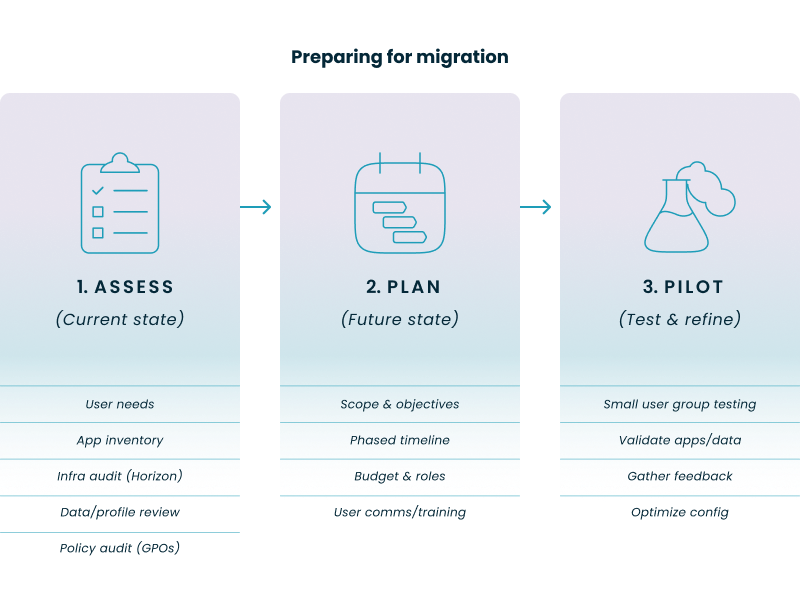
A successful migration is 90% planning and 10% execution. A structured preparation process, broken into three key phases—Assess, Plan, and Pilot—is the most critical factor in ensuring a smooth transition with minimal disruption to your users.

What happens during the assessment phase?

The first phase involves creating a comprehensive inventory of your current Omnissa Horizon environment. Before you can plan your destination, you must have a perfect map of your starting point.

  • User Segmentation and Personas:
    • Catalog all user groups (e.g., developers, finance, contact center agents).
    • Define their personas: What applications do they use? What are their performance needs? Are they task workers or power users?
    • Analyze connection patterns: When do they log on/off? What is their peak usage?
  • Application Inventory and Rationalization:
    • Create a complete list of all applications delivered through Omnissa Horizon.
    • Assess each application for its compatibility with Windows 10/11 multi-session.
    • Decide on a delivery strategy in AVD: install in the base image, deliver dynamically with MSIX App Attach, or publish as a RemoteApp.
  • Infrastructure and Policy Audit:
    • Document your current vSphere configuration, storage capacity and performance, and network architecture.
    • Audit all Group Policy Objects (GPOs) applied to your Horizon environment. Determine which policies are still relevant and can be migrated versus those that can be replaced with modern Intune policies.
  • User Data and Profiles:
    • Identify how user profiles are currently managed (e.g., roaming profiles, UEM solutions, persistent disks).
    • Plan your migration strategy to FSLogix Profile Containers on Azure storage, the standard for AVD.

How do you create the migration plan?

With the assessment complete, the next phase is to build a detailed project plan. This document will serve as your strategic roadmap throughout the migration, defining success and outlining the steps to get there.

  • Defined Scope and Objectives: Clearly state what constitutes success. Is it migrating 100% of users? Reducing costs by a certain percentage? Improving user login times?
  • Phased Rollout Schedule: Do not attempt a "big bang" migration. Plan a phased approach, starting with the pilot group, followed by logical user waves based on department or application usage, and ending with a final decommission date for the old environment.
  • Budget and Resource Allocation: Define your Azure budget, accounting for compute, storage, and networking costs. Assign clear roles and responsibilities to your project team.
  • User Communication Plan: Keep users informed about the upcoming changes, timelines, and benefits. Provide training and clear instructions on how to access the new AVD environment.

What’s the purpose of the pilot phase?

The final preparation phase is a limited-scope pilot deployment. This is a critical validation step to test your plan and assumptions with a small group of real users before committing to a full-scale migration.

  • Test with Real Users: Deploy AVD for a small, controlled group, typically from the IT department and a few tech-savvy business users.
  • Validate Functionality: Confirm that applications launch correctly, user profiles and data are migrated successfully, and performance meets expectations.
  • Gather Feedback: Actively solicit feedback from pilot users on their experience, noting any issues with peripherals, login times, or application behavior.
  • Optimize and Refine: Use the feedback and performance data to fine-tune your AVD configuration, golden image, and policies before proceeding to the first wave of the main migration.

How do you execute the technical migration from Omnissa Horizon to AVD?

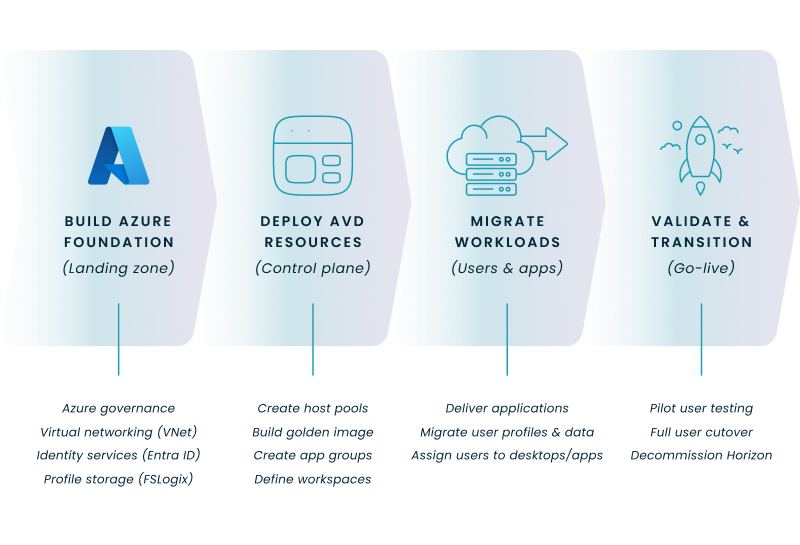
The execution phase involves setting up your new home in Azure and then methodically moving your users, applications, and data. This process requires careful sequencing and validation at each stage, following four primary technical steps to ensure success.

Step 1: How do you set up the foundational Azure environment for AVD?

Before any AVD components are deployed, you must build the underlying Azure infrastructure that will support it.

  • Azure Governance: Configure your Azure subscription, create a dedicated resource group for AVD, and establish your tagging and naming conventions.
  • Virtual Networking (VNet): Deploy a VNet in your chosen Azure region. Configure subnets, Network Security Groups (NSGs), DNS, and a reliable connection back to on-premises resources via VPN or ExpressRoute.
  • Identity Services: Synchronize your on-premises Active Directory with Microsoft Entra ID using Microsoft Entra Connect. This is crucial for a seamless user login experience.
  • Storage for Profiles: Deploy and configure Azure Files or Azure NetApp Files to store the FSLogix user profile containers.

Step 2: How do you deploy the core AVD resources?

With the foundation in place, you can now build the AVD-specific components using your chosen migration approach, whether manual, scripted, or with a third-party platform like Nerdio Manager for Enterprise.

  • Create Host Pools and the Golden Image: Build your session host pools and install the core applications and agents into your primary "golden" session host image.
  • Create Application Groups: Your application delivery strategy determines how you group applications. You can publish full desktops or use RemoteApp to deliver individual applications.
  • Define Workspaces: Create workspaces to organize and present the application groups to your end-users.

Step 3: How do you migrate user workloads and applications?

This step involves moving the two most critical components: the applications your users need and the user data that makes their desktop experience unique.

  • Deliver Applications: For applications not in the golden image, use MSIX App Attach to package and deliver them dynamically, which simplifies image management.
  • Migrate User Personas and Data: A user's profile and settings are their digital identity. Develop and execute a process using migration tools or scripts to move data from your current profile solution into the new FSLogix Profile Containers.

Step 4: How do you validate the migration and transition users?

The final step is to confirm everything works as expected and formally cut users over to the new environment.

  • Pilot User Testing: Before migrating a full department, have the pilot users validate that all their settings, files, and application configurations are present and working correctly in the new AVD environment.
  • Full User Cutover: Once the pilot is successful, proceed with your phased rollout schedule, transitioning users from Omnissa Horizon to AVD.
  • Decommission Horizon: After all users are successfully migrated and the new environment is stable, you can decommission the legacy Omnissa Horizon infrastructure.

What are the best practices for managing and optimizing an AVD environment after migration?

Your work isn't done once the migration is complete. Effective day-to-day management and continuous optimization are key to realizing the full value of AVD, especially regarding cost control and performance.

How can costs be effectively managed in AVD?

Without proper management, cloud costs can quickly spiral. AVD provides tools to keep your spending in check.

  • Implement Autoscaling: Use AVD's native scaling plans or more advanced automation to power on session host VMs during business hours and shut them down when they are not needed. This is the single most effective way to control compute costs.
  • Use Reserved Instances: For the portion of your workload that is predictable and runs 24/7 (e.g., a minimum number of session hosts), purchase Azure Reserved Instances to save up to 72% for one- or three-year terms compared to pay-as-you-go pricing, and up to 80% when combined with Azure Hybrid Benefit.1
  • Monitor and Alert: Regularly review your spending in Azure Cost Management. Set budgets and configure alerts to be notified if costs are trending higher than expected.

How do you monitor performance and user experience?

Proactive monitoring helps you identify and resolve issues before they impact a large number of users.

  • Utilize AVD Insights: Leverage the Azure Virtual Desktop Insights dashboard to get insights into connection diagnostics, host performance (CPU/memory), and user login times (Azure documentation, "Use Azure Monitor for Azure Virtual Desktop").
  • Track Key Metrics: Pay close attention to user input delay, round-trip time, and session logon duration. These metrics are strong indicators of the end-user experience.

What are the best practices for image and application lifecycle management?

Keeping your environment up-to-date is essential for security and functionality.

  • Maintain a Golden Image: Use a standardized "golden image" for your session hosts. When updates or new applications are required, update this single image and then redeploy your host pools.
  • Automate Updates: A consistent and automated patching schedule is crucial for security. Automation platforms can streamline this process; for example, Nerdio Manager for Enterprise offers a unified console to manage images, schedule monthly patching, and test updates before rolling them into production.

Know the TCO

This step-by-step wizard tool gives you the total cost of ownership for AVD in your organization.

How can a platform like Nerdio Manager for Enterprise simplify the migration and management process?

While AVD can be deployed and managed with native tools, a dedicated automation and management platform can significantly reduce the complexity, time, and expertise required for a successful migration and ongoing operations. It acts as a force multiplier for your IT team by abstracting the complexity of the underlying Azure infrastructure.

  • Streamlined Deployment: The platform's guided wizards can deploy a production-ready AVD environment in a few hours instead of manually configuring dozens of Azure components. It ensures best practices are followed from day one by automating the setup of networking, identity, storage, and host pools.
  • Simplified Image Management: Nerdio provides a centralized library for your golden images, making it easy to apply Windows updates, install new applications, and roll out updated images to your host pools without downtime.
  • Advanced Cost Optimization: The platform includes sophisticated autoscaling capabilities that go beyond native AVD functions. Nerdio uses predictive algorithms to scale hosts based on actual usage trends and can automatically shrink storage to the smallest possible size to minimize costs.
  • Unified Management: It offers a single pane of glass for all AVD operations. From this interface, administrators can manage users, troubleshoot sessions, manage applications, and monitor costs without needing to navigate multiple tools in the Azure portal.

See this demo to learn how you can optimize processes, improve security, increase reliability, and save up to 70% on Microsoft Azure costs.2

Optimize and save

See how you can optimize processes, improve security, increase reliability, and save up to 70% on Microsoft Azure costs.

Frequently Asked Questions


About the author

Photo of Carisa Stinger

Carisa Stringer

Head of Product Marketing

Carisa Stringer is the Head of Product Marketing at Nerdio, where she leads the strategy and execution of go-to-market plans for the company’s enterprise and managed service provider solutions. She joined Nerdio in 2025, bringing 20+ years of experience in end user computing, desktops-as-a-service, and Microsoft technologies. Prior to her current role, Carisa held key product marketing positions at Citrix and Anthology, where she contributed to innovative go-to-market initiatives. Her career reflects a strong track record in driving growth and adoption in the enterprise technology sector. Carisa holds a Bachelor of Science in Industrial Engineering from the Georgia Institute of Technology.

  1. https://azure.microsoft.com/en-us/pricing/reserved-vm-instances
  2. https://getnerdio.com/customer-story/nerdio-manager-for-enterprise-case-study-penn-state-university/

Ready to get started?